Purchasing & Forecasting
Automated Purchase Order System for Shopify
SKUSavvy forecasts what each SKU will sell, learns how long each vendor really takes, and sizes every purchase order to cover both. You review it, send it and receive it by scan.
Included in every plan. No separate purchasing module.
Over 1,500 brands have signed up since 2021





What is an automated purchase order system?
An automated purchase order system decides what to reorder and how much, from your own sales and your vendors' real lead times, then runs the order through to stock on the shelf. A buyer reviews each order instead of building it from a spreadsheet.
- 01
Forecast demand
Daily sales are measured over the days each item was actually in stock, so a stockout never reads as low demand.
- 02
Size every order
Safety stock and reorder points come from how much both sales and lead times vary, rounded to each vendor's order step.
- 03
Close the loop
Send the PO, check it in by scan and put it away to bins. Every receipt sharpens the next lead time.
Inventory Forecasting
Forecasting built on real demand
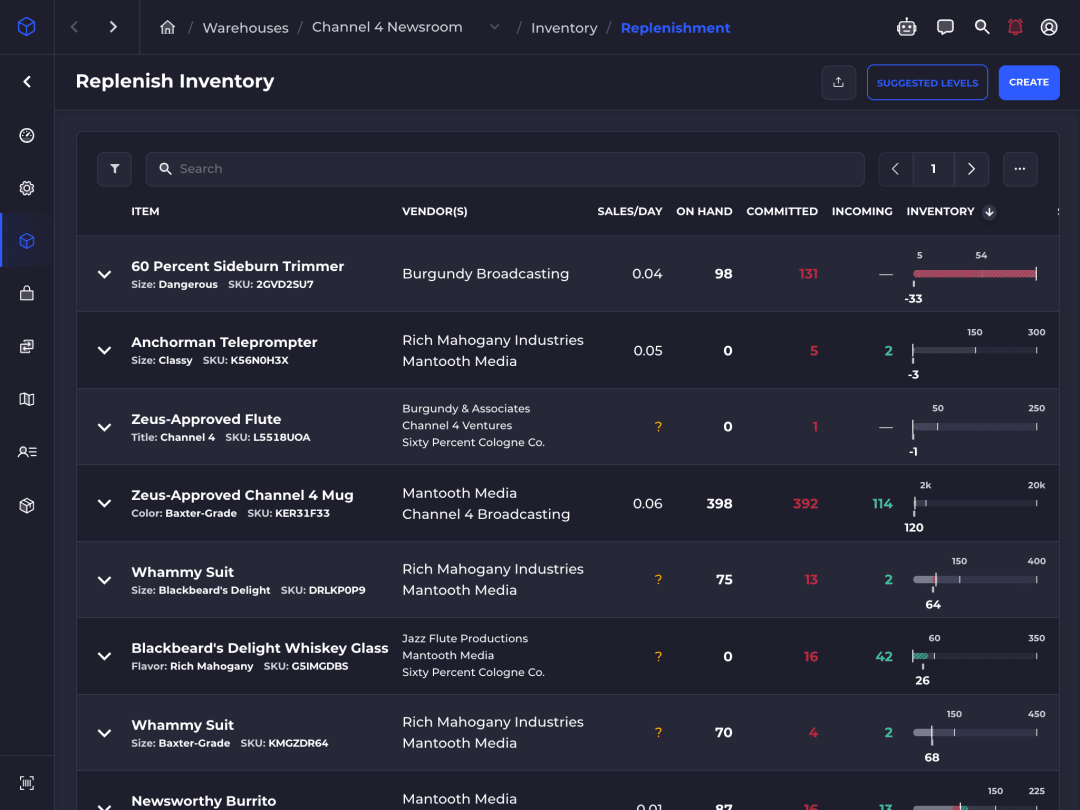
Par Levels
Safety stock and reorder points for every SKU
Suggested Par Levels sets each item's min and max from its own sales and its vendor's lead time. Accept them one at a time, or tune them with two sliders.
Stockout-adjusted demand
Sales are averaged over the days an item was in stock, rebuilt weekly from the inventory log.
Two kinds of variability
Safety stock covers swings in daily sales and in vendor lead time, not just the averages.
Service level by ABC class
Best sellers get a higher service level than the long tail, set with one aggressiveness slider.
Cost-aware coverage
Expensive items carry fewer days of stock and cheap ones more, so cash isn't tied up where it doesn't need to be.
A confidence score on each
Every suggestion is scored 0 to 100, and items with too little history say so instead of guessing.
Seasonal levels
Limit a min and max to a recurring date range for products that sell in season.
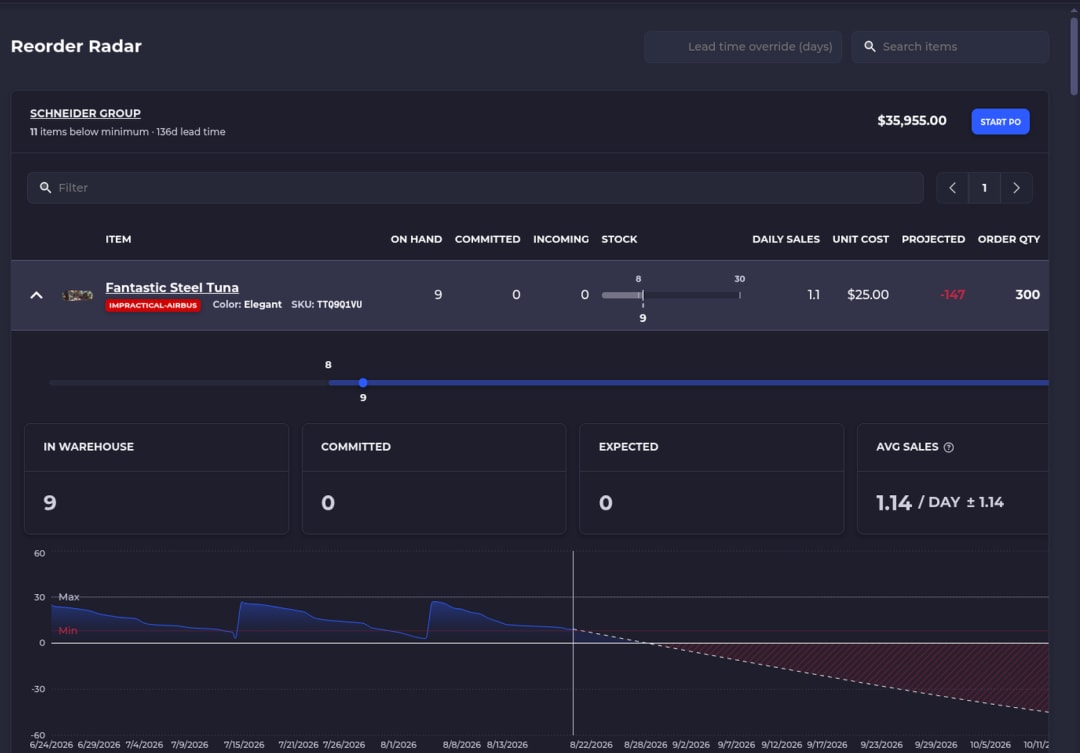
Reorder Radar
Know which vendors need an order today
Radar projects every item to the end of its vendor's lead time and flags it while a PO placed today can still arrive in time.
Projected, not current, stock
On hand, minus committed, plus incoming POs and transfers, minus expected sales over the lead time.
Grouped by vendor
Items that need an order sit under each vendor that supplies them, most urgent first.
Order steps built in
Suggested quantities refill to your max and round up to the vendor's order step.
One click to a draft
Start PO opens a prefilled order. Nothing is sent until you review it and submit it.
Lead Times
Lead times learned from every receipt
SKUSavvy measures how long each vendor really takes, from confirmation to check-in, and feeds it into every forecast.
Measured, not typed in
Each received PO from the last year is a sample, timed from the vendor's confirmation to check-in.
Outliers trimmed
The fastest and slowest 5% are clipped, so one lost shipment doesn't skew the average.
The most specific history wins
Item history first, then the vendor to this warehouse, the vendor overall, then your default.
Updated on every check-in
A lead time updates the moment a shipment is received, so the next Radar projection and order suggestion already use it.
How It Works
How every suggestion is sized
No black box. Each suggestion comes from three things you can check on the item itself.
- 01
Safety stock
Weighted by volatility: items whose sales or vendor lead times swing more carry a bigger cushion.
- 02
Reorder point
What you expect to sell before a new order can arrive, plus that safety stock.
- 03
Order quantity
Enough to refill to your max, rounded up to the vendor's order step.
Purchase Order Management
From suggested order to stock on the shelf

Vendors
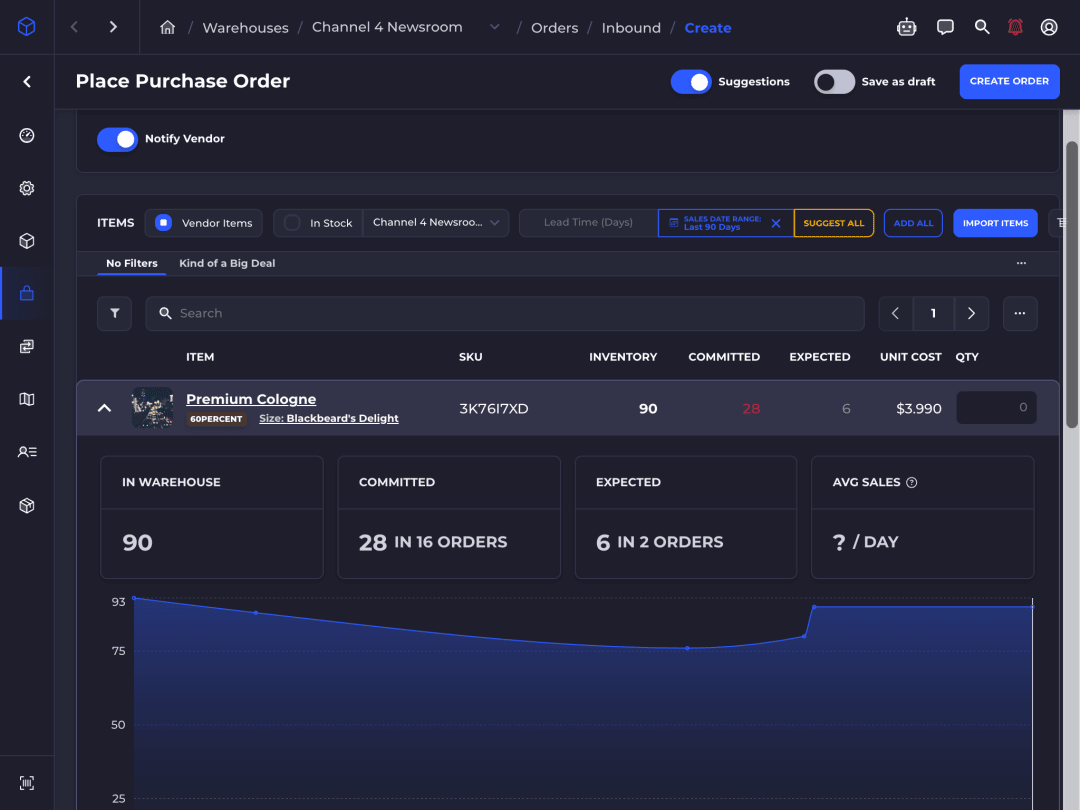
Send it, and let the vendor confirm it
Every PO goes to the vendor by email with a link to the vendor portal, where they confirm it, adjust it or cancel it.
Several vendors per SKU
Each vendor keeps its own unit cost, vendor SKU and order step for the item.
Vendor changes need your yes
Approve or reject what a vendor proposes. Approved prices can update your unit costs.
Vendor network
A vendor that runs SKUSavvy gets each PO as an order in its own account.
Landed costs
Add freight, duty, tax, fees or insurance and split them by quantity, value or weight.
Receiving
Check it in by scan, put it away to bins
Receive against the PO with a scanner or a phone camera, and every unit lands in the bin pickers expect.
Scanned check-in
Scan each item against the PO, across as many shipments as it takes.
Short shipments caught
Receive less than you ordered and the discrepancy is logged at the dock.
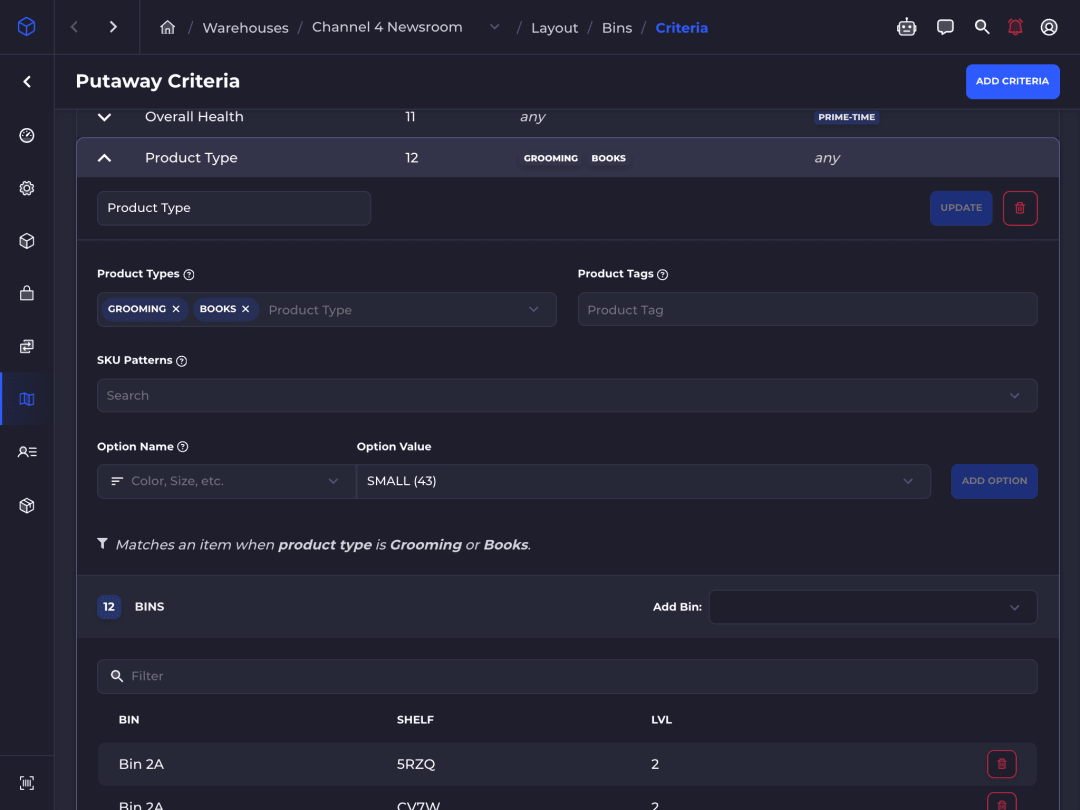
Directed put-away
Rules send items to bins by product type, tag, SKU pattern or option.
Shopify in step
Available quantity syncs to the matching Shopify location as stock is received.
Automation
Built for scripts, agents and SavvyBot
The same numbers that drive Reorder Radar sit behind the GraphQL API, so purchasing can run from your own tools.
Create POs by API
inboundOrderCreatemakes drafts or sends to the vendor, with lots, metafields and extra costs.Import from a CSV
Load PO lines, or up to 10,000 min and max rules, from a spreadsheet.
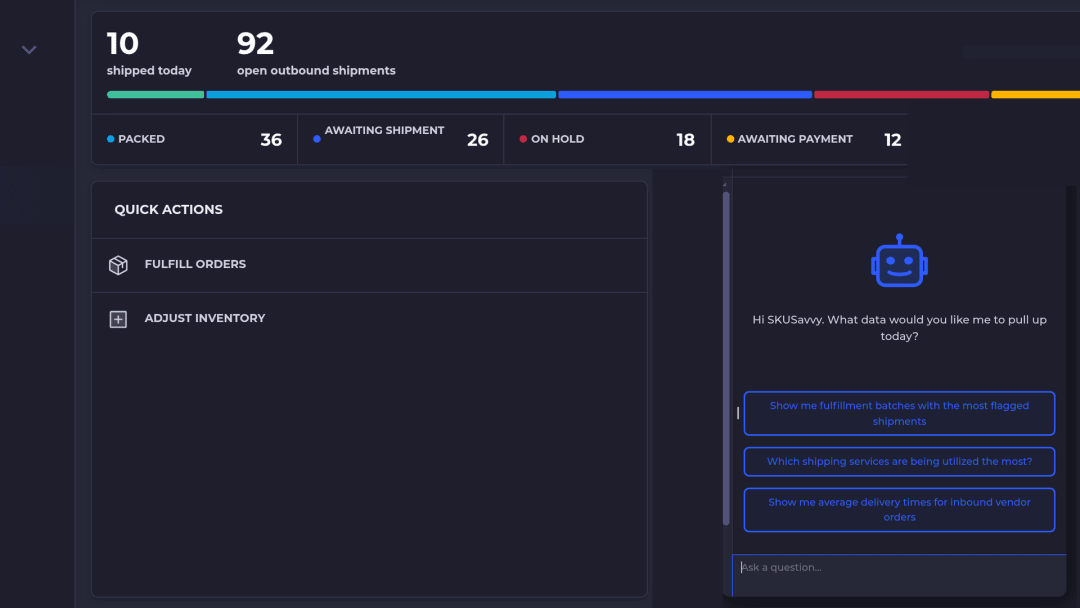
Ask SavvyBot
Ask which items are running low or how long a vendor takes, and get live numbers, charts or a CSV.
QuickBooks bills
Received POs become bills in QuickBooks with the QuickBooks integration (paid add-on).
Spreadsheet purchasing vs SKUSavvy
Same job, two ways to run it.
| Job | Spreadsheet and email | SKUSavvy |
|---|---|---|
Decide what to reorder | Scan the sheet at month end | Reorder Radar flags items by vendor before they run out |
Size each line | Guess from last order | Suggestions from par levels, sales, and lead time |
Send and confirm | Email a PDF, wait for a reply | Email with a vendor portal link to confirm or adjust |
Receive | Count the boxes, update a cell | Scan against the PO, log short shipments |
Put away | Wherever there is room | Put-away rules point each item to its bins |
Update Shopify | Edit quantities by hand | Available syncs to Shopify as stock is received |
If you keep creating purchase orders in Shopify while SKUSavvy runs the warehouse, received stock has to be resynced and assigned to bins by hand. Creating POs in SKUSavvy avoids that step.
Buy from the numbers. Receive to the bin.
Start a 30-day free trial, or check pricing for your order volume.
Questions
Purchase order management FAQ
Straight answers for Shopify brands that buy, receive, and ship their own stock.
What is purchase order management software?
Software that runs the buying side of inventory: vendors and costs, creating and sending purchase orders, receiving what arrives, and updating stock. In a WMS like SKUSavvy it also puts received stock away to bins, so it can be picked right away.
Can I manage Shopify purchase orders in SKUSavvy?
Yes. Create the PO in SKUSavvy instead of Shopify. When it is received, stock is added to bins and the Available quantity syncs to the matching Shopify location in real time.
Does Reorder Radar place purchase orders by itself?
No. Radar shows which vendors need an order and suggests quantities. Start PO opens a prefilled draft, and nothing is ordered until you review it and submit it.
How does SKUSavvy calculate reorder quantities?
Reorder Radar projects each item to the end of its vendor's lead time: on hand, minus committed, plus incoming POs and transfers, minus expected sales. When that falls below the min, it suggests enough to refill to the max, rounded up to the vendor's order step. Suggested Par Levels sets the min as expected sales over the lead time plus safety stock.
Where do lead times come from?
From your own receipts. Each PO received in the last year is timed from the vendor's confirmation to check-in, the fastest and slowest 5% are trimmed, and the rest are averaged. SKUSavvy uses the item's own history first, then the vendor's, then your default, and you can override any of them.
Can vendors confirm a purchase order online?
Yes. Turn on email communication for the vendor and each PO is emailed with a link to the vendor portal, where the vendor can confirm, adjust, or cancel it. A vendor that runs SKUSavvy can connect instead: each PO lands in its account as an order, with no PDFs, retyping, or integration to maintain.
Can vendors change a purchase order?
Vendors can propose changes in the vendor portal, and nothing changes until you approve them. Approved prices can update your unit costs, so the next PO starts from the new number.
How do I receive a partial shipment?
Check in what arrived. SKUSavvy logs the discrepancy and keeps the rest of the PO open for the next shipment, or you can close it out early.
How are landed costs allocated?
Add each freight, duty, tax, fee, or insurance invoice to the PO, then split it by quantity, value, or weight. The landed cost is stored on the stock, so cost of goods sold reflects it.
Can one PO deliver to several warehouses?
A PO has one destination warehouse and one delivery date. Teams with several locations usually receive at one warehouse and move stock with transfer orders.
Does SKUSavvy sync purchase orders to QuickBooks?
Yes, with the QuickBooks integration (paid add-on). Received POs create bills for the received quantity, and vendors and inventory costs sync too. It does not create customer invoices.
Does SKUSavvy use AI for purchasing?
The forecasting is statistics you can check, not a black box: stockout-adjusted demand, safety stock weighted by volatility, and lead times learned from your receipts. SavvyBot, the AI assistant, answers questions about vendors and stock with live data and changes nothing without your explicit approval.
Can an AI agent create purchase orders?
Yes, through the GraphQL API. An agent or script can read low-stock products and forecasts and create a PO with inboundOrderCreate. API calls are included in every plan.
Is SKUSavvy a Stocky alternative?
Yes, for brands that run their own warehouse. SKUSavvy covers purchase orders, forecasting and receiving, and adds bins, scanned put-away and pick routes on top.
What does purchase order management cost in SKUSavvy?
It is included. $179 a month covers your first 249 orders, then a per-order rate that falls with volume. Purchase orders count as orders, and seats are unlimited.
Explore the Platform
Two systems on one inventory record, synced with your sales channels in real time.

