Choosing the Best Warehouse Inventory Tracking System
The best warehouse inventory tracking system is the one that can tell you which bin every unit is in, updates the moment someone scans, and logs who moved what. For a Shopify brand running its own warehouse, that usually means a mobile WMS, not a spreadsheet app or an ERP module.
The short answer
Pick the system that answers "which bin?" as fast as it answers "how many?". Counts alone don't ship orders. Pickers need a location, and you need a record of every move so you can find out why a number went wrong.
Any warehouse inventory tracking system worth paying for does four things: it tracks stock by location, updates on every scan, separates what's on the shelf from what's already sold, and keeps a history you can audit. Many of the products below say they do. They go about it very differently.
We make SKUSavvy, so read this with that in mind. Competitor details come from the reviews and vendor pages ranking for this search, and we left out prices and star ratings because they change too often to print. If you already know you want bins on a map, go straight to SKUSavvy's warehouse inventory tracking system features.
Four questions a tracking system has to answer
How many?
On hand per item, per warehouse. Every system shows this number, and it drifts if nobody scans.
Where exactly?
The bin, not just the building. Without it, a correct count still sends a picker hunting.
What's spoken for?
Units committed to open orders aren't available to sell. Your store should see available, not on hand.
Who moved it?
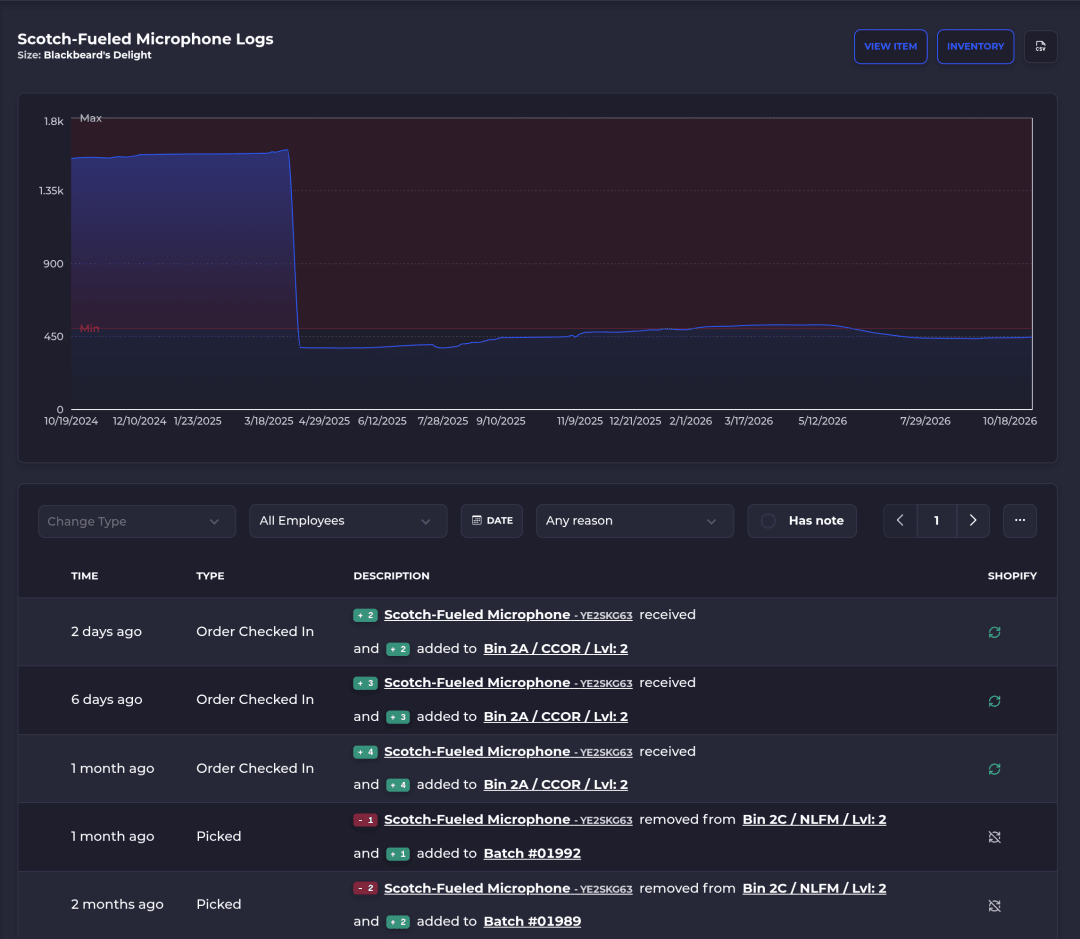
A log of every receive, move, pick, count and adjustment, with who and when. It's how you fix a bad number instead of overwriting it.
A spreadsheet handles the first question until the second person edits it. The bigger differences between the products below tend to show up on questions two and four.
Five types of warehouse inventory tracking systems
The top results for this search list anywhere from 6 to 51 products. SAP's WMS explainer splits the software into standalone, cloud and ERP-integrated systems. That's a split by how the software is deployed and packaged. Sorted by who each one is actually for, the field falls into five groups.
| Type | Examples in current reviews | Tracks well | Where to look closer |
|---|---|---|---|
Simple inventory apps | Sortly, Zoho Inventory | Item counts, folders or locations, barcode and QR scans, low-stock alerts | Picking logic and bin rules for a busy warehouse |
No-code app builders | Softr, Glide | Whatever you build on your own data, with scanning on some plans | You build and maintain the warehouse logic yourself |
Ecommerce and mobile WMS | ShipHero, Cin7 Core, SKUSavvy | Bin-level stock, scan-checked receiving, picking and counts, store sync | Price at your volume, setup time, how much complexity you take on |
ERP warehouse modules | NetSuite WMS, Dynamics 365 Supply Chain Management, SAP Extended Warehouse Management, Odoo Inventory | Warehouse work tied to finance, purchasing and the rest of the ERP | You need the ERP first, and setup is a project |
Enterprise WMS | Manhattan Active Warehouse Management, Blue Yonder | Multi-site, high-volume operations with labor management and automation | More system, cost and implementation than many growing brands need |
1. Simple inventory apps
Sortly is photo-first: items live in folders by location or category, with barcode and QR scanning, label generation and low-stock alerts, according to Softr's 2026 review. The same review says it isn't a deep WMS for complex warehouses. Ply's guide calls Zoho Inventory and Sortly good starting points for straightforward inventory, and notes Zoho tracks stock across warehouses and transfers between them.
Fits a stockroom, a small team and orders you could pick from memory. Ask: can one SKU sit in two bins, and does a pick take stock from the right one?
2. No-code app builders
Softr and Glide let you build your own inventory app on top of Airtable, Google Sheets or their own databases. Softr's review is upfront that neither is a full WMS. You won't get complex picking strategies or slotting out of the box, and it describes Glide as a floor layer that only partly works offline.
Fits an ops person who likes building and has a process no product matches. Ask: who maintains it when that person leaves?
3. Ecommerce and mobile WMS
These run the warehouse floor for online sellers: receiving against purchase orders, bin locations, scan-checked picking and packing, and inventory synced back to the store. Softr's review describes ShipHero as built for high-volume ecommerce and 3PLs, with batch picking, tote checks and 3PL client portals, and Cin7 Core as a mobile WMS that scans receipts against a PO and tracks stock across locations.
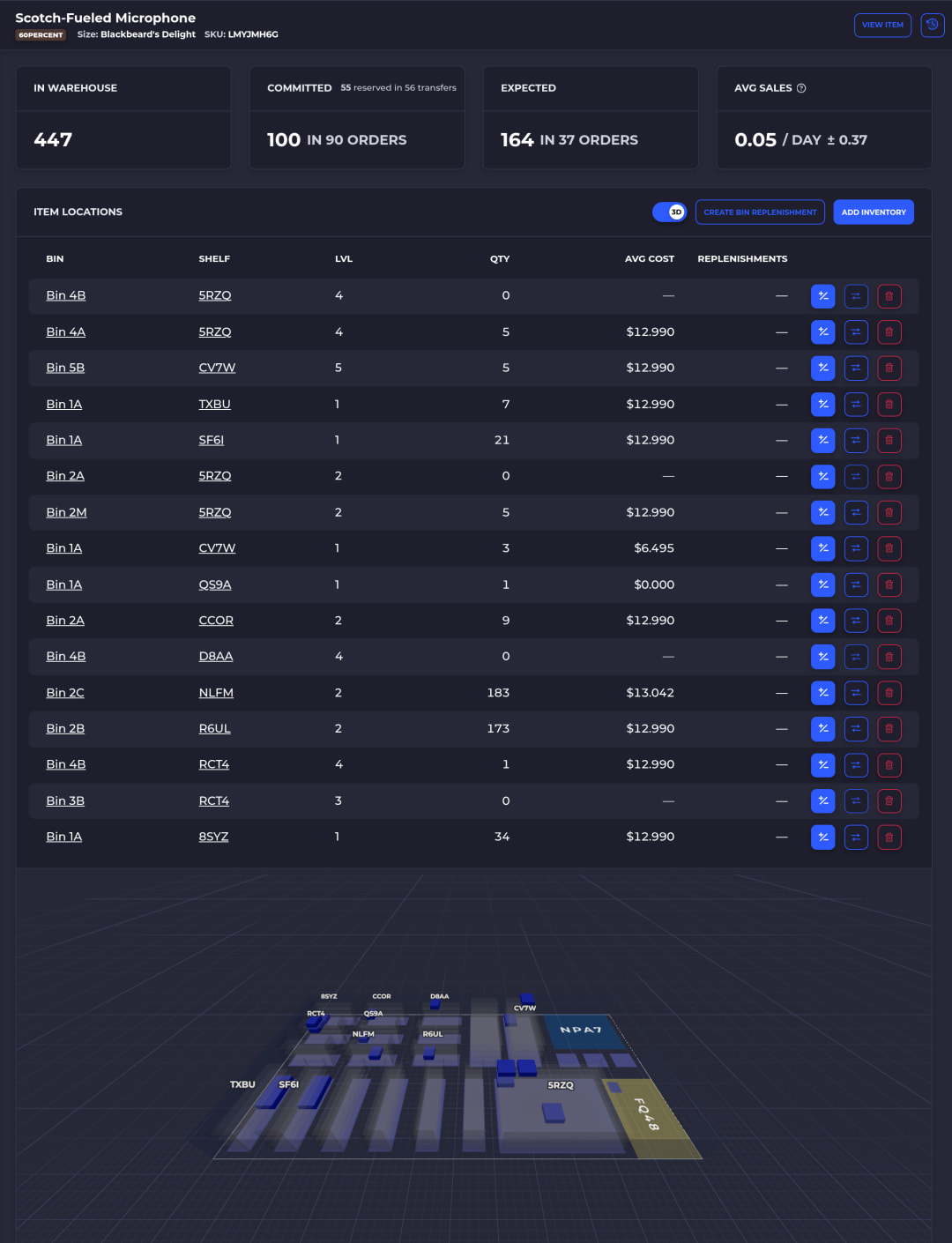
SKUSavvy sits here too: a mobile WMS for Shopify brands that fulfill their own orders, with every bin on a 3D map of your warehouse. More on how it tracks stock below.
Fits a brand shipping from its own warehouse or back room. Ask: what does the plan cost at next year's order volume, and how long until you're live?
4. ERP warehouse modules
If you already run NetSuite, Dynamics 365 or SAP, the warehouse module is the natural first look. Ply's guide describes NetSuite WMS as an add-on module with mobile receiving, putaway, bin-level visibility, picking, packing and cycle counting, and Dynamics 365 Supply Chain Management as covering inbound, location control, cycle counting and outbound work alongside procurement. Odoo Inventory adds multiple warehouses, transfers, barcode workflows and replenishment rules inside Odoo's suite of apps.
Fits a company whose finance and purchasing already live in that ERP. Ask: what's in the license you're quoted, and who configures it?
5. Enterprise WMS
Manhattan Active Warehouse Management and Blue Yonder are built for large, complex distribution: many sites, labor management, slotting and robotics. Softr's review says small businesses won't find a match in Blue Yonder because of complexity and cost, and Ply suggests Manhattan when the warehouse itself needs sophisticated execution at scale.
Fits several distribution centers, automation and a dedicated operations team. Ask: what does implementation take, and how many people will run it?
Run the bin test in any trial
Demos show the happy path. Before you sign anything, load your own products and run this. Give it an afternoon. It tells you more than any feature list.
Pick five SKUs: a fast seller, a slow one, one stored in two places, one with a lot or serial number, and one you just received.
Ask the system where each one is, down to the bin, and how many are in each.
Walk to every bin and count. Write down any difference.
Move one unit to another bin by scanning it. Check that both bins updated and that the move shows who did it and when.
Sell one unit in your store. Check that it shows as committed, then gets picked from the right bin.
Correct one count. See whether the system asks for a reason and keeps the old number in its history.
If a step needs a workaround, a second app or a spreadsheet, that's the system telling you where it stops.
Questions to ask before you choose
| Question | Why it matters |
|---|---|
Does every move need a scan? | Stock that moves without a scan is stock the system loses. Receiving, put-away, picking, transfers and counts should all be scan-checked. |
Can one item live in several bins? | Overstock and pick bins are normal. A system that allows one location per SKU forces workarounds. |
Which number goes to your store? | Your store should get available stock (on hand minus what's committed to open orders), or you'll oversell. |
Does it run on the devices you have? | Phones, tablets and Bluetooth scanners cost less than dedicated handhelds. Check whether each device needs its own install. |
Can you see the history behind a number? | When counts disagree, the log of who moved what is how you find the cause. |
How is it priced as you grow? | Some tools charge per user, per SKU, per location or per order. Price next year's volume, not this year's. |
How long until you're live? | Bins, labels and a first full count take real time. Ask what setup looks like for your SKU count. |
How to make sure inventory tracking is accurate
Software doesn't make counts accurate. Habits do, and the software either enforces them or lets them slide. The ones that matter most:
Give every bin a barcode label, and every unit a home bin.
Receive against the purchase order, so short or extra units show up at the dock, not at the next count.
Scan the bin and the item on every pick. A wrong scan should stop the picker.
Move stock between bins with a scan, never by hand and memory.
Cycle count a few bins every day instead of one big count a year.
Require a reason on every manual adjustment, and read them weekly.
Block fulfillment when stock would go negative, so a bad count gets caught instead of shipped.
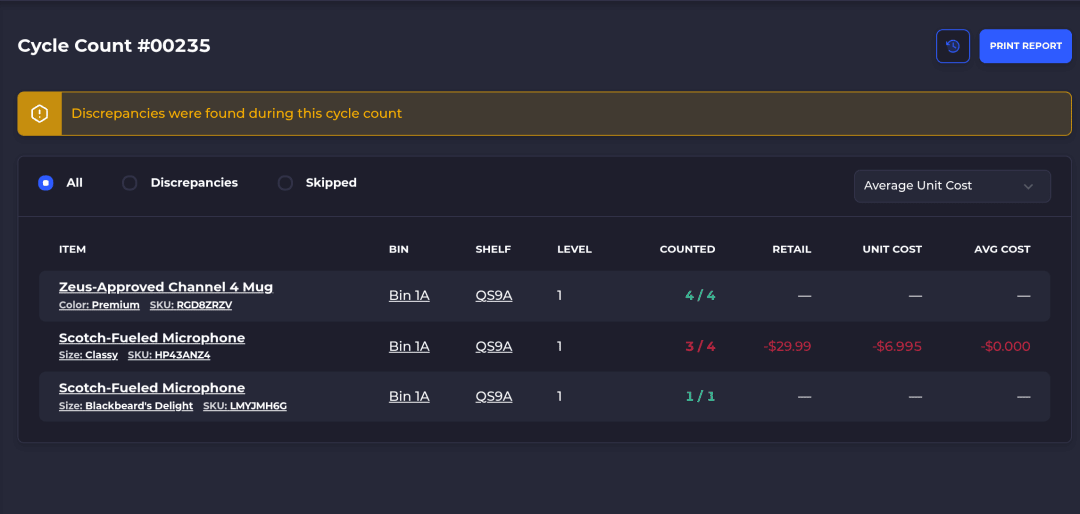
In SKUSavvy, a cycle count walks the counter through a route of bins to recount. They scan each bin and item, enter what they find, and the differences are reconciled when the count is done.
Features and benefits: how SKUSavvy tracks warehouse inventory
SKUSavvy is a mobile WMS for Shopify brands that fulfill their own orders. Here's how it answers the four questions above, and what you get from each piece.
| Feature | What it gets you |
|---|---|
Stock by bin | Only bins hold inventory in SKUSavvy, so stock is tracked by location. One item can sit in several bins, each with its own count. |
2D and 3D warehouse map | Shelves and bins sit on a layout of your building with an inventory heatmap, so you can see where stock is before you walk. |
On hand, committed and expected | Each item shows on hand, committed and expected quantities, and inventory stays in sync with your Shopify store, with an optional buffer held back. |
Scan-checked work | Receiving, picking and packing can each require a bin or item scan. A wrong scan raises an alert and has to be fixed before the picker moves on. |
Directed put-away | When stock is received, the device shows which bin each item goes to, on the map. |
Bin moves and transfers | Move stock between bins with a scan, or send a transfer order between warehouses that's picked at one end and received at the other. |
Inventory logs | Every movement is logged by action, employee and date, for each item and each bin. |
Cycle counts | Assign counts by bin or product and complete them on any device. |
Adjustments with a reason | Manual changes record why, such as damaged, found or miscounted. |
Lots, expiry and serials | Record lot numbers and expiry dates on receipt, and serial numbers on the items that need them. |
Your existing barcodes | Import the bin barcodes you already use, print bin labels, and print product labels at 2x1, 4x2, 4x4, 4x6 or a custom size. |
Real-time Shopify sync | Orders, products and inventory sync with Shopify as they change, and several Shopify stores can share one account. |
Phones, tablets and scanners | SKUSavvy is a web app. Open it in the browser or add it to the home screen. Phone cameras scan UPC, EAN, Code 128 and QR codes, and Bluetooth scanners pair too. |
Unlimited users | No per-seat fees, so every picker and counter gets their own login and their own line in the log. |
The device side, from receiving to counts, is covered in more depth on our mobile warehouse management system page.
Using Savvy Bot to find stock
Savvy Bot is the AI assistant inside SKUSavvy, and it works from your live account data. Ask how many units of a SKU are on hand, which items are running low, or for a report like your top sellers this month, and it answers with a table or chart, or opens the right page.
It reads and explains. It won't change anything unless you turn on edits and approve each one, it tells you when it can't find a number instead of guessing, and it runs on AI credits. Counting the shelf is still a person with a scanner.
When SKUSavvy isn't the best choice
If you don't sell on Shopify, SKUSavvy isn't built for you. Orders from other marketplaces come in through Shopify, not through direct connections.
If you run several distribution centers with robotics and labor planning, look at an enterprise WMS. If you plan production around bills of materials, start with a manufacturing or ERP system. And if most of your orders are drop-shipped, you may not need a warehouse system yet.
What SKUSavvy costs
As of October 19, 2026, SKUSavvy is $179/month, which covers your first 249 orders. Orders past that are billed per order, and the rate falls as volume grows. Purchase orders and transfers count as orders too. Users are unlimited, plans are month to month, and the 30-day trial needs no credit card.
Hardware is up to you. A phone camera is enough to start. A dedicated Bluetooth scanner and a thermal label printer are worth it once someone is scanning all day.
Enter your monthly orders on SKUSavvy pricing for an exact quote.
Warehouse inventory tracking system FAQ
What is the best program to track inventory?
It depends on where the stock lives. For a small stockroom, a simple inventory app is enough. For a warehouse shipping online orders every day, you want a WMS that tracks by bin and scan-checks every move. If you sell on Shopify and run your own warehouse, that's what SKUSavvy is for.
What does WMS stand for?
Warehouse management system: software that runs warehouse work from receiving and put-away through picking, packing, shipping and counting, and tracks inventory as it moves.
Is SAP an ERP or a WMS?
Both, as separate products. SAP sells ERP software, including SAP Cloud ERP and SAP Business One, and a separate warehouse management system, SAP Extended Warehouse Management (EWM), which SAP positions for high-volume warehouse operations.
What are the main types of warehouse management systems?
SAP's explainer names three: standalone systems on your own servers, cloud systems sold as a subscription, and WMS modules built into an ERP or supply chain suite. By who they serve, the field splits into the five types on this page.
How do I make sure inventory tracking is accurate?
Label every bin, receive against the purchase order, scan on every pick and move, cycle count a few bins every day, and require a reason for every manual adjustment. A system that enforces those scans keeps the count honest.
What is a good basic inventory tracking system?
For one room and a short catalog, a simple inventory app with barcode scanning and low-stock alerts. Once more than one person picks orders, or one SKU sits in more than one place, move to a system that tracks bins.
Can I track warehouse inventory with a phone?
Yes. SKUSavvy runs in the browser on iPhone and Android, and the camera scans common barcodes. Bluetooth scanners pair with the same devices when you need more speed.
Can I keep my existing bin barcodes?
Yes. SKUSavvy imports the bin barcodes you already have, so you don't have to relabel the warehouse.
Keep reading
Mobile warehouse management system
Receive, put away, pick, pack and count from phones, tablets and scanners.
See mobile WMSWarehouse management software
The full SKUSavvy WMS for Shopify brands: bins, picking, purchasing and shipping in one system.
Explore the WMSKnow which bin, not just how many.
Start a 30-day trial and run the bin test on your own stock.