Warehouse management software for Shopify warehouses
SKUSavvy is cloud warehouse management software (WMS) for Shopify brands that pick, pack, and ship their own orders. Every unit gets a bin, every pick gets a path on a phone, and Shopify's available count matches the shelf.
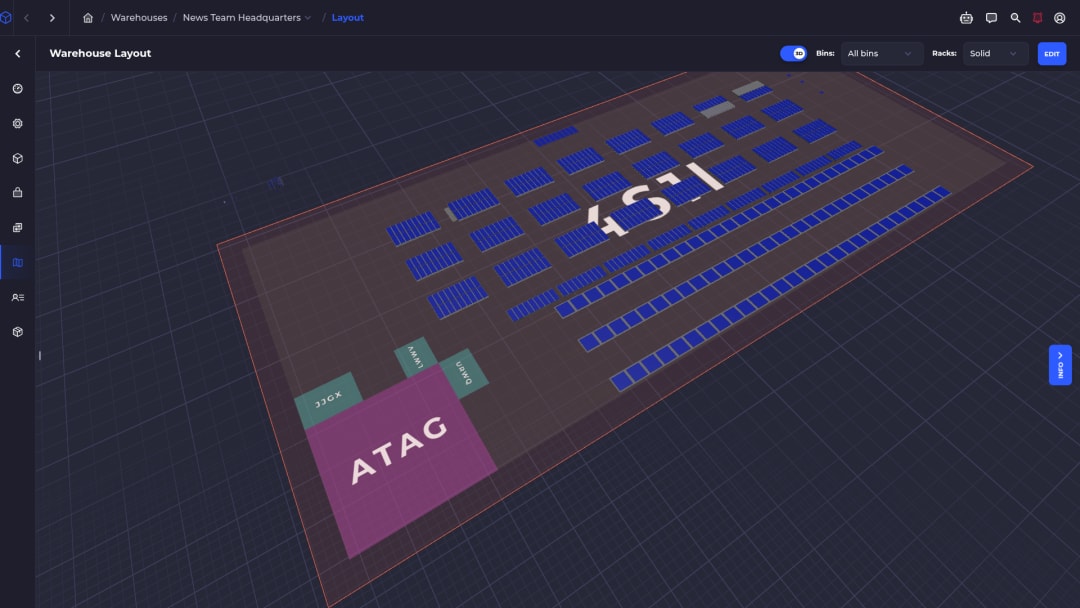
What is warehouse management software?
Warehouse management software (WMS) runs the physical work between receiving and shipping. It records which bin every unit sits in, tells your team where to put stock away and what to pick next, checks each step with a barcode scan, and keeps the counts your sales channels see accurate.
Inventory apps tell you how many you have. A WMS tells you where it is and moves the work. That gap is why brands with a real floor outgrow Shopify Admin and spreadsheets.
Where stock lives
Warehouse, shelves, bins. Areas organize the floor and only bins hold inventory, so every count has an address.
How work moves
Receive, put away, pick, pack, ship, count. Each step is scanned against the bin and the product, so mistakes get caught at the shelf.
What Shopify sells
On Hand minus committed is Available. SKUSavvy pushes Available to Shopify as it changes, so you stop selling units that are already promised.
Who SKUSavvy is built for
Shopify-first brands that fulfill at least some of their own orders. Shopify Plus is not required.
A real floor to run
A warehouse, a back room, or a warehouse plus retail stores. If people walk aisles to pick orders, you need bins and pick paths, not a longer spreadsheet.
Outgrew spreadsheets and ShipStation
Labels are handled, but the bin list lives in Sheets and new pickers learn by guessing. Shopify Admin covers light purchasing. It does not tell a picker which bin to walk to.
Lots of SKUs, bins, or locations
Kabayare manages about 2,200 bins and more than 20,000 unique SKUs. Bunker 27 runs 12 retail stores and a warehouse on the same system.
Not a fit
Dropship-only stores, FBA as the main model, or no warehouse to pick from. If you only need purchase orders, Shopify Admin may be enough.
How SKUSavvy runs the receive, store, pick, and pack loop
Here is the floor, step by step, with real screens from the app. Customer data is anonymized.
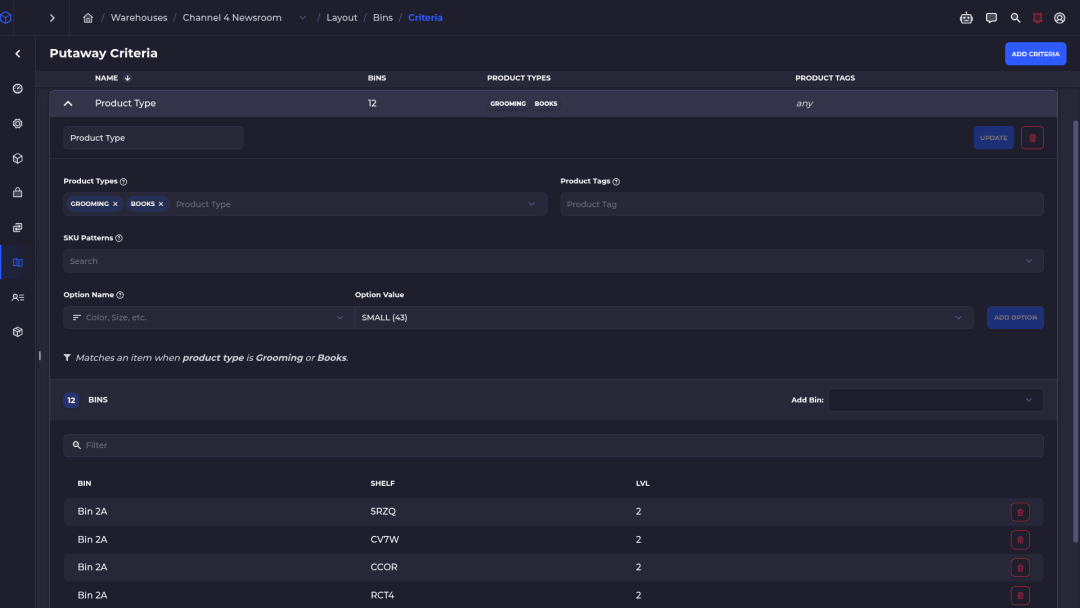
Receive stock and put it away by rule
Check in a purchase order with a scanner, then put each unit away. Putaway criteria match items by product type, tag, SKU pattern, or option and point them at the bins you choose, so inbound lands where pickers expect it.
See purchase order management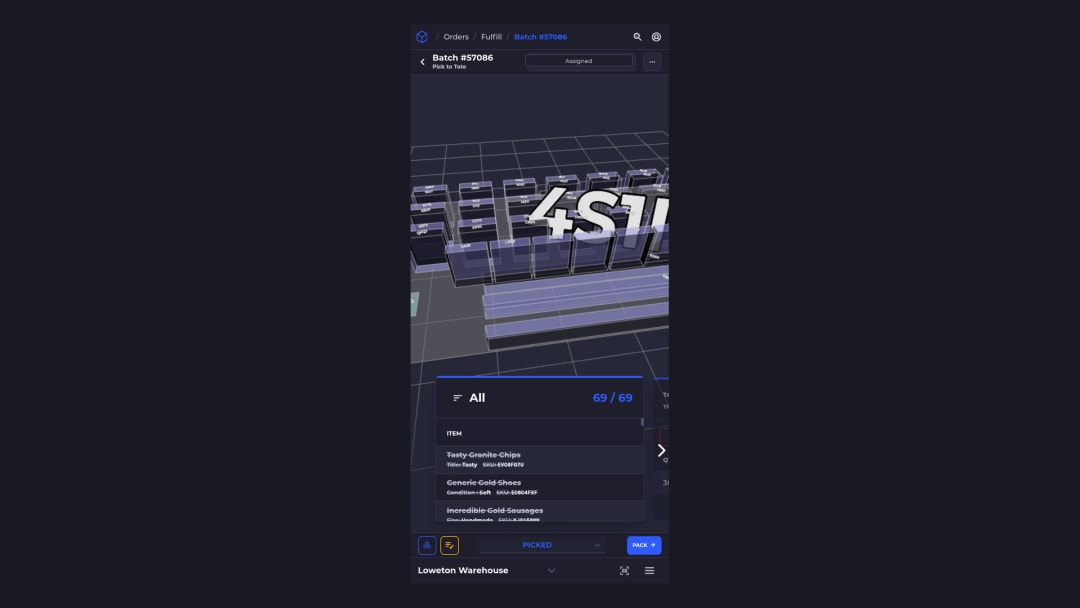
Pick on a phone with a routed path
Pickers open the batch on a phone or tablet at app.skusavvy.com. SKUSavvy routes them through the 3D or 2D layout, shows the bin to walk to, and checks the bin and product scans before the item counts as picked.
Batch picking and pick-to-tote are built in.
See how batch picking works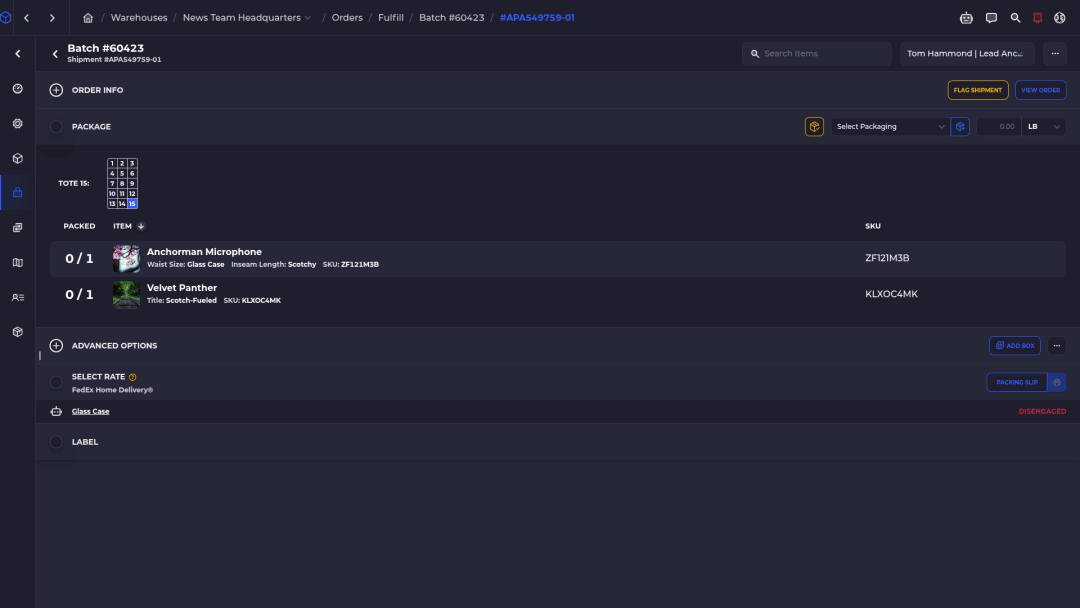
Pack, rate shop, and print in the same flow
Scan to pack, split an order into multiple boxes, print the packing slip, and buy the label without leaving the WMS. Labels run through ShipEngine for major carriers, and Autopilot can choose the package and shipping method for you.
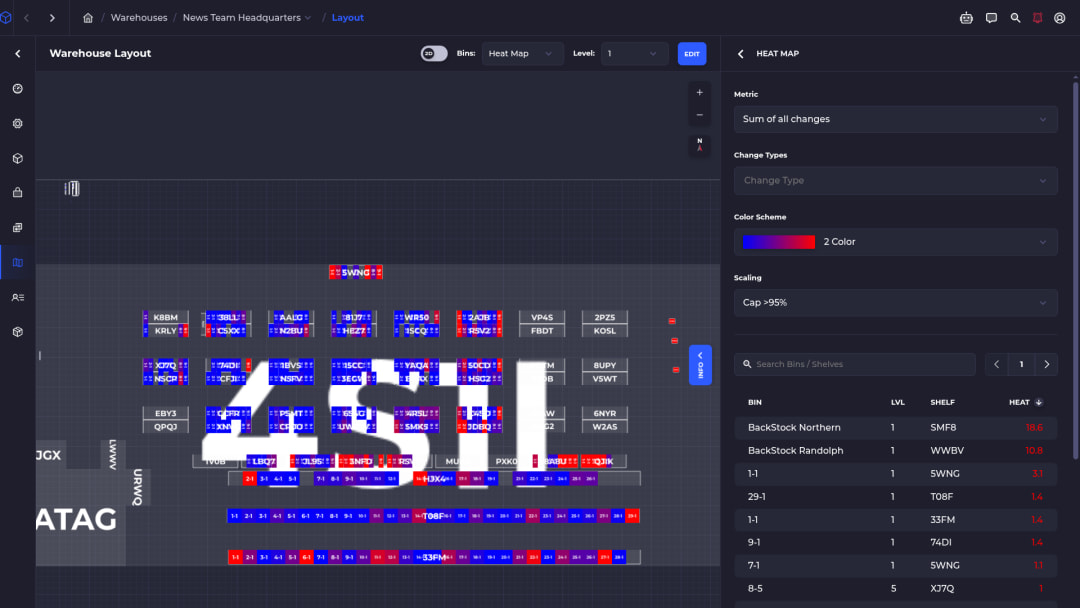
Move stock and keep counts honest
Bin-to-bin moves and warehouse transfer orders keep retail and warehouse stock findable. Cycle counts check bins while the floor keeps shipping, so you never need a full shutdown to trust the numbers.
The heat map ranks bins by activity, so fast movers can sit near the pack station.
Must-have WMS features for a DTC brand
If you sell direct to consumer on Shopify, check any WMS against this list, including ours. Each card says what the feature does and what it changes for you.
Bin-level inventory
Every unit has a bin address on a 2D or 3D map of your warehouse, shelves, and bins.
Anyone can find stock, not just the person who shelved it.
Directed put-away
Rules match inbound items by product type, tag, SKU pattern, or option and send them to the right bins.
Stock lands where pickers will look for it.
Scan-verified picking
Bin and product scans confirm each pick, with an alert on a wrong scan.
Wrong items get caught at the shelf, not by your customer.
Batch picking with routing
Group orders into batches, pick to totes, and follow a path planned on your layout.
One walk fills many orders.
Packing and labels
Scan to pack, split into multiple boxes, rate shop, and print labels through ShipEngine.
No second app just to buy postage.
Replenishment and reorder
Min-max bin replenishment, a Low Stock view, and reorder suggestions from sales velocity and lead time.
You reorder before the shelf runs dry.
Purchase orders and receiving
Vendor POs, a vendor portal, landed cost, scanned check-in, and put-away in one place.
Inbound gets counted once, at the dock.
Cycle counts and transfers
Count bins while you keep shipping, and move stock between bins, warehouses, and stores with transfer orders.
Counts stay trusted without a shutdown day.
Two-way Shopify sync
Webhooks bring in orders and product changes within seconds, and SKUSavvy sends the Available count back.
Fewer oversells from stale counts.
What changes on the floor
The short version of what a WMS buys you, before any AI.
Fewer mis-picks
Bin and product scans stop the wrong item before it is packed. Bunker 27 credits scan-to-pick with cutting their mis-ships.
Shopify matches the shelf
Available is On Hand by bin minus what open orders have committed, pushed to Shopify the moment it changes.
Faster training
New pickers follow the bin and the path on a phone instead of memorizing the shelves.
Peak help without seat fees
Seats are unlimited, so a seasonal picker costs you a login, not a license.
AI warehouse management software that keeps you in charge
SKUSavvy uses AI where it saves a warehouse team time: answering questions, sizing purchase orders, and planning pick paths. It does not run the warehouse on its own. Orders and account changes wait for a person to approve them.
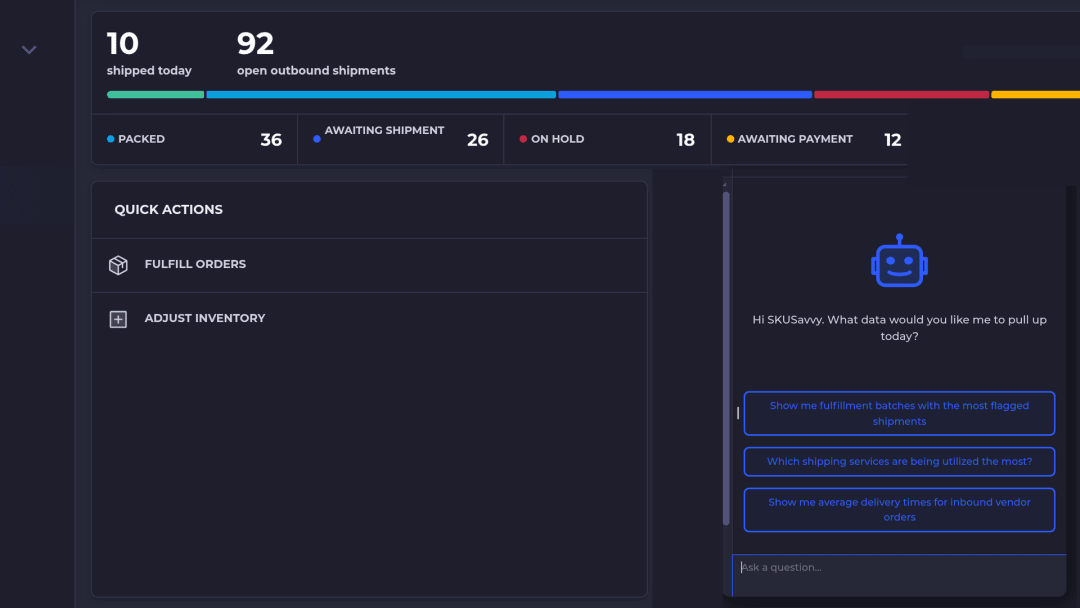
SavvyBot, the in-app assistant
Open SavvyBot from the sidebar and ask in plain English: which batches have the most flagged shipments, which shipping services you use most, how long inbound vendor orders take to arrive.
It looks up live account data, runs analytics with charts and CSV export, takes you to the right screen, searches the docs, and helps new users get set up. It can take actions in your account only when you explicitly approve them. SavvyBot runs on AI credits, bought in packs.
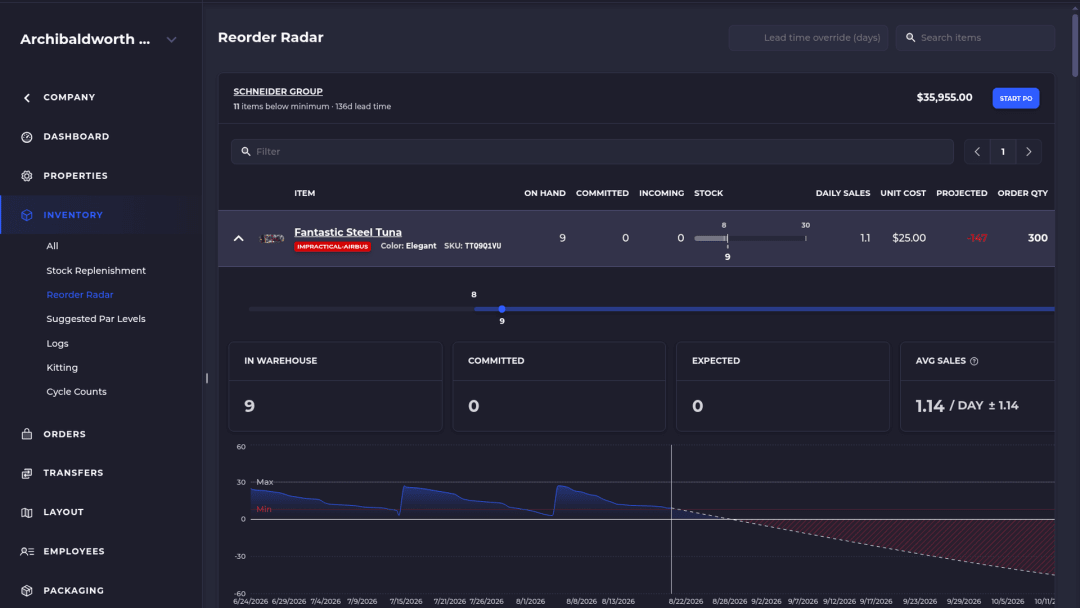
AI-powered forecasting and purchase suggestions
Reorder Radar groups what to buy by vendor and sizes each purchase order line from sales velocity, lead time, and days of stock.
You review the suggestion and place the purchase order. Nothing is ordered until a person confirms it.
Pick routing on your actual layout
SKUSavvy plans each pick path against your real warehouse layout as a traveling-salesman route and draws it on the 3D map.
Pickers walk the short way without learning the building first.
A GraphQL API for AI and inventory agents
Products, orders, inventory, locations, pick batches, replenishments, and forecasts sit behind one GraphQL API, and API calls are included in every plan.
Why it suits an inventory agentCloud WMS: why it runs in the browser
A cloud WMS runs on the vendor's servers and opens in a web browser, so there is nothing to install on a warehouse PC and every device sees the same live data. SKUSavvy is a cloud WMS built as a progressive web app: managers work on a desktop, pickers on a phone or tablet, in one system with one login.
It is not a native App Store app. It runs in the browser on iOS and Android devices and can be added to the home screen. If Shopify has an outage, picking, packing, and shipping keep running, and the sync catches up when Shopify is back.
| On-premise WMS | Cloud WMS (SKUSavvy) | |
Where it runs | Servers you buy, host, and maintain | Hosted. Open app.skusavvy.com in a browser |
Updates | Planned upgrade projects | Released to every account, nothing to install |
Floor devices | Often dedicated handheld computers | Phones, tablets, the built-in camera, or any Bluetooth or USB scanner |
Pricing | Usually licenses plus per-user fees | Monthly by order volume, with unlimited seats |
Shopify | A separate integration project | Built around Shopify products, orders, locations, and inventory |
Shopify Admin, a per-seat WMS, or SKUSavvy
Three tools for three different floors. Pick the one that matches yours.
| Job | Shopify Admin and spreadsheets | Per-seat desktop WMS | SKUSavvy |
Know where each unit lives | Location totals, bin list in a sheet | Bin map, usually at a desk | 3D or 2D bin map on phone and tablet |
Put away and pick with a path | Walk and search | Directed, once you pay for seats and handhelds | Directed put-away and pick routing on the layout |
Pack and ship | A separate label tool | Often a paid add-on module | Scan to pack, rates, and labels in one flow |
Keep Shopify available accurate | Manual edits and CSV imports | An integration you maintain | Real-time two-way Shopify sync |
Add seasonal pickers | Free, with no floor controls | Another paid seat each | Unlimited seats |
Cloud inventory management vs warehouse management software
Cloud inventory software keeps a count online and syncs it to your channels. Warehouse management software adds the floor: bins, put-away, pick paths, scans, and replenishment. If you are deciding which one you need, start with the count and look at where it breaks.
See where cloud inventory management stops and the warehouse floor startsWhat does WMS software cost?
SKUSavvy costs $179 a month, which includes your first 249 orders. Orders past that are billed per order on a graduated scale that drops to $0.06 an order above 100,000. At 1,000 orders a month the bill is $324.19.
Seats are unlimited, so adding pickers for peak season does not change the price. Plans run month to month, and every account starts with a 30-day free trial with no credit card. Purchase orders, transfers, and POS orders count toward the monthly total.
Estimate your bill on the SKUSavvy pricing pageSee what a WMS costs under each pricing modelCompare WMS pricing models and implementation costsWarehouse management software FAQ
Straight answers for Shopify brands that pick their own orders.
What is a WMS used for?
A WMS runs the warehouse floor: receiving, put-away, picking, packing, shipping, transfers, and counts. It records the bin for every unit and confirms each move with a scan, so inventory stays accurate and orders leave the building correct.
What is the difference between inventory management and warehouse management software?
Inventory management tracks how much stock you own and where it sells. Warehouse management software tracks where each unit sits inside the building and directs the people moving it. SKUSavvy covers both for Shopify brands: the count and the floor.
What is a cloud WMS?
Warehouse software that the vendor hosts and you use in a web browser. There are no servers to run, updates arrive without an install, and every device reads the same live data. SKUSavvy works this way on desktops, phones, and tablets.
What is a mobile WMS?
A mobile WMS puts warehouse work on phones and tablets instead of a desk. Pickers see the bin, scan the item, and confirm the pick where they stand. SKUSavvy runs on modern phones and tablets with the built-in camera or a Bluetooth or USB barcode scanner.
Is SKUSavvy a native mobile app?
No. SKUSavvy is a progressive web app at app.skusavvy.com. It runs on iOS and Android in the browser and can sit on the home screen, with nothing to download from an app store.
Is SKUSavvy AI warehouse management software?
In specific places. SavvyBot answers questions about your warehouse, pulls live data, builds charts, and searches the docs. Forecasting suggests purchase order quantities from sales and lead time. Pick paths are planned against your layout. A person confirms every purchase order and approves any change SavvyBot makes.
Can an AI agent connect to SKUSavvy?
Yes. SKUSavvy has one GraphQL API that covers products, orders, inventory, locations, and forecasts, and API calls are included in every plan. Your agent works with the same data your team sees.
Do I need Shopify Plus?
No. Shopify Plus is not required. SKUSavvy connects to your Shopify store's products, orders, locations, and inventory.
What hardware do I need?
A phone or tablet and an internet connection are enough to start, because the camera works as a scanner. Most teams add a Bluetooth or USB barcode scanner and a thermal printer for 4x6 shipping labels and bin labels.
How much does WMS software cost?
It depends on the pricing model. Many WMS vendors charge per user plus implementation. SKUSavvy bills by monthly order volume: $179 covers the first 249 orders, then each additional order costs less as volume grows, and seats are unlimited.
How long does WMS implementation take?
Self-service setups usually take one to two weeks. Guided onboarding usually takes two to four weeks, and complex or ERP-connected setups four to eight. Test Mode lets your team practice on real products before you go live.
Can I run more than one warehouse or Shopify store?
Yes. Warehouses are unlimited, and one account can connect several Shopify stores. Each store syncs on its own, and orders route to the warehouse you choose, with shared or dedicated inventory.
Does it work with Amazon, eBay, or Etsy?
Through Shopify. Marketplace orders that reach Shopify, for example through Shopify Marketplace Connect, flow into SKUSavvy like any other Shopify order. SKUSavvy does not connect to marketplaces directly.
Is a simple WMS enough for a small warehouse?
Start with the basics: bins, scanned picks, and accurate counts synced to Shopify. Turn on batching, putaway rules, Autopilot shipping, and reorder suggestions as volume grows. Small teams pay for orders, not seats.
Related pages
Cloud inventory management
How cloud stock counts reach the floor with par levels, purchase orders, and transfers.
Read the cloud inventory guidePurchase order management
Vendor POs sized from sales and lead time, scanned check-in, and put-away to bins.
See purchase order managementWMS pricing
What per-user and order-volume WMS plans cost, and what the price should include.
Compare WMS pricingBatch picking software
Batches built from your rules, routed pick paths, and pick to tote on any phone.
See batch pickingSKUSavvy pricing
Order-based pricing with unlimited seats and a calculator for your volume.
Open pricingOrder picking software
Shortest-path batch picking and pick-to-tote on any phone or tablet.
See order picking3D warehouse mapping
Draw shelves and bins, see stock where it sits, and route pickers through the layout.
See warehouse mappingCustom WMS: build vs buy
When a custom build makes sense and when configuring a WMS fits the floor.
Compare build vs buyRun the warehouse from the browser.
Start a 30-day free trial, or check pricing for your order volume.