Replenishing Stock Meaning: What It Is and How It Works
Alex
Replenishing stock means refilling inventory before it runs out. You buy more from a supplier, move stock in from another warehouse, or bring cases down from overstock to the bin people pick from. Done right, the shelf never goes empty and you never sit on months of cash in boxes.
That's the whole idea. The hard part is timing and quantity: when to reorder, and how much.
If you already run SKUSavvy and want the clicks, the step-by-step guide to replenishing stock in SKUSavvy covers par levels and bin replenishment. This post is the plain-English side: what the word means, the terms people mix up, the main methods, the math behind a reorder point and what it looks like on a real warehouse floor.
Replenishment, restocking and the terms around them
People use these words loosely. In a warehouse they mean slightly different things, and the difference matters when you set rules.
| Term | What it means |
|---|---|
Replenishment | The whole process of keeping enough stock on hand: deciding when and how much, then getting it there |
Restocking | Usually the physical part: putting product back on a shelf or into a pick bin |
Reordering | Placing a new purchase order with a supplier |
Reorder point | The stock level that tells you it's time to reorder |
Par level (min/max) | The lowest and highest amount you want on hand for an item. Drop below the min, refill toward the max |
Safety stock | Extra units held to cover slow suppliers or a sales spike |
Lead time | Days between placing an order and having the stock ready to sell |
Committed stock | Units already promised to open orders. On the shelf, but not really available |
Incoming stock | Units on open purchase orders or transfers that haven't arrived yet |
Replenishment order | The purchase order or transfer that refills an item |
Two kinds of replenishing: buying stock and moving it
Inventory replenishment brings new stock into the building. It's a purchase order to a vendor, or a transfer from another warehouse. This is what most guides mean.
Bin replenishment (or pick-face replenishment) moves stock you already own. Cases sit on a pallet in overstock; a few units sit in the pick bin. When the pick bin runs low, someone brings stock down so pickers don't walk to a back rack or skip the order.
Store replenishment is the retail version: the warehouse or a central stockroom refills a store's shelves, usually through transfers. If you sell online and in a shop, you're doing both.
All three use the same logic. Know the minimum, know how long a refill takes, and refill before you hit zero.
The main replenishment methods
Most businesses use one of these, or mix them by product.
| Method | How it works | Good fit for |
|---|---|---|
Reorder point (min/max) | Reorder whenever stock hits a set level, then refill toward the max | Steady sellers with known lead times |
Periodic review | Check stock on a fixed schedule, like every Monday, and order what's needed then | Vendors you order from on a routine |
Top-off | Refill anything below its max during slow periods, even if it isn't low yet | Pick bins before a busy season |
Demand-based (forecast) | Order based on expected sales over the lead time, not just today's stock | Seasonal or fast-moving products |
Just-in-time | Order small amounts just before you need them | Reliable local suppliers and tight space |
When people ask about the three types of replenishment systems, they usually mean continuous review (reorder point), periodic review and demand-based ordering. The labels vary between textbooks. The question underneath is the same: what triggers the next order?
How to calculate when and how much to replenish
Two formulas cover most of it.
Reorder point = (lead time in days x average daily sales) + safety stock
Reorder quantity = target days of stock x average daily sales
Say a SKU sells 12 units a day and your vendor takes 10 days to deliver. You keep 3 days of sales as safety stock, which is 36 units. Your reorder point is (10 x 12) + 36 = 156. When stock falls to 156, you reorder.
If you want each order to cover 30 days, you order 30 x 12 = 360 units.
One catch: "stock" in that formula should mean available stock, not what's physically on the shelf. Take on-hand units, subtract what's committed to open orders, and add what's already incoming. A shelf with 200 units looks fine until you notice 80 are promised to orders that haven't shipped.
What replenishing stock looks like on the floor
On paper it's a number. In the building it's a list of jobs:
Receiving. The purchase order arrives, someone checks it in and counts it.
Put-away. Stock goes to a home bin, and the extra goes to overstock.
Pick-bin refills. Someone moves cases from overstock to the pick face before it runs dry.
Transfers. Stock moves between warehouses or out to a store.
You can tell replenishment is off when the same things keep happening: pickers find an empty bin while a full pallet sits two aisles over, orders go on backorder for an item you have in the building, or rush POs go out every week while slow sellers collect dust.
How SKUSavvy handles replenishment
SKUSavvy is a warehouse management system for Shopify sellers. Replenishment runs on the same inventory data your pickers scan, so the numbers come from the same counts and scans your team records in each warehouse. Here's what it does today.
| Feature | What it gets you |
|---|---|
Min/max par levels per item, per warehouse | Set the minimum and maximum you want on hand, plus a default lead time that gets more accurate as you place purchase orders in SKUSavvy |
Stock replenishment view | See each item's range, average sales per day, and a red range when stock is below your minimum, with order and inventory history for the last quarter |
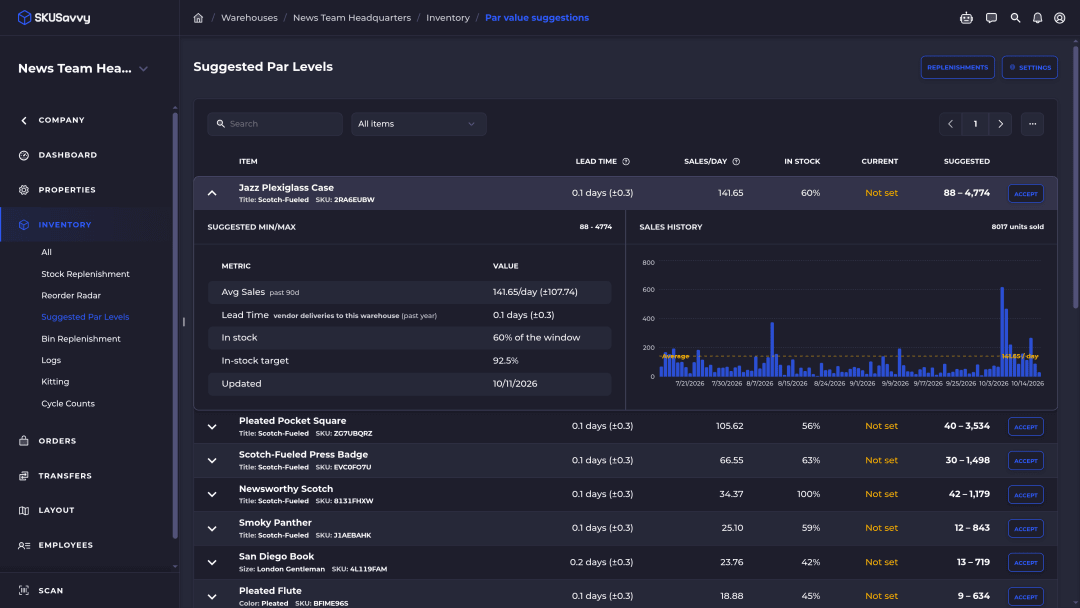
Suggested Par Levels | Get a computed min/max for items that are selling, based on recent sales rate, how often they've been in stock and lead time. Thin history gets a Low Confidence badge. Click Accept to save one |
Reorder Radar | Shows items projected to fall below their minimum before a PO placed today could arrive, grouped by vendor, most urgent first, with a suggested quantity that refills to your max, rounded up to the vendor's order step. Items need a min and max set first. |
Suggestions on POs and transfers | Turn on suggestions when you create a purchase order or a transfer, and SKUSavvy fills in quantities from on-hand, committed and incoming stock, sales and lead time |
Bin to bin replenishment | Set a min and max for an item in each bin, then work a list of the bin transfers that are needed |
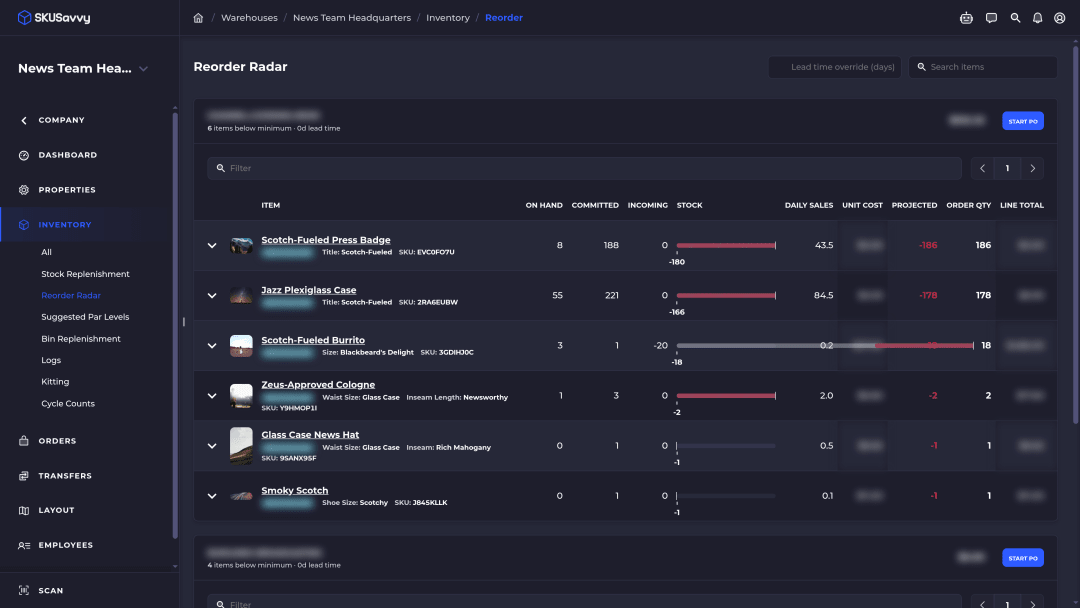
The setup steps for par levels and bin rules are in the stock replenishment docs. Reorder Radar and Suggested Par Levels have their own guide, and purchase order management shows how POs and check-in fit around them.
The AI part, kept honest
Suggested Par Levels and Reorder Radar are math, not AI. They work from your sales history, lead times, par levels, committed orders and incoming stock, and you can expand a Suggested Par Levels row to see exactly what its suggestion is based on. Nothing is ordered until you review a purchase order and submit it yourself.
The AI in SKUSavvy is Savvy Bot, the in-app assistant. Ask it about your own orders and inventory, have it run a report like your top sellers this month, or ask how a feature like Reorder Radar works, and it explains it and can take you to the right page. It reads and explains. It won't change anything unless you turn on edits and approve each one, and it runs on AI credits.
Receiving the pallet, counting it in and carrying cases to the pick bin stay physical work on the floor. The software tells you what to move and when. People still move it.
SKUSavvy is $179/month including your first 249 orders, then a per-order rate that falls as volume grows, with unlimited users and month-to-month plans, as of October 15, 2026. See SKUSavvy pricing for your volume. The 30-day trial needs no credit card.
Replenishing stock FAQ
Short answers to what people ask most.
What does replenishing stock mean?
It means refilling inventory before it runs out, by ordering from a supplier, transferring from another location or moving stock from overstock to a pick bin. The goal is enough stock to fill orders without tying up cash in extra inventory.
What is the difference between replenishment and restocking?
Replenishment is the whole process of deciding when and how much to refill and getting the stock there. Restocking usually means the physical job of putting product back on the shelf or into a bin.
What is a replenishment order?
The purchase order or transfer that refills an item. In a min/max setup it's created when stock drops below the minimum and orders enough to get back toward the maximum.
What are the three types of replenishment systems?
Usually continuous review (reorder when stock hits a set point), periodic review (check and order on a schedule) and demand-based ordering (order from a sales forecast over the lead time).
What is the 80/20 rule in inventory?
It's the idea that roughly 20% of your SKUs drive about 80% of sales. It's a rule of thumb, not a law. A common use is giving top sellers tighter par levels and more frequent reviews.
What are the four types of inventory?
Raw materials, work in progress, finished goods, and MRO (maintenance, repair and operating supplies). Most ecommerce brands mainly replenish finished goods, plus packaging.
What does store replenishment mean?
Refilling a retail store's shelves from a warehouse or stockroom, usually with transfers, so the store doesn't sell out of items the business has elsewhere.
Does SKUSavvy place purchase orders automatically?
No. SKUSavvy suggests quantities and can pre-fill a purchase order for a vendor, but nothing is ordered until you review and submit it.
Keep reading
Reorder Radar and Suggested Par Levels
See which vendors need a PO before you run out, and get suggested min/max levels.
Read the Reorder Radar guidePurchase order management
Create, send and receive purchase orders in the same system as your bins.
See purchase ordersRefill before the bin goes empty.
Start a 30-day trial or check pricing for your order volume.