Inventory Software for Retail Stores That Also Run a Warehouse
Inventory software for retail stores should keep one stock picture across the sales floor, the back room, and online. Most roundups stop at POS. If you also pick from a warehouse or move stock between store and DC, you need inventory that reaches the bin, not just the till.
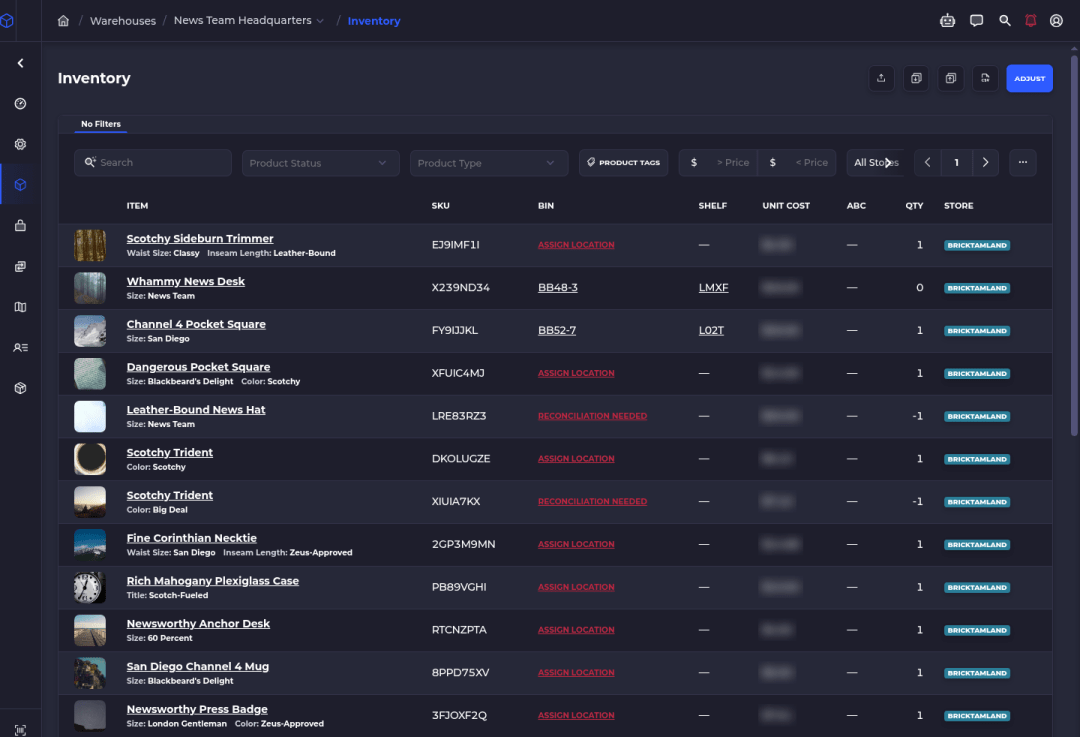
POS listicles ignore the floor behind the counter
Search for inventory software for retail stores and you get lists led by POS tools like Square, Lightspeed and Magestore, plus inventory apps like Zoho. Those tools are right when the till is the whole problem.
They are incomplete when the same SKU lives on a retail shelf, in a back-room bin, and in a warehouse that ships online orders. The count at checkout is only useful if it matches the shelf and the bin that restocked it.
If you run retail locations on Shopify and also hold stock in a warehouse or back room, start with our retail store setup workflow. This page is the buying side: what kinds of inventory systems exist, which job each one covers, and where a warehouse system like SKUSavvy fits next to Shopify POS.
One disclosure up front. SKUSavvy is our product. We sell a warehouse management system for Shopify sellers who fulfill their own stock, including hybrids with retail stores. We'll say where POS-only tools are enough too.
The four main types of inventory systems retailers actually choose
People Also Ask lists "four main types" in different ways. For a retail buyer choosing software, these four buckets match how vendors actually sell:
POS-first retail
Checkout, receipts, and a stock count tied to the register. Strong on the sales floor. Weak when stock lives in a separate warehouse or needs bin-level picks.
Inventory suite
Dedicated stock, purchasing, and multichannel counts. Good when you care about orders and locations more than a pick path through shelves.
Store platform + locations
Shopify Admin with locations already tracks Available by location for online and POS. It does not tell a picker which bin to open.
Warehouse / WMS
Bin homes, transfers, receiving, cycle counts, and scan-checked picks. Built for the floor work after the sale or the transfer is created.
Periodic vs perpetual, barcode vs RFID, and FIFO vs LIFO still matter as accounting or hardware choices. They are not the same decision as which software owns the floor. Buy the bucket that matches where your count goes wrong today.
Option types compared (not a ranked best-of)
| Type | Built around | Where it stops for retail + warehouse | Typical fit |
|---|---|---|---|
POS-first retail | The register and sales floor | Often treats the store as one stock pool; little or no bin map for a separate DC | Single-location or POS-heavy shops with simple back rooms |
Inventory suite | Stock, POs, multichannel counts | May track locations without directing put-away, pick routes, or scan checks | Teams that need purchasing and channels more than a warehouse floor |
Shopify Admin + locations | Your store catalog and Available by location | Chooses a location, not a shelf; transfers and POS still need floor discipline | Shopify retailers who should try what they already pay for first |
Warehouse / WMS (SKUSavvy) | Bins, transfers, picks, and Shopify sync | Not a standalone POS or multichannel OMS; Amazon/eBay come through Shopify | Shopify brands with stores plus a warehouse or serious back room |
This is a type comparison, not a scored leaderboard. We are not listing competitor prices here. For SKUSavvy's own plan, see SKUSavvy pricing. For bin-level cloud inventory next to Shopify, see cloud inventory management.
What retail stores need when stock also sits in a warehouse
One Available number
Online, POS, and transfers must hit the same truth. If the website sells what the store already rang up, the software failed the job.
Transfers you can trust
Restocking stores from a DC needs outbound pick/pack and inbound check-in when locations are separate, or bin-to-bin moves when store and warehouse share one location.
Floor proof
Cycle counts, receiving scans, and pick scans keep the cloud count honest. A POS sale that deducts from the wrong bin creates reconciliations nobody wanted.
Unlimited people on the floor
Seasonal staff and multi-store managers should not multiply seat fees just to scan a tote.
Bunker 27 is a public proof pattern for this shape of business: retail stores plus a warehouse on Shopify, with scan-to-pick cutting mis-ships. We don't publish a headcount of customers. Fit is about your workflow, not a logo wall.
How SKUSavvy handles retail stores next to a warehouse
SKUSavvy is a warehouse management system for Shopify. Shopify stays the sales engine and the product catalog. SKUSavvy runs inventory by warehouse, shelf, and bin, including locations you treat as retail stores.
Locations arrive as warehouses. When you connect Shopify, locations come into SKUSavvy as warehouses. A retail store can be a warehouse with one bin for the whole floor, or many bins if you want areas and back stock.
POS sales deduct stock. Orders made at Shopify POS still arrive in SKUSavvy for that location. They are marked fulfilled automatically, and inventory deducts when the item sits in a single bin or you use POS reconciliation bins so POS stock comes from the bins you designate.
Reconcile when bins compete. If an item lives in more than one bin and you have not set POS reconciliation bins, SKUSavvy creates reconciliations so someone chooses which bin the sale came from.
Transfer warehouse to stores. Separate Shopify/SKUSavvy locations use full transfers: pick and pack on the outbound side, check-in on the inbound side. Same building as one location uses bin-to-bin moves instead.
Count the floor. Cycle counts run from Inventory on the retail bin or warehouse bins so the count matches what you can touch.
Buy online, pick up in store. BOPIS can use SKUSavvy to pick, package, and label for pickup, then scan when the customer takes it so Shopify updates.
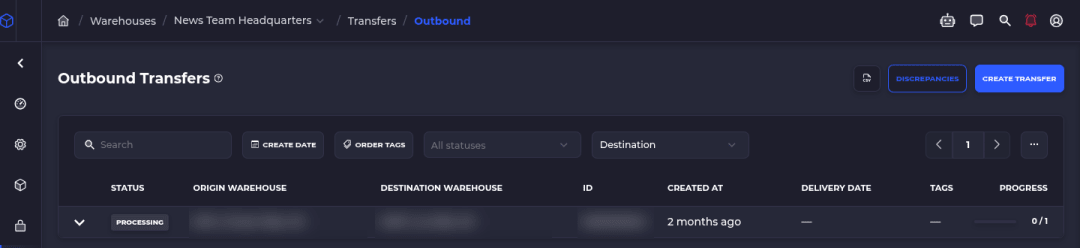
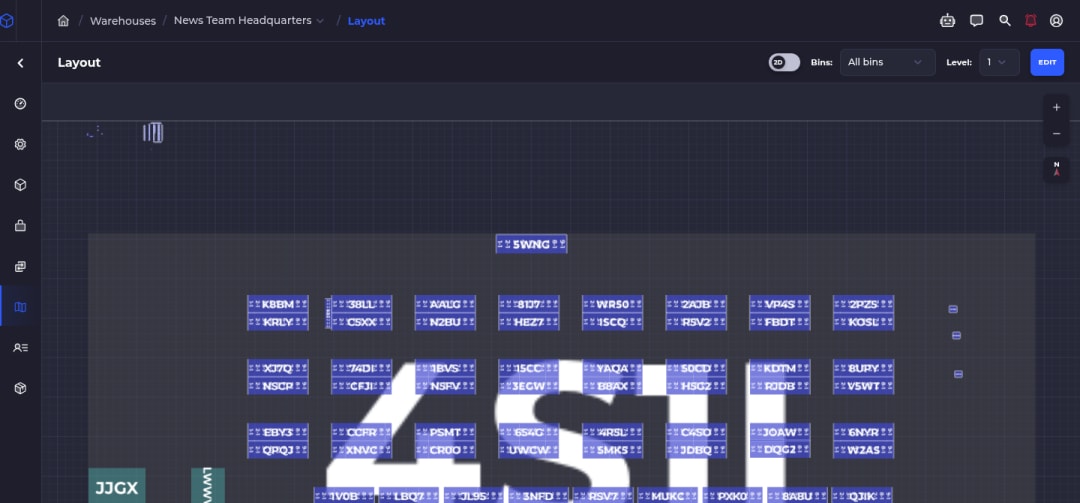
Step-by-step setup, POS reconciliation bins, and transfer choices are documented in retail store setup and transfer orders.
Features and benefits
| Feature | What it gets you |
|---|---|
Bin-level inventory synced to Shopify | On Hand by bin, Available back to Shopify so online and POS share one picture |
Retail locations as warehouses | One bin for the sales floor, or many bins for back stock and POS reconciliation |
Shopify POS stock deduct / reconcile | Auto-deduct from a single bin or POS reconciliation bins; reconcile when bins compete |
Transfers between warehouse and stores | Full transfer workflow across locations, or bin-to-bin when store and DC share one location |
Cycle counts on store or warehouse bins | Count what you can touch so the cloud number stays honest |
Purchase orders, receiving, put-away | Inbound stock lands in bins before it hits the floor or a transfer |
Forecasting and reorder suggestions | Velocity and lead time signal what to buy; you still approve the PO |
Routed picks and scan checks (warehouse side) | When the DC ships online or builds a transfer, pickers follow the map and scan bins and items |
Box suggestion, rates, and labels | Warehouse packing suggests a configured box, pulls carrier rates, prints the label |
Unlimited users | Store associates and warehouse pickers don't add seats |
Runs in the browser on phones and tablets | PWA at app.skusavvy.com; nothing to download from an app store |
The AI part, kept honest
Inventory software does not need AI to keep a retail count honest. Bin homes, POS reconciliation rules, transfers, and cycle counts are rules and floor work you can see.
The AI in SKUSavvy is Savvy Bot, the in-app assistant. Ask it about your own orders and inventory, have it run a report like your top sellers this month, or ask how a feature like batch picking works, and it explains it and can take you to the right page. It reads and explains. It won't change anything unless you turn on edits and approve each one, and it runs on AI credits.
Scanning a sale, counting a bin, and moving a transfer tote stay physical work on the floor. Reorder suggestions and box suggestions are product features with rules behind them, not an autonomous store manager.
Start a 30-day trialWhat SKUSavvy costs
SKUSavvy is $179/month, which covers your first 249 orders. Each order past that is billed at the rate for its band, and the rate falls as volume grows.
| Orders a month | Rate |
|---|---|
0 to 249 | Included in the $179 flat fee |
250 to 499 | $0.20 each |
500 to 4,999 | $0.19 each |
5,000 to 24,999 | $0.13 each |
25,000 to 49,999 | $0.08 each |
50,000 to 99,999 | $0.07 each |
100,000 and up | $0.06 each |
At 1,000 orders a month that's $324.19. At 5,000 it's $1,084.13. Every order that enters SKUSavvy counts: online and POS orders, purchase orders and transfers. Users are unlimited. Plans are month to month. Outside the plan you pay for postage, plus the optional hands-on onboarding package and extra AI credits if you choose them. Scanners and label printers are bought separately. Enter your own volume on SKUSavvy pricing. The 30-day trial needs no credit card.
Inventory software for retail stores FAQ
Which software is best for inventory management?
The best inventory software is the one that fixes where your count goes wrong. If the till is wrong, start with POS. If locations disagree but shelves are simple, an inventory suite or Shopify locations may be enough. If people can't find stock, transfers drift, or picks mis-ship, you need a warehouse system with bins and scans. There is no honest single winner across every retail shape.
What is SKU and KPI?
A SKU (stock keeping unit) is the identifier for a sellable variant: size, color, pack size. A KPI (key performance indicator) is a metric you watch on purpose, such as sell-through, days of cover, stockout rate, or inventory accuracy after cycle counts. Software should make SKUs scannable and KPIs visible; it should not invent which KPIs matter for your category.
Does Microsoft have an inventory management system?
Yes. Microsoft sells Dynamics 365 supply chain and inventory capabilities aimed at larger organizations and ERP-style rollouts. That is a different buying motion than Shopify retail plus a warehouse floor. If you already live in Microsoft Dynamics, evaluate it on its own. If you sell on Shopify and pick your own stock, compare tools that sit next to Shopify, not an enterprise ERP by default.
What are the four main types of inventory systems?
For software buyers: POS-first retail, dedicated inventory suites, store-platform admin with locations (like Shopify), and warehouse / WMS systems. Accounting texts also talk about periodic vs perpetual systems, and hardware conversations talk about barcode vs RFID. Pick the software type by where stock physically lives and who touches it.
Can inventory software work with Shopify POS?
Yes, when the POS location is tied into the same inventory picture as online. In SKUSavvy, Shopify POS sales deduct stock once the store's location is linked as a warehouse location, with single-bin auto-deduct or POS reconciliation bins when you need to choose which bin sold.
Do I need a WMS if I only have one retail store?
Not always. A single store with one stock room and light online volume can stay on Shopify Admin and a solid POS. A WMS earns its place when you add a real warehouse, multi-bin back stock, frequent transfers, or a team that mis-picks without scan checks.
How much does retail inventory software cost?
It ranges from POS subscriptions to per-order warehouse plans and quoted ERPs. SKUSavvy is $179/month including the first 249 orders, then per-order bands down to $0.06, with unlimited users and a 30-day trial with no credit card, as of October 13, 2026. We are not listing competitor prices on this page; check each vendor's site at your real order and seat count.
Can SKUSavvy run on my phone in the store?
Yes. SKUSavvy runs in the browser on phones and tablets as a web app (PWA), so there's nothing to download from an app store. A dedicated Bluetooth or USB scanner is faster than the phone camera if you scan all day.
Keep reading
Cloud inventory management
Bin-level counts, par levels, POs and transfers synced to Shopify.
See cloud inventoryRetail store setup
Warehouses vs retail locations, POS reconciliation bins, and transfers.
Read the retail setup guideWarehouse management software
3D bin map, pick routing, receiving and packing next to Shopify.
Explore the WMSOne stock picture from the till to the bin.
Start a 30-day trial or check pricing for your order volume.