QuickBooks Inventory Management Software Reviews
The honest review of QuickBooks inventory management software: QuickBooks Online tracks inventory well enough for the books, but it doesn't run a stockroom. Here's what QuickBooks does on its own, where Intuit's own pages say it stops, and how five add-ons compare.
The short review
If you sell a handful of products from one room, QuickBooks Online Plus or Advanced may be all the inventory software you need. Quantities update as you buy and sell, low-stock alerts tell you when to reorder, and purchase orders turn into bills.
Add-ons earn their place when you need to know where stock sits, not just how much you own. Intuit's QuickBooks Online inventory help doesn't cover bins, barcode scans, lot numbers, picking or packing, so that work usually happens outside it.
One disclosure. SKUSavvy is one of the six options here, and it's our product. If you're already sold on a warehouse layer, SKUSavvy's QuickBooks inventory features are covered on their own page. This page is the review side: what each option is built around, where it stops, and who it fits.
We didn't reprint star ratings. They move every week and mix very different businesses. Every fact below comes from Intuit's help pages or the vendor's own site, read on October 17, 2026, and we link each one.
How good is QuickBooks' own inventory tracking?
Good at the money side, thin on the physical side. It also depends on which QuickBooks you run. QuickBooks Online and QuickBooks Desktop Enterprise handle inventory very differently.
| What you need | QuickBooks Online (Plus or Advanced) | QuickBooks Desktop Enterprise + Advanced Inventory |
|---|---|---|
Plan | Inventory tracking is on Plus and Advanced, or as an add-on for Simple Start and Essentials | Advanced Inventory is bought or subscribed to on top of Enterprise |
Quantity on hand | Updates as you buy and sell | Units and value tracked per inventory site |
Reorder alerts | Reorder points and low-stock alerts | Reorder points, set per site with Advanced Inventory |
Purchase orders | A purchase order becomes a bill when the stock arrives | Purchase orders by inventory site |
Costing method | FIFO only | FIFO or moving average cost |
Stock by warehouse | No. Intuit's team says locations are for tagging and reporting, and inventory is managed globally | Yes, multiple inventory sites with transfers |
Bins | Not in Intuit's QuickBooks Online inventory help | Bin locations within a site |
Barcode scanning | Not in Intuit's QuickBooks Online inventory help | Yes, with Advanced Inventory |
Serial or lot numbers | Not in Intuit's QuickBooks Online inventory help | Yes, with Advanced Inventory |
Sources, all Intuit: setting up inventory in QuickBooks Online, inventory tracking, FIFO in QuickBooks Online vs Desktop, low stock alerts, Advanced Inventory, setting up Advanced Inventory and multiple inventory sites. The QuickBooks Online location answer comes from a QuickBooks Team reply in Intuit's community, March 2026.
The downsides people run into
One pool of stock
QuickBooks Online knows you own 40 units. It doesn't know 25 are on a shelf in the back and 15 are at your second location.
No scan on the floor
Receiving, picking and counting happen in your head or on paper, then someone types the result into QuickBooks.
One costing method
QuickBooks Online uses FIFO. Moving from Desktop's average cost means picking a FIFO start date you can't change later.
Built for the books
Its job is the value of what you own and the bills you owe. Which shelf, which picker and which box are not its job.
None of that makes QuickBooks bad. It's accounting software doing accounting. The question every review is really answering is how much of the physical work you've outgrown.
How to read QuickBooks inventory software reviews
Many reviews grade features on one long grid. Read them through four questions instead. They tell you whether a glowing review came from a business like yours.
Which QuickBooks does the reviewer run? A happy Desktop Enterprise user and a happy Online user bought different things. Check the vendor supports your version, not just "QuickBooks".
Which system owns the quantity? Pick one record for how many units sit where. If two systems both edit on-hand counts, they will drift.
What goes to QuickBooks, and what doesn't? Bills, vendors, item costs, customer invoices. Each tool sends a different mix. Ask for the list.
Where do your mistakes happen? Wrong reorder quantity, wrong item picked, wrong lot shipped, wrong cost on the books. Buy for that problem, not the longest feature list.
The six options at a glance
| Option | Built around | QuickBooks version | Strongest at | Pricing model |
|---|---|---|---|---|
QuickBooks Online | Your books | Online | Inventory value, COGS, POs to bills | Included in Plus and Advanced |
QuickBooks Desktop Enterprise + Advanced Inventory | Your books, on a desktop install | Desktop Enterprise | Sites, bins, barcodes, lots and serials inside QuickBooks | Add-on to Enterprise |
SOS Inventory | Orders and manufacturing for QuickBooks Online | Online | Sales orders, lots and serials, assemblies | Monthly plans, users included per plan |
inFlow | Inventory and orders for small teams | Online | Locations and bins, barcodes, bills of materials | See inFlow's site |
Fishbowl | Manufacturing and warehouse inventory | Desktop and Online | Multi-level bills of materials, work orders | Per user |
SKUSavvy | The warehouse floor for Shopify sellers | Online | Bins on a 3D map, scan-checked receiving and picking | Monthly fee plus a per-order rate |
Versions and pricing models come from each vendor's own page: SOS Inventory, inFlow, Fishbowl. Where we couldn't confirm a feature or a price on the vendor's site, we left it out. Check each one before you buy.
Each option, reviewed
QuickBooks Online (Plus or Advanced)
The option you may already pay for. Turn on inventory tracking and QuickBooks keeps quantity on hand, warns you at a reorder point, and turns a purchase order into a bill when the goods arrive. The Inventory Summary report shows what's in stock.
Where it stops: one pool of stock, FIFO costing only, and nothing on Intuit's QuickBooks Online inventory pages for bins, barcode scans or lot numbers.
Fits: one location, a short product list, and an owner who mostly needs the books right.
QuickBooks Desktop Enterprise with Advanced Inventory
Intuit's most complete built-in inventory option. Advanced Inventory adds multiple inventory sites, bin locations, barcode scanning, serial or lot numbers, FIFO or moving average cost, and a sales order fulfillment process.
Where to look closer: it runs on a desktop install, and it's an add-on on top of Enterprise. If your team picks orders from phones in the aisle, check how scanning reaches the warehouse.
Fits: businesses already on Desktop Enterprise that want inventory inside QuickBooks rather than in another app.
SOS Inventory
SOS Inventory is built for QuickBooks Online. Its site lists sales orders with partial shipments and invoices, lot and serial tracking, barcodes, multiple locations, bins and aisles, assemblies and manufacturing, plus ShipStation and UPS connections for labels.
Where to look closer: its entry plan includes two users, with each extra user billed on top. Lots, serials, bins and barcoding start on its Plus plan, so check which tier you need. Count your whole team, not just the office.
Fits: QuickBooks Online businesses that sell on sales orders or build simple assemblies.
inFlow
inFlow connects to QuickBooks Online and syncs sales, purchases and payments. Its own guide lists multiple locations with bins, a built-in barcode system, purchase and sales orders, product variants, kitting and bills of materials.
Where to look closer: decide up front whether inFlow or QuickBooks creates your sales records, so the same sale isn't entered twice.
Fits: small product businesses that want inventory and orders in one app next to QuickBooks Online.
Fishbowl
Fishbowl syncs to both QuickBooks Desktop and QuickBooks Online. It's built around manufacturing: multi-level bills of materials, work orders, multiple warehouses and barcode scanning.
Where to look closer: pricing is per user, and Fishbowl pairs you with an implementation specialist and training before go-live. Budget your team's time, not just the license.
Fits: manufacturers and wholesalers, especially ones staying on QuickBooks Desktop.
SKUSavvy
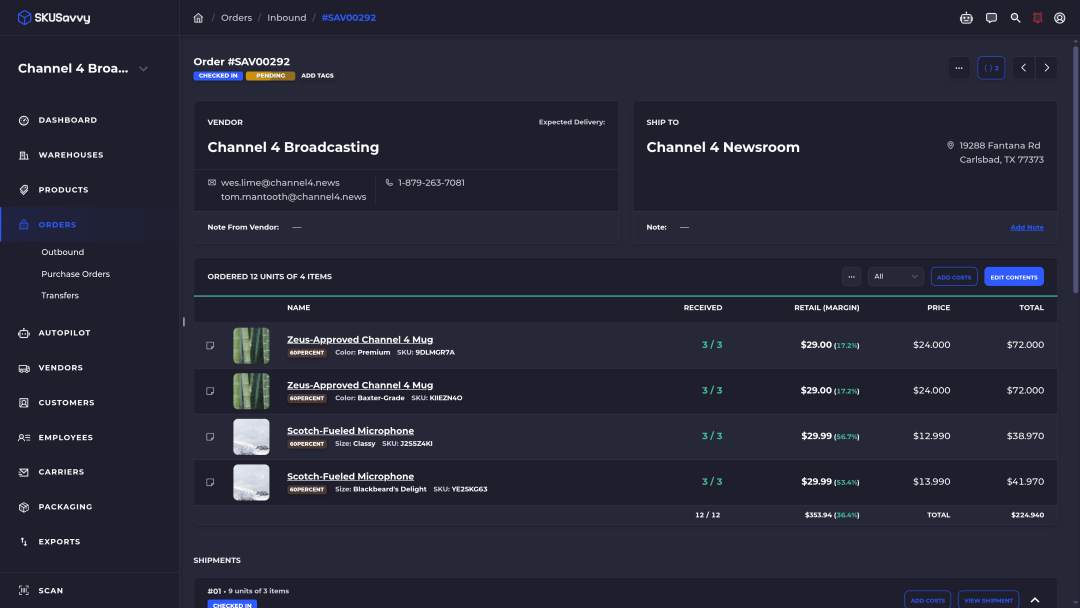
SKUSavvy is a warehouse management system for Shopify sellers who hold their own stock. Shopify runs the store, QuickBooks Online keeps the books, and SKUSavvy runs the shelves in between: bins, receiving, picking, packing and labels.
It connects to QuickBooks Online and syncs products, vendors, purchase orders and inventory cost updates. The table below shows exactly what goes across, and there's more on how SKUSavvy works alongside QuickBooks Online.
Where it stops: SKUSavvy doesn't create customer invoices in QuickBooks. Sales usually reach QuickBooks from Shopify through Shopify's own QuickBooks connection. And it's built around Shopify, so it's not the pick if you don't sell there.
Fits: Shopify brands picking orders from their own shelves that want QuickBooks to get clean purchasing and cost data.
What SKUSavvy sends to QuickBooks Online
Reviews don't always spell out the sync. Here's ours, step by step.
| In SKUSavvy | What QuickBooks gets |
|---|---|
You create a purchase order | A draft bill |
You check in the shipment | A bill for the quantity you actually received. You pay it in QuickBooks |
You add or edit a vendor | The vendor record, mirrored |
You add or update a product | SKU, name and description |
You adjust inventory | The quantity adjustment |
An item's cost changes | The new cost, for cost of goods sold |
A customer orders on Shopify | Nothing from SKUSavvy. Shopify's own QuickBooks connection handles sales and invoices |
A sync dashboard shows what synced, when it last synced, and any failed events. The full list is on the QuickBooks Online integration page.
Features and benefits
What SKUSavvy does on the floor, before anything reaches QuickBooks.
| Feature | What it gets you |
|---|---|
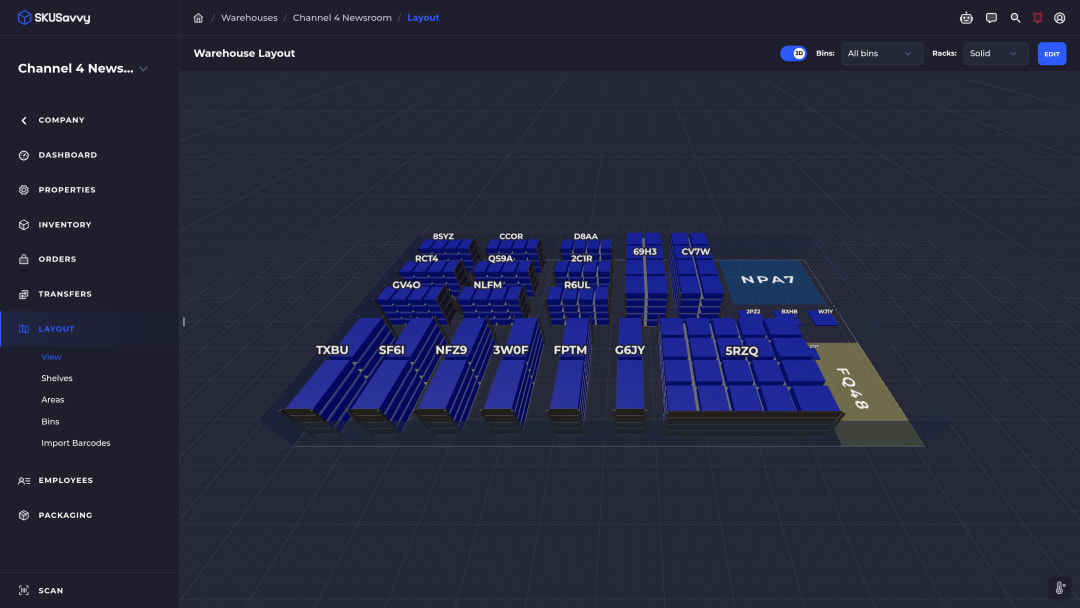
Bins on a 3D warehouse map | Everyone sees which shelf and bin an item lives in, not just a total |
Check-in against the purchase order | Scan items as they arrive, and short or over shipments show up as discrepancies on the PO |
Directed put-away | New stock goes to the bin the system points to, so the next picker finds it |
Replenishment suggestions | Purchase quantities calculated from your min and max, vendor lead time, on hand, committed, incoming and sales |
Landed costs on the PO | Freight, duties and fees split across the units they paid for |
Routed picking with scan checks | A wrong item or wrong bin gets flagged before it ships |
Your existing bin barcodes | Import the barcodes already on your shelves, and print labels at 4x6, 2x1, 4x2, 4x4 or a custom size |
Two-way Shopify sync | Orders come in and stock levels go back without retyping |
Unlimited users | Seasonal pickers don't add seats to the bill |
Runs in the browser on phones and tablets | Use devices you already own, with nothing to install from an app store |
Using Savvy Bot with purchasing and inventory
Savvy Bot is the in-app assistant. Ask it about your own orders and inventory, have it run a report like your top sellers this month, or ask how a feature like purchase orders works, and it explains it and can take you to the right page.
It reads and explains. It won't change anything unless you turn on edits and approve each one, and it runs on AI credits. Deciding what to buy, and checking what came off the truck, stays with your team.
Start a 30-day trialWhat SKUSavvy costs
As of October 17, 2026, SKUSavvy is $179/month, which covers your first 249 orders. Orders past that are billed per order, and the rate falls as volume grows. Users are unlimited, plans are month to month, and the 30-day trial needs no credit card.
Carrier postage, the optional hands-on onboarding package and extra AI credits are billed outside the plan. Ask us about the QuickBooks Online integration when you start your trial. Enter your monthly orders on SKUSavvy pricing for an exact number.
QuickBooks inventory software FAQ
Does QuickBooks have an inventory tracker?
Yes. QuickBooks Online Plus and Advanced track inventory quantities, reorder points and the cost of goods sold, and Simple Start and Essentials can add it. QuickBooks Desktop Enterprise goes further with the Advanced Inventory add-on.
How good is QuickBooks inventory management?
Good for the books. It keeps inventory value and cost of goods sold right as you buy and sell. It's thin on the physical side: QuickBooks Online tracks one pool of stock, with nothing on bins, barcode scans or lot numbers in Intuit's help.
What are the downsides of using QuickBooks for inventory?
In QuickBooks Online, stock isn't tracked by warehouse or bin, costing is FIFO only, and Intuit's inventory help doesn't cover scan-based receiving or picking. Desktop Enterprise with Advanced Inventory covers more of that, as a paid add-on on a desktop install.
What's the best way to keep track of inventory?
Count it where it lives. Give every item a bin, scan when you receive, move and pick, and let one system own the quantity. Then send the money side to your accounting software.
Is QuickBooks inventory worth it?
If you already pay for Plus or Advanced and run one small stockroom, try it first. When you're tracking bins in a spreadsheet next to it, you've outgrown it.
What's the best inventory software that integrates with QuickBooks?
It depends on your work. If you manufacture, Fishbowl and SOS Inventory are built for it. Small product teams can look at inFlow, and Shopify sellers running their own warehouse at SKUSavvy. Check which QuickBooks version each one supports first.
Does SKUSavvy create invoices in QuickBooks?
No. SKUSavvy sends purchase orders as bills, plus vendors, products, inventory adjustments and cost updates. Customer sales usually reach QuickBooks from Shopify through Shopify's own QuickBooks connection.
Does SKUSavvy work with QuickBooks Desktop?
SKUSavvy's integration is built for QuickBooks Online. If you're on Desktop, it's worth asking us before you plan around it.
Keep reading
QuickBooks Online integration
Products, vendors, purchase orders and costs synced with QuickBooks Online.
See what syncsKeep QuickBooks for the books. Run the shelves in SKUSavvy.
Start a 30-day trial or check pricing for your order volume.