Saved views
Your warehouse filters, ready when you are
Save the product, inventory, order, shipment, or picking filters you use every day. Return to the same working list with one click, or make it your default view.
Free 30-day trial, no credit card required.
Less setup
Stop rebuilding the same filter every shift.
Warehouse work rarely starts from an unfiltered list. One person watches priority orders. Another checks low stock. A buyer follows open purchase orders. Saved Views keeps each person’s working filters close at hand without changing the underlying records.
- 01
Save the whole view
Apply several filters once, give the result a useful name, and save the complete combination.
- 02
Switch in one click
Choose a saved view from the row above the table instead of opening and rebuilding every filter.
- 03
Start with your default
Make one view the starting point for that area, so the list opens on the work you handle most often.
How it works
Filter it. Name it. Come back anytime.
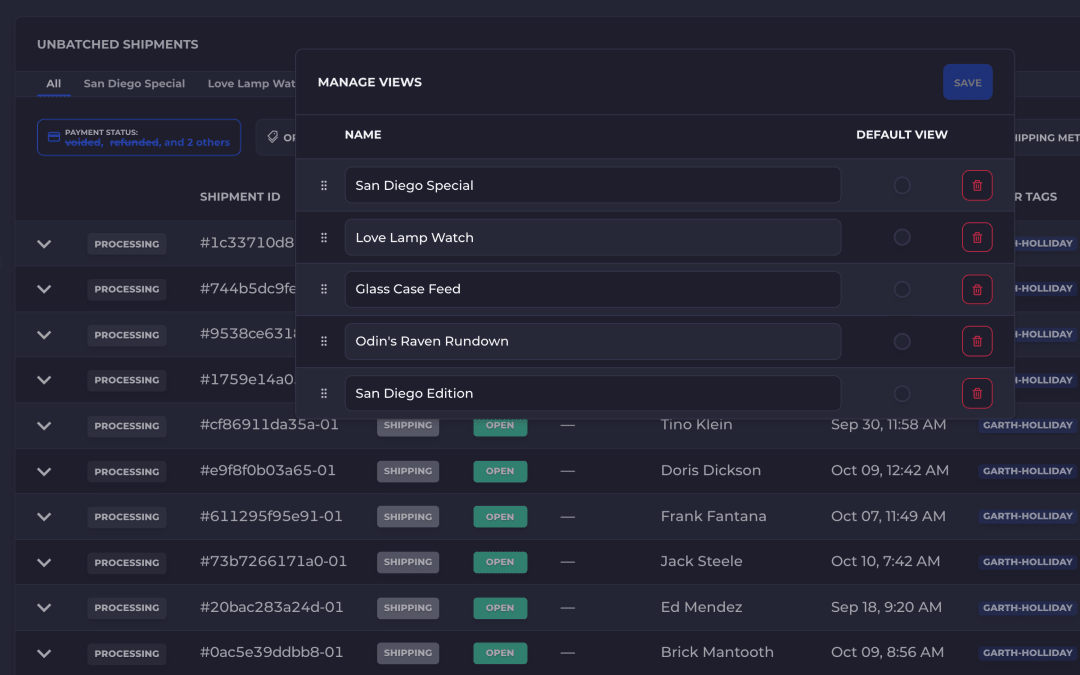
Saved Views stores the active filters behind a short name. The view appears as a tab beside All, where you can open it immediately. Manage Views lets you rename it, drag it into a new order, choose a default, or remove it when the job changes.
- 01
1. Narrow the list
Set the status, warehouse, date, tag, stock, or other filters the screen provides.
- 02
2. Save the setup
Select Save View and give that filter combination a name your team will recognize.
- 03
3. Return to the work
Select the named view whenever you need it, or mark it as the default for that area.
Across SKUSavvy
Keep a shortcut to the lists that run your operation.
Saved Views follows the same pattern across the platform, while each area keeps the filters that belong to its work.
Products and inventory
Return to the products, variants, stock states, warehouses, or bins you review most.
Inbound orders
Keep views for the purchase orders and inbound work that need attention.
Outbound orders
Save the order statuses, dates, tags, destinations, and other filters used by fulfillment.
Outbound shipments
Reopen the shipment queues your team uses for packing and dispatch.
Picking batches
Move between the batched and unbatched picking work that matters for the current shift.
Order creation
Reuse product filters while adding items to sales, transfer, and purchase orders.
Questions
Saved Views, answered.
What is a Saved View?
A Saved View is a named set of filters for a list in SKUSavvy. Selecting it restores that filter combination so you can get back to the same working list quickly.
Where can I use Saved Views?
You can save views for products, inventory, inbound orders, outbound orders, outbound shipments, picking batches, and the product picker used while creating orders.
Can I make a Saved View open by default?
Yes. Open Manage Views, choose the view under Default View, and that filter set becomes the starting view for that part of SKUSavvy. You can remove the default later without deleting the view.
Can I rename or delete a Saved View?
Yes. Manage Views lets you rename a saved view or remove it when you no longer need it.
Can I change the order of my Saved Views?
Yes. Open Manage Views and drag a view by its grip to a new place in the list. The tabs above the table follow the new order.
Does selecting a view change my warehouse data?
No. A Saved View changes which records appear in the list. It does not edit the products, orders, shipments, inventory, or batches themselves.
Open every shift on the work that matters.
Start a 30-day free trial and save your first view in minutes.