Best Ecommerce Order Management Software for Shopify Sellers
The best ecommerce order management software is the one that fixes where your orders actually go wrong. Shopify's admin already tracks orders and, with two or more locations, routes them, shipping tools fix label buying, inventory suites add multichannel stock and B2B, and a warehouse system fixes picking and packing from your own shelves.
Start with where your orders break
Most order management roundups rank tools on one long feature grid. That hides the question that matters: which part of the order is costing you?
Every ecommerce order goes through three jobs. Something decides where it ships from and whether it splits. Someone does the work of picking, packing and labeling it. Then something tells the customer and your store what happened.
If you want the definitions first, we cover what order management software does, from the basics. This page is the buying side: seven real options for ecommerce sellers, what each one is built around, and what each costs on its own pricing page as of October 11, 2026.
One disclosure up front. SKUSavvy is one of the seven, and it's our product. We'll say where it doesn't fit too.
The three jobs inside order management
Decide
Route the order to a location, split it when stock sits in two places, hold it for a backorder. Shopify's admin already does a lot of this once you have two or more locations.
Do
Pick the right item from the right shelf, pack it in the right box, print the label. This is where mis-ships happen, and it's where tools differ most in how much they help.
Tell
Send tracking back to the store, update stock so you don't oversell, keep a record of who touched the order. Most tools on this list handle this part.
The tools below cover different mixes of the three. A shipping tool is strongest at the label. An inventory suite is strongest at deciding across channels and locations. A warehouse system is strongest at the floor work. Buy for the job you're failing at today.
The 7 options at a glance
| Tool | Built around | Order management highlights | Public starting price (October 11, 2026) |
|---|---|---|---|
Shopify admin | Your store | Orders page, edits and refunds, label buying, rule-based order routing across 2 or more locations | Included in Shopify plans. Basic is $29/month billed yearly |
ShipStation | Shipping | Rate shopping and label automation. Combine and auto-split orders from the Standard plan | Starter from $14.99/month at the lowest volume tier |
Veeqo | Shipping, plus multichannel inventory | Free shipping plan. Inventory sync, forecasting and digital picking on the Inventory plan | Shipping plan free. Inventory plan from $19/month |
Zoho Inventory | Inventory and orders for small teams | Orders, inventory and purchasing with plan caps on orders, users and locations. Bins from Premium | Free for 50 orders. Standard $29/month billed yearly for 500 orders a month |
Cin7 Core | Inventory, B2B and light manufacturing | Multichannel inventory, B2B portal, POS, warehouse app by tier | Standard $349/month for 6,000 sale orders a year |
Brightpearl | Retail operations with a guided rollout | Order splitting, routing, backorders, dropship rules, retail accounting | Tailored quote |
SKUSavvy | The warehouse floor for Shopify sellers | Batch picking on a routed path, bin and item scans, packing, labels, real-time Shopify sync | $179/month including your first 249 orders, then per order |
Every price above comes from the vendor's own pricing page, read on October 11, 2026: Shopify, ShipStation, Veeqo, Zoho Inventory, Cin7, Brightpearl. They measure different things: shipments, orders a month, sale orders a year, or a quote. Prices change, so check each vendor's page before you buy, and run your own monthly order count through each one before you compare. Where we couldn't confirm a feature or a price on the vendor's own site, we left it out.
Each option, and where it stops
Shopify admin
If you sell on Shopify, you already own an order management system. From the Orders page you can review, edit, refund and cancel orders, print shipping documents, and buy labels through Shopify's integrated carriers.
With two or more active locations, Shopify's order routing assigns each online order to a location by rules. The default rules try to minimize split shipments, stay in the destination market and ship from the closest location. You can rank locations or add your own rules.
Where it stops: routing chooses a location, not a shelf. Which bin to pick from, and whether the picker grabbed the right item, is still up to your team.
Fits: stores with simple fulfillment, and anyone who should try the option they already pay for before buying another.
ShipStation
ShipStation is shipping software first. Its plans center on rate shopping, label automation and returns, with unlimited store connections even on Starter.
Order management grows with the plan. Combining and auto-splitting orders and basic warehouse management start on Standard. Auto-routing, pick to tote and advanced inventory, including purchase orders and forecasting, sit on Premium.
Starter is listed from $14.99/month at the lowest volume tier, with a 30-day free trial.
Where to look closer: it's built around the label. If your errors happen before the box is taped, check that the warehouse features you need are on the tier you'll pay for.
Fits: multichannel sellers whose main pain is buying labels fast across stores.
Veeqo
Veeqo is owned by Amazon. Its Shipping plan is free, and Veeqo says it earns a commission on labels bought through it.
The Inventory plan, listed from $19/month, adds inventory sync across channels, demand forecasting, the Veeqo scanner and picking path optimization. Paid plans are priced by monthly order volume, and every plan includes unlimited users. High Volume, listed from $350/month, adds an account manager and ERP integration.
Where to look closer: the paid plans follow your order volume across all connected channels, so get the number at your volume, not the starting one.
Fits: sellers with Amazon in the mix who want shipping without a subscription fee.
Zoho Inventory
Zoho Inventory prices plans by orders, users and locations. The free plan covers 50 orders. Standard is $29/month billed yearly for 500 orders a month, 3 users and 2 locations.
Premium is $79/month billed yearly for 3,000 orders a month, 5 users, 4 locations and up to 500 bins per location. It adds barcode generation plus serial number and batch tracking. There's a 14-day free trial.
Where to look closer: every plan caps orders, users and locations, so plan for where you'll be in a year, not today.
Fits: small teams that want orders, inventory and purchasing in one low-cost app.
Cin7 Core
Cin7 Core covers inventory, purchasing, B2B, point of sale and light manufacturing. Standard is $349/month with 5 users, 2 ecommerce and app integrations and 6,000 sale orders a year.
Pro is $599/month for 24,000 sale orders a year. Advanced is $1,199/month for 120,000 a year and adds advanced warehouse management. Cin7 Omni is quoted.
Where to look closer: Cin7 says its standard warehouse management app supports one warehouse location, and its advanced warehouse app for multiple warehouse locations comes with the Advanced plan. Inventory locations themselves are unlimited on every Core plan. Order volume is counted per year, so divide by 12 to compare.
Fits: wholesale-heavy or assembly businesses that need B2B and production in the same system.
Brightpearl
Brightpearl, part of Sage, is a retail operations system. Order management includes order splitting, routing and backorders, with no-code fulfillment rules that cover partial fulfillment and dropshipping. Inventory planning, retail accounting and CRM sit alongside.
Pricing is a tailored quote, users are unlimited, and Brightpearl says customers go live in 90 to 120 days on average with an expert-led implementation.
Where to look closer: that timeline is a project. Budget your team's time, not just the license.
Fits: larger retailers selling across several channels who want one system of record and a guided rollout.
SKUSavvy
SKUSavvy is a warehouse management system for Shopify sellers who fulfill their own stock. Shopify stays the sales engine and the product catalog. SKUSavvy runs the floor: which bin, which picker, which box, which label.
Orders arrive from Shopify within seconds. Picking runs in batches on a routed path through your warehouse map, scans check the bin and the item, and packing suggests a box, pulls carrier rates and prints the label. Tracking and stock levels go back to Shopify.
Pricing is $179/month including your first 249 orders, then a per-order rate that drops as volume grows. Users are unlimited, and the 30-day trial needs no credit card.
Where it stops: SKUSavvy isn't a standalone multichannel OMS. Amazon or eBay orders come in through Shopify, not through direct connections. And if you don't hold stock, because everything is dropshipped or sits at a 3PL, you don't need a warehouse system.
Fits: Shopify brands picking from their own shelves, especially with a team that changes from season to season.
How to choose in five questions
Where do your orders go wrong today? Wrong location, wrong item, a late label or a wrong stock count. Buy for that problem.
Do you sell outside Shopify? If most orders come from Amazon, eBay or wholesale, a multichannel tool earns its place. If they come through Shopify, you may already own the deciding layer.
How many people touch an order? One person needs a fast label tool. A team with turnover needs the system to tell them where to go and check what they grabbed.
What does it cost at your volume? Convert every price to your monthly orders, users and locations. Per-shipment, per-order, per-year and per-seat prices aren't comparable until you do.
How long until it's live? A self-serve app can run this week. A quoted implementation can take months. Either can be right, as long as you budget for it.
Four things to ask for in every demo
Show me a wrong pick
Scan the wrong item on purpose. Does the system stop the picker, or does the mistake reach the customer?
Show me a split order
One item in stock, one on backorder. Watch how the order splits and what the customer sees.
Show me my bill
Ask for the monthly price at your real order count, users and locations, not the starting tier.
Show me what the AI can change
If there's an assistant, ask what it can edit on its own and what needs your approval.
How SKUSavvy handles an order, start to finish
Here's the path one Shopify order takes through SKUSavvy. Each step is a setting you control, not a black box.
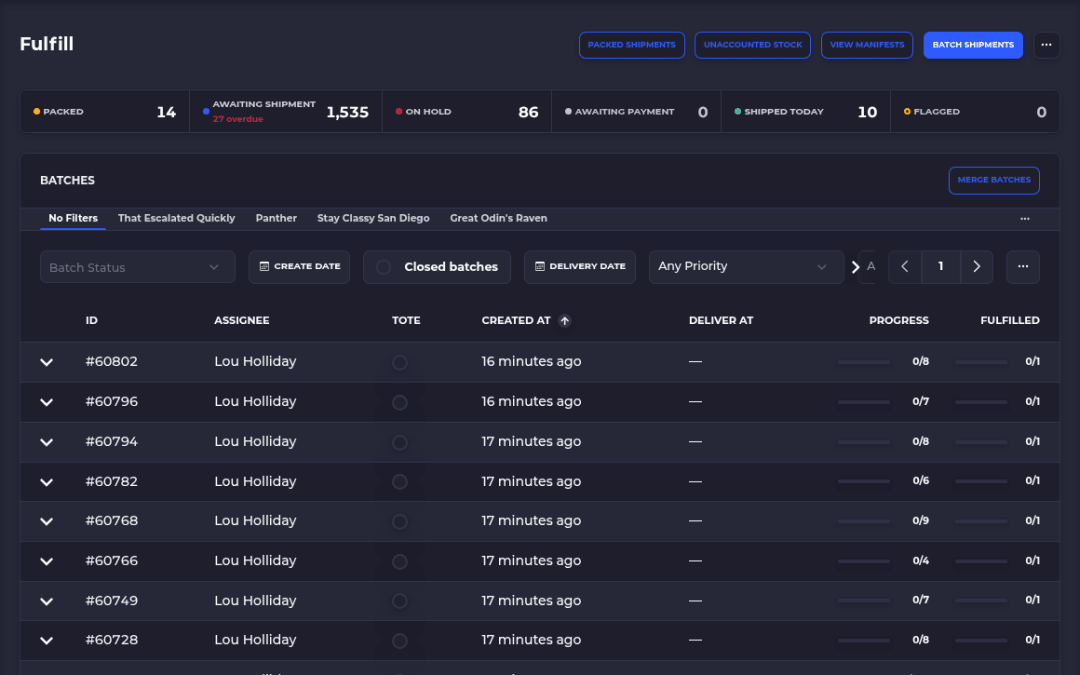
Shopify sends it. New orders arrive within seconds over Shopify webhooks. Import rules can filter orders by tag or fulfillment location, or leave out draft and subscription orders.
Batch it. Group orders into a pick batch yourself, or let SKUSavvy batch them, with one tote per order.
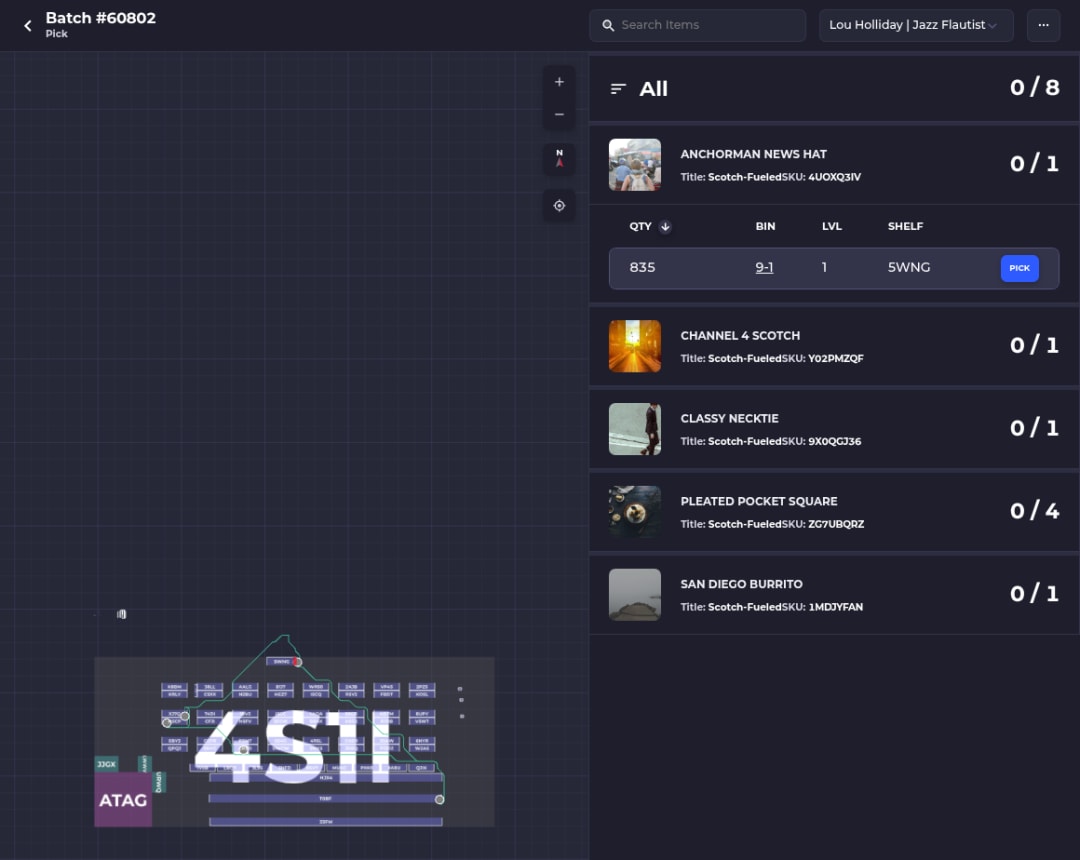
Pick on a routed path. The pick screen shows each item's shelf, level and bin on your warehouse map, in route order.
Scan to check. Turn on bin, product and pack scans. A wrong scan shows a red alert, and the picker has to fix it before moving on.
Pack and label. SKUSavvy suggests the smallest configured box that fits, pulls live carrier rates and prints the label. Split an order into more boxes or shipments when you need to.
Send it back. Tracking numbers and stock levels sync to Shopify, so the customer gets tracking and your storefront shows what's actually available.
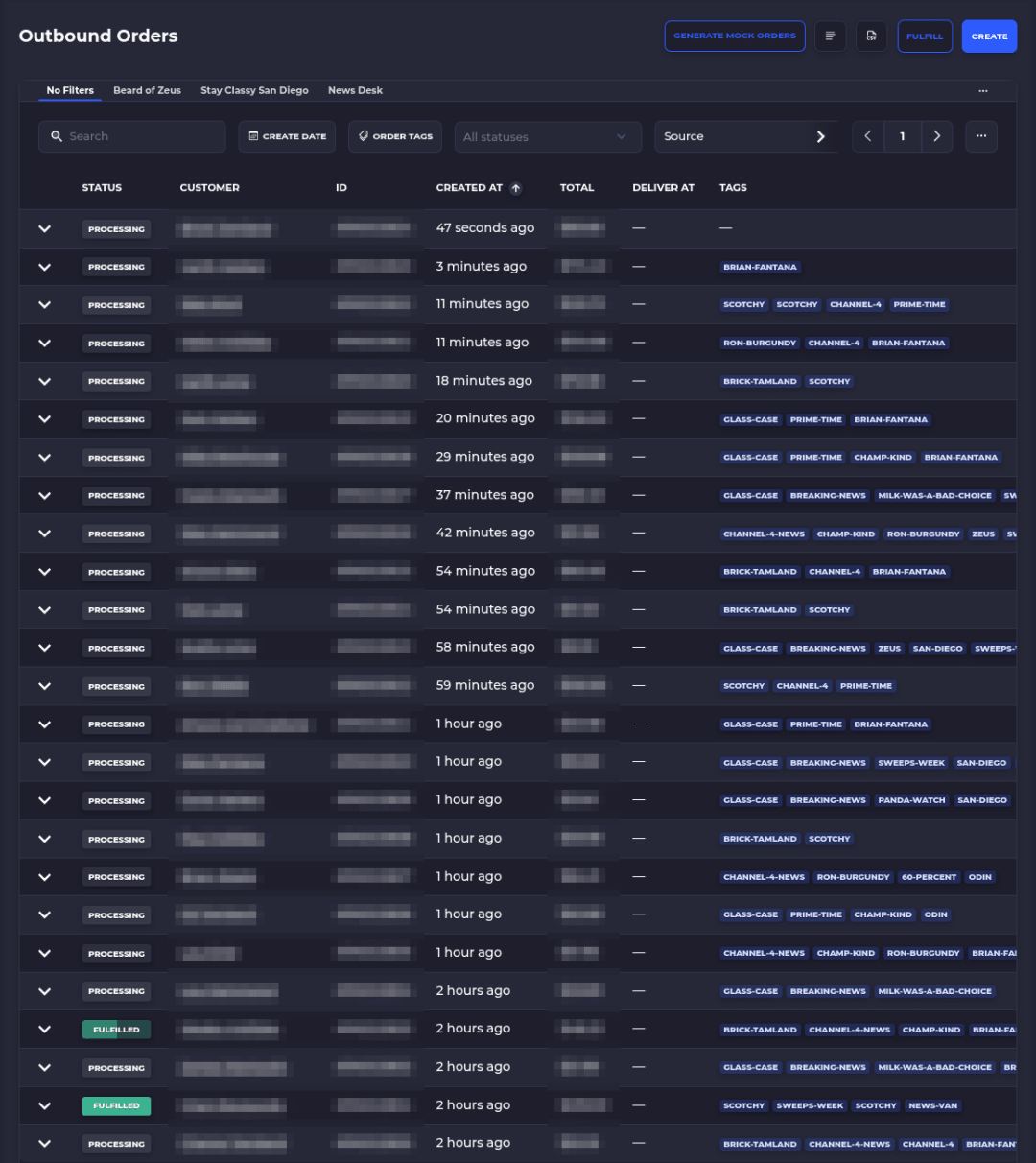
Running more than one Shopify store? Connect each one to the same SKUSavvy account and route each store's orders to the right warehouse. Shopify POS sales deduct stock too, once the store's location is linked to a SKUSavvy warehouse.
Features and benefits
| Feature | What it gets you |
|---|---|
Real-time Shopify order sync | New orders show up in seconds, and tracking goes back without retyping |
Batch picking, one tote per order | One walk through the warehouse covers many orders |
Routed pick path on your warehouse map | New pickers follow the route instead of asking where things live |
Bin, product and pack scans | A wrong item or wrong bin gets a red alert before it ships |
Box suggestion, live rates and labels | The smallest box that fits, the rate you pick, and a label from the same screen |
Autopilot shipping rules | Package, shipping method and label chosen by your rules for repeat order types |
Split and multi-box shipments | Ship what's in stock now and the rest later, each box with its own tracking |
Several Shopify stores, one account | You choose which warehouse each store's orders go to |
Unlimited users | Seasonal pickers don't add seats to the bill |
Runs in the browser on phones and tablets | Use devices you already have, with nothing to install from an app store |
The AI part, kept honest
Order management doesn't need AI to be good. Routing rules, scan checks and box suggestions are rules you can read, and that's what you want when an order is on the line.
The AI in SKUSavvy is Savvy Bot, the in-app assistant. Ask it about your own orders and inventory, have it run a report like your top sellers this month, or ask how a feature like batch picking works, and it explains it and can take you to the right page. It reads and explains. It won't change anything unless you turn on edits and approve each one, and it runs on AI credits. Picking, packing and taping boxes stay physical work on the floor.
Other tools here are adding assistants too: Shopify lists Sidekick on its plans, and Veeqo lists a Seller Assistant on its Inventory plan. Ask every vendor the same question: what can the assistant change without your approval?
Start a 30-day trialWhat SKUSavvy costs at your order volume
SKUSavvy is $179/month, which covers your first 249 orders. Each order past that is billed at the rate for its band, and the rate falls as volume grows.
| Orders a month | Rate |
|---|---|
0 to 249 | Included in the $179 flat fee |
250 to 499 | $0.20 each |
500 to 4,999 | $0.19 each |
5,000 to 24,999 | $0.13 each |
25,000 to 49,999 | $0.08 each |
50,000 to 99,999 | $0.07 each |
100,000 and up | $0.06 each |
At 1,000 orders a month that's $324.19. At 5,000 it's $1,084.13. Every order that enters SKUSavvy counts: online and POS orders, purchase orders and transfers. It's month to month. Outside the plan you pay for postage, plus the optional hands-on onboarding package and extra AI credits if you choose them. Scanners and label printers are bought separately. Enter your own volume on SKUSavvy pricing for an exact quote.
Ecommerce order management software FAQ
What does OMS stand for in ecommerce?
Order management system. It's the software that takes an order from your store or marketplace, decides where it ships from, tracks it through fulfillment and sends updates back to the customer and the store.
What software is used for order management?
Most ecommerce sellers start with their store platform's own order tools, like the Shopify admin. Shipping tools such as ShipStation or Veeqo add label buying and automation. Inventory suites like Zoho Inventory, Cin7 or Brightpearl add multichannel stock and B2B. A warehouse system like SKUSavvy runs picking and packing on the floor.
Is Shopify an order management system?
For many stores, yes. The Shopify admin handles order review, edits, refunds, label buying and, with two or more locations, rule-based order routing. Routing works at the location level. Bin-level picking and scan checks inside a warehouse are what a warehouse system adds.
What's the difference between an OMS and a WMS?
An OMS decides and tracks: where an order ships from, whether it splits, what the customer sees. A WMS does the physical work inside the building: where stock lives, the pick route, scan checks, packing and labels. Many Shopify sellers use Shopify as the OMS and add a WMS once a team picks orders.
Does SKUSavvy connect to Amazon or eBay?
Not directly. SKUSavvy connects to Shopify. Sellers bring Amazon or eBay orders into Shopify with a multichannel tool, and SKUSavvy fulfills them from there.
How much does order management software cost?
It ranges from free to quoted. As of October 11, 2026, Veeqo's shipping plan and Zoho Inventory's 50-order plan are free, ShipStation starts at $14.99/month, SKUSavvy is $179/month including 249 orders, Cin7 Core starts at $349/month, and Brightpearl quotes each business. Prices change, so check each vendor's page and compare at your own order volume.
Do I need order management software with one warehouse?
With one location, Shopify's order routing has nothing to choose between, so the value moves to the floor: finding the item, checking it and packing it fast. That's the job a warehouse system is built for.
Can SKUSavvy run on my phone?
Yes. SKUSavvy runs in the browser on phones and tablets as a web app, so there's nothing to download from an app store. A dedicated Bluetooth or USB scanner is faster than the phone camera if you scan all day.
Keep reading
Order fulfillment software
How SKUSavvy picks, packs and ships Shopify orders from your own shelves.
See order fulfillmentWarehouse management software
Bins, a 3D warehouse map, receiving and picking next to Shopify.
Explore the WMSRun the floor your orders depend on.
Start a 30-day trial or check pricing for your order volume.