Best Warehouse Packing Software for Shopify Pack Stations
The best warehouse packing software makes the packer scan every item before the box closes, suggests the box from product dimensions, and prints the right label without retyping weights. For a Shopify warehouse, that usually means packing inside your WMS, not in a separate shipping tab.
What Makes Packing Software Good at the Pack Station
Packing is the last place a wrong item can be caught before a customer opens the box. Good packing software is built around that one moment: the packer, the order, the items on the bench, and a box that is about to be taped shut.
Most searches for packing software return two kinds of pages: shipping apps that print labels, and big warehouse systems that list packing as one feature among fifty. Neither tells you what to test at a real bench. This page sorts the options by how they handle the pack step itself.
We make SKUSavvy, a warehouse management system for Shopify sellers, so weigh our view with that in mind. If you want the product tour instead of a comparison, SKUSavvy's warehouse packing software features sit on our order picking page, because in SKUSavvy picking and packing run as one flow.
Whatever you buy, it should do four jobs:
Confirm the order. The packer scans or opens the order, so the bench and the screen agree on what's being packed.
Verify every unit. Each item is scanned against the order, and a wrong or extra item is flagged before the box closes.
Choose the packaging. The box, mailer or tube comes from product dimensions and the packaging you stock, not a guess.
Print and hand off. The label, packing slip and tracking go out without anyone retyping weight or address.
4 Types of Warehouse Packing Software Compared
There is no single best tool for every warehouse. There is a best type for how you work today. Here's how the four common types handle the four jobs.
| Type | Item verification | Box choice | Labels | Fits when |
|---|---|---|---|---|
Shopify admin alone | None; the packer reads the order and checks by eye | Packer's judgment | Shopify Shipping labels | A few orders a day and one person who knows every product |
Shipping and label apps | Varies; many focus on rates and labels, some add scan-to-verify | Saved package presets on many apps | Their core job: rates, labels, batch printing | Volume is up but inventory still lives in Shopify or a spreadsheet |
Pack station and cartonization tools | Often strong at the bench | Their core job; some pair with box-making machines | Usually through a connected shipping or warehouse system | High volume with many box sizes, where packaging cost is the main lever |
Warehouse management system with packing built in | Scan checks tied to the bin, the pick and the order | Suggested from item dimensions and the packaging you set up | Bought inside the same flow | You also need bins, picking, receiving and counts in one place |
Examples in each group change fast, so check current features with each vendor. Treat the table as the list of questions to ask, not a ranking.
When a Shipping App Is Enough
If one or two people pack, stock sits in a single room, and mis-ships are rare, a shipping app plus careful packers can carry you a long way. The cracks show when you add a second packer, a second location, or products that look alike.
When You Need Packing Inside a WMS
Packing errors usually start upstream. The wrong bin, the wrong variant pulled, a short pick nobody flagged. When packing lives inside the WMS, the scan at the bench checks against the same record the picker used, and the inventory change lands in one system that's kept in sync with your Shopify store.
How Packing Works in SKUSavvy
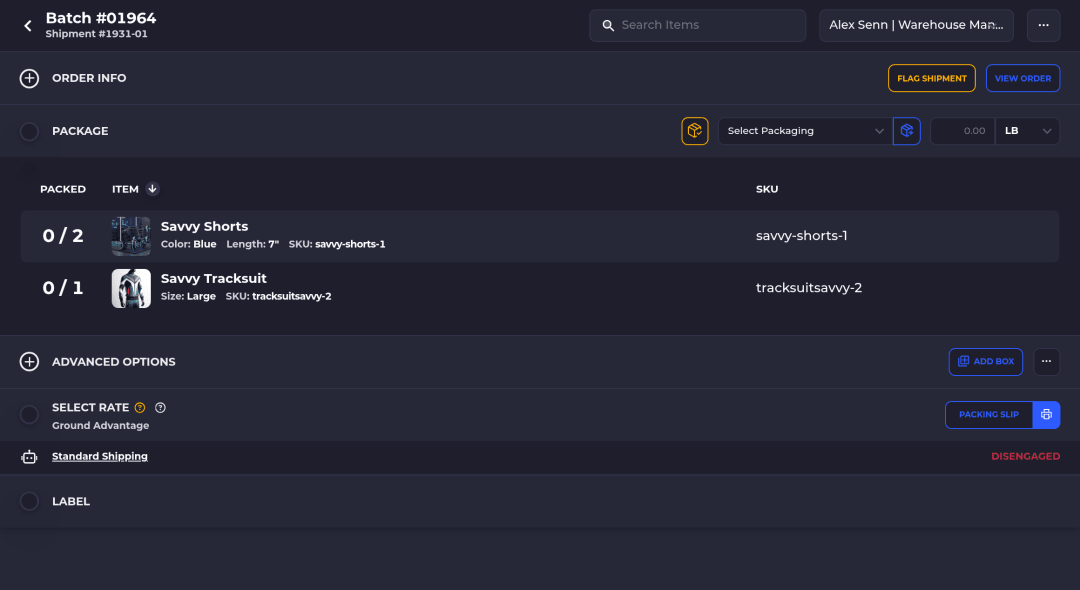
Here's the pack step in SKUSavvy on a single order, from the bench.
The packer opens the order or pulls it from the tote it was picked into.
SKUSavvy shows the suggested packaging before the first scan. On a single-box shipment it's applied with the first pack.
With pack scans turned on, each item is scanned. A wrong item raises a red alert, and the packer fixes it before moving on.
Split the order into more boxes or shipments if it doesn't fit in one.
Buy the label through your connected carrier or Shopify Shipping, and print the label and packing slip.
Tracking goes back to Shopify and the order is marked fulfilled.
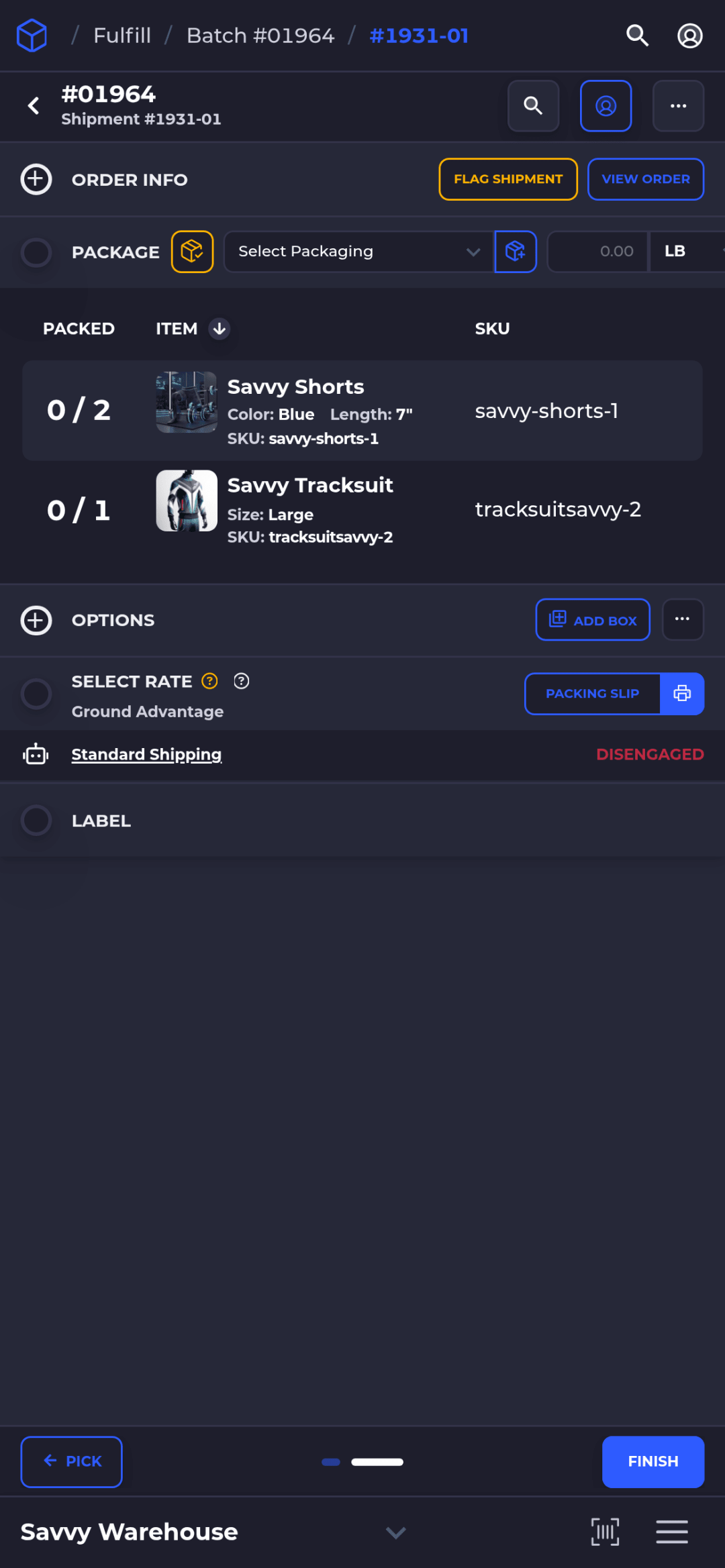
The box suggestion starts with the packaging you used last time for the same contents, if it's in stock in that warehouse. Otherwise SKUSavvy picks the best fit from the packaging on hand. Packaging can be a box, a mailer or a tube, and the 3D packaging preview accounts for each shape. The details are in packing that picks the box.
If you'd rather not compare rates by hand, AutoPilot picks the carrier and service from the rules you set once the shipment is packed, buys the label if the rate stays inside your cost limits, and can print it without a click. Anything outside those limits waits for a packer to approve.
Features and Benefits
| Feature | What it does at the bench |
|---|---|
Configurable scans: bin, product and pack | Require the checks your floor needs; a wrong scan raises an alert to correct |
Suggested packaging | The box, mailer or tube is proposed from contents and stock, so packers stop guessing |
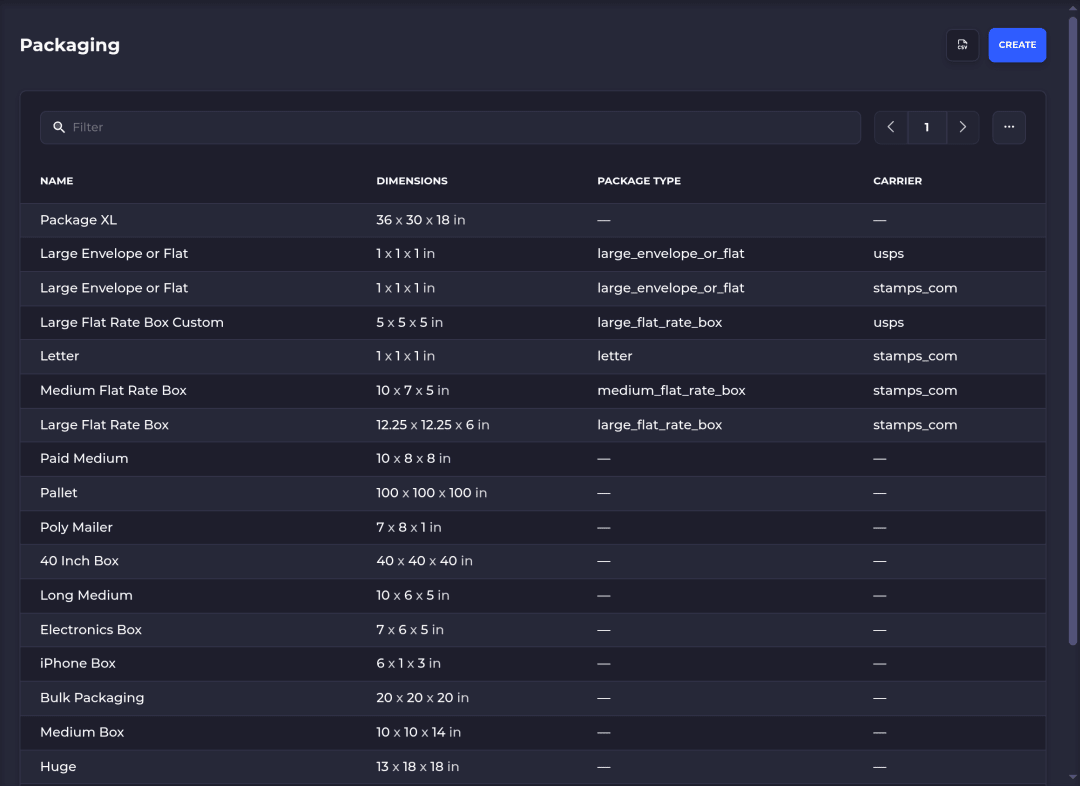
Boxes, mailers and tubes | Set up the packaging you actually stock, with dimensions, in one place |
Multi-box and multi-shipment orders | Split an order across boxes or shipments without leaving the pack screen |
Labels and packing slips in the same flow | Buy carrier labels and print slips at 4x6 or letter without retyping |
AutoPilot shipping | Picks the carrier and service from your rules after packing, buys labels inside your cost limits and can print them without a click |
Packed Lots export | See which lot went to which customer, by warehouse and date range, for a recall |
Phones, tablets, scanners and kiosk printing | Runs in the browser as a web app; any Bluetooth or USB scanner, or the camera |
Unlimited users | Every packer gets their own login, with no per-seat fee |
Using Savvy Bot With Packing
Savvy Bot is the AI assistant inside SKUSavvy. At the pack station it's most useful as a guide and a report runner: ask how to set up a mailer in Packaging, or ask it to pull a report on recent shipments from your own data. It reads and explains. It doesn't change anything unless you turn on edits and approve each one, and it uses AI credits.
The scan, the box and the tape stay human work. The software's job is to make the wrong item hard to ship.
What to Test in a Packing Software Trial
Bring your own products and run these checks on a real bench, not in a sales demo.
| Test | What good looks like |
|---|---|
Scan the wrong item on purpose | The screen stops you, says what's wrong, and won't close the order until it's fixed |
Pack an order with two lookalike variants | The barcode, not the packer's eye, tells them apart |
Pack an order that needs two boxes | Splitting is a couple of taps and each box gets its own label |
Add a new mailer size | It's suggested on the next order that fits, without anyone remembering it exists |
Print at a busy station | The label prints straight to the right printer without a dialog every time |
Hire a second packer | Adding a login doesn't change your bill or need an IT ticket |
Most packing problems trace back to picking, so test the two together. Our pick, pack and ship overview covers the steps before the bench.
What Packing Software Costs
Shipping apps often price by shipment or label volume. Pack station and cartonization tools are commonly quote-based, especially when hardware is involved. A WMS usually prices by order volume, seats or both.
SKUSavvy is $179 a month including your first 249 orders, then a per-order rate that falls from $0.20 to $0.06 as volume grows, with unlimited users, as of October 23, 2026. Packing and built-in shipping labels are part of the plan; carrier postage is billed separately. Enter your volume on SKUSavvy pricing for an exact number. The trial runs 30 days.
Warehouse Packing Software FAQ
What Is Warehouse Packing Software?
Software that runs the pack step: confirms the order, checks each item by scan, suggests the packaging, and prints the label and packing slip. It can be a shipping app, a pack station tool, or part of a warehouse management system.
What Software Does an Amazon Warehouse Use?
Amazon runs its own internal systems, and they aren't sold to other businesses. For a Shopify warehouse, the closest match is a WMS that ties picking, packing and shipping to the same inventory record.
What Software Is Commonly Used in Logistics?
A WMS for bins, picking, packing and counts; shipping software for rates and labels; the store or ERP that takes orders; and accounting software. Some tools cover more than one of these.
Is Packing Software Different From Shipping Software?
Yes, though they overlap. Shipping software is built around rates and labels. Packing software is built around what goes in the box. A WMS with packing built in covers both in one flow.
Can Packing Software Choose the Box?
Yes, if it knows your item dimensions and the packaging you stock. In SKUSavvy, the suggested packaging is applied on single-box shipments with the first pack, and packers can change it.
Do I Need a Barcode Scanner to Pack Orders?
Not to start. SKUSavvy can scan with a phone or tablet camera. A Bluetooth or USB scanner is faster at a busy bench.
Can I Pack in SKUSavvy and Still Buy Labels in Shopify?
Yes. You can pack in SKUSavvy and buy the label in Shopify, though buying the label inside SKUSavvy is faster. Tracking syncs either way.
Keep Reading
Order Picking Software
Batch picking, pick to tote and the scan checks that feed the pack step.
EXPLORE ORDER PICKINGPacking That Picks the Box
How SKUSavvy suggests the box, and the mailers and tubes it now supports.
READ THE UPDATEPick Pack and Ship Software
The whole flow from pick to label on a phone or tablet.
SEE PICK PACK SHIPPack Your Next Order With a Scan Check
Set up your packaging, scan an order through and see the box suggested for you.