Inventory Optimization Software for Growing Ecommerce Brands
Inventory optimization software helps you hold the right amount of each item: enough to ship every order, not so much that cash sits on shelves. Here's how the main types differ, and where a warehouse system with reorder suggestions fits.
What inventory optimization software does
Inventory optimization software decides how much of each item to keep and when to reorder it. It looks at sales history, supplier lead times and what's already on order, then suggests minimums, maximums and order quantities so you avoid both stockouts and overstock.
The term covers very different products, from enterprise planning suites to a reorder screen inside your warehouse system. Picking the wrong type is a common and costly mistake.
If you want the operating habits first (counting, par levels, dead stock), read our guide to inventory management optimization. This page compares the software.
Three types of inventory optimization software
Planning suites
Forecasting and multi-echelon optimization across many warehouses, suppliers and channels. Built for large supply chains with planners on staff.
Replenishment tools
Purchase suggestions for ecommerce brands, connected to your store and suppliers. Focused on buying, not on what happens in the warehouse.
WMS with reorder suggestions
A warehouse system that already knows on-hand by bin, committed orders and incoming POs, and suggests what to reorder from that.
Examples of each: GAINS and ToolsGroup describe multi-echelon inventory optimization for large networks; Optiply publishes a roundup of inventory optimization software for ecommerce; SKUSavvy is a warehouse system with Reorder Radar built in.
How to compare inventory optimization software
| Question to ask | Why it matters |
|---|---|
Where does the on-hand number come from? | Suggestions are only as good as the stock count behind them. A tool reading a stale or store-level total will reorder wrong. |
Does it count committed and incoming stock? | Units already promised to orders aren't available, and units on a PO are coming. Both change what to buy. |
How does it handle lead time? | A reorder point that ignores the vendor's lead time leaves you short while the PO is in transit. |
Can you see why it suggested a number? | You'll trust and correct suggestions you can explain. Black-box numbers get ignored. |
Who places the order? | Look for suggestions you review and submit, not orders that go out on their own. |
What does it cost as you grow? | Some tools price by SKU, seat or location. Check the bill at next year's volume, not this year's. |
For Shopify brands shipping their own orders, the first question often decides the rest. If your stock count is wrong, no forecast fixes it.
Which type fits your business
| Your situation | Usually the best fit |
|---|---|
Many warehouses, wholesale and retail channels, a planning team | A planning suite |
Stock held by a 3PL, buying is the main job | A replenishment tool connected to your store |
You run your own warehouse or back room on Shopify | A WMS with reorder suggestions, so counts, orders and POs live in one place |
These aren't exclusive. Larger brands often run a warehouse system for the floor and a planning tool for long-range buying.
Features and benefits of SKUSavvy for inventory optimization
SKUSavvy is a warehouse system for Shopify sellers. Reorder suggestions come from the same records your team scans into every day.
| Feature | What it gets you |
|---|---|
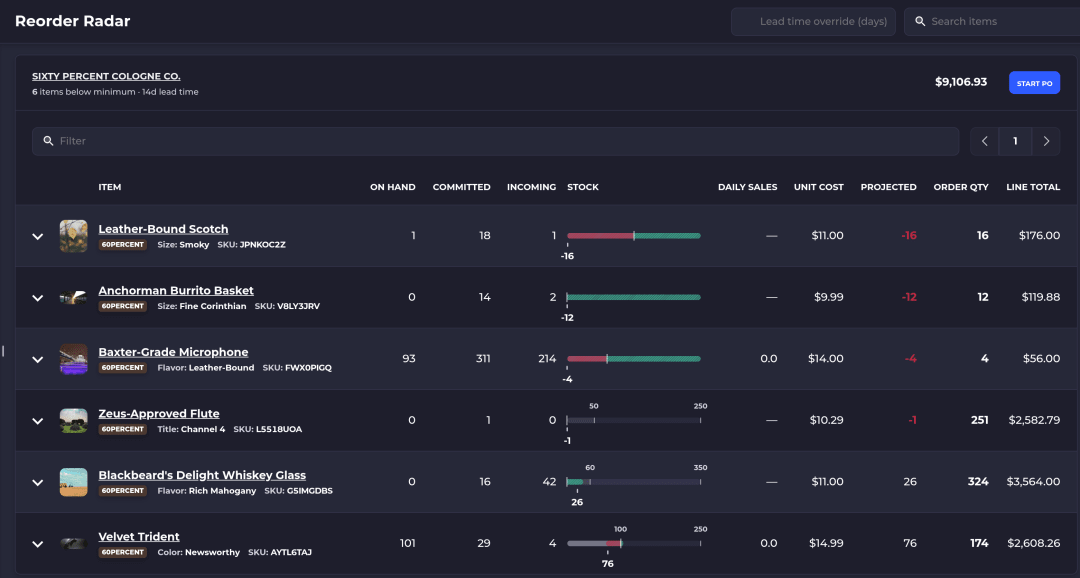
Reorder Radar | Flags items projected to fall below their minimum before a PO placed now could arrive: on hand minus committed, plus incoming, minus expected sales over the vendor's lead time |
Grouped by vendor, most urgent first | Each item shows on hand, committed, incoming, a stock bar against min and max, daily sales and a suggested order quantity |
Start PO from the radar | Opens a new purchase order for that vendor with every suggested quantity filled in; nothing is ordered until you review and submit it |
Lead time override | See the radar as if every vendor shipped in a different number of days, without changing any saved lead time |
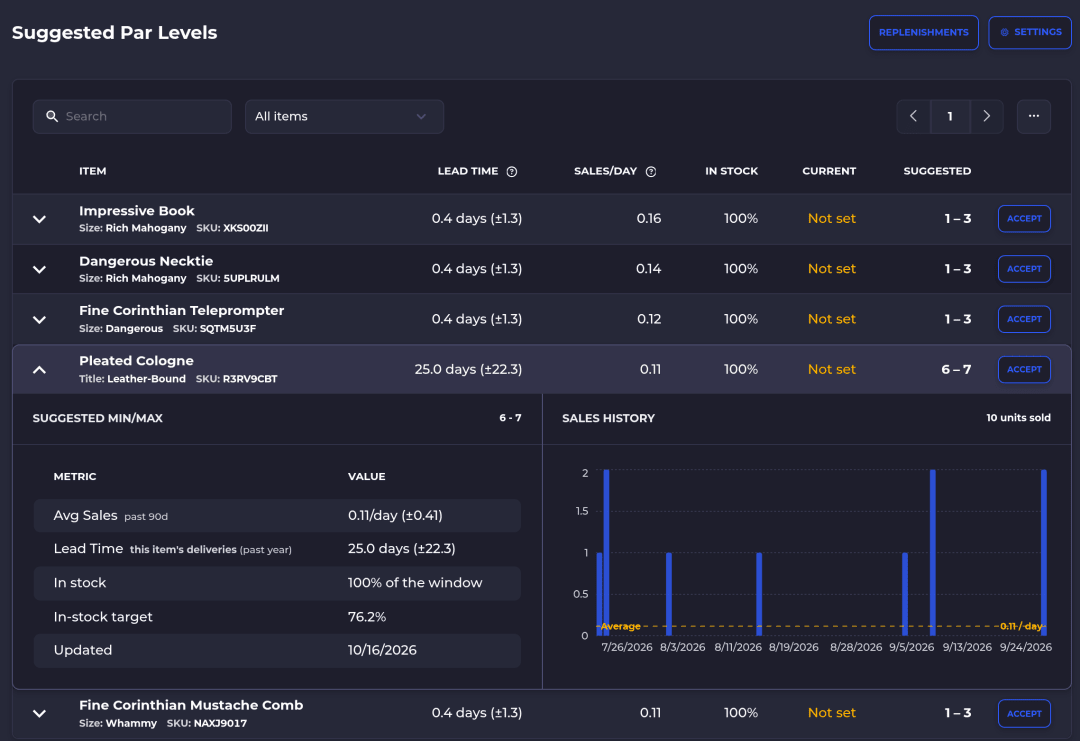
Suggested Par Levels | A min and max for every item selling at a warehouse, based on recent sales rate, in-stock history and lead time |
See the reasoning | Expand a row for average sales per day, lead time and its source, in-stock percentage and a sales chart; thin history gets a Low Confidence badge |
Accept in one click | Accepted suggestions save to the same replenishment settings you'd edit by hand |
Counts by bin behind every number | Scan-checked receiving, picking and cycle counts keep on-hand accurate, so suggestions start from the right stock |
How the radar calculates urgency, step by step, is in the Reorder Radar and Suggested Par Levels guide. Turning suggestions into orders is covered on purchase order management.
Can AI optimize inventory?
Forecasting has used statistics for decades, and newer tools add machine learning on top. The math matters less than the inputs: accurate on hand, real lead times and clean sales history.
In SKUSavvy, Savvy Bot is the in-app assistant. Ask it which items are running low, have it run a report like your top sellers this month, or ask how Reorder Radar works, and it explains and can take you to the right page. It reads and explains. It won't change anything unless you turn on edits and approve each one, and it runs on AI credits. Placing orders stays with you.
What SKUSavvy costs
As of October 17, 2026, SKUSavvy is $179/month, which covers your first 249 orders. Orders past that are billed per order, and the rate falls as volume grows. Purchase orders and transfers count as orders too. Users are unlimited, plans are month to month, and the 30-day trial needs no credit card.
When SKUSavvy isn't the right fit
If you need multi-echelon planning across a large supplier and distribution network, a planning suite is the better tool. If you don't sell on Shopify, SKUSavvy isn't built for you.
Inventory optimization software FAQ
What is inventory optimization software?
Software that recommends how much of each item to stock and when to reorder, using sales history, lead times, committed orders and incoming stock.
What's the difference between inventory management and inventory optimization?
Inventory management tracks what you have and where. Inventory optimization decides how much you should have. Optimization depends on accurate management data.
Do small businesses need inventory optimization software?
Not a planning suite. Many small and mid-size Shopify brands get further with accurate counts and simple reorder suggestions based on sales and lead time.
Does SKUSavvy place purchase orders automatically?
No. Reorder Radar suggests quantities and can start a pre-filled PO, but nothing is ordered until you review and submit it.
What data does inventory optimization need?
Accurate on hand, committed and incoming quantities, a few months of sales history, supplier lead times and a min and max for each item.
Keep reading
Inventory management optimization
Habits that keep stock lean: counting, par levels, dead stock and reorder points.
Read the guideReorder Radar guide
How Reorder Radar and Suggested Par Levels calculate what to order.
Read the guideOrder what you'll sell, before you run out.
Start a 30-day trial or check pricing for your order volume.