SHOPIFY WAREHOUSE MANAGEMENT
Stop searching for stock. Start guiding every pick.
See how SKUSavvy connects Shopify inventory to bin locations, scan checks and shipping. Book a live walkthrough of the workflow your warehouse needs.
A live walkthrough with the SKUSavvy team. Bring your warehouse questions.

Over 1,500 brands have signed up since 2021





See your Shopify workflow in SKUSavvy
Choose a time below. We will walk through inventory, picking and shipping, then discuss setup and pricing for your operation.

Find stock without asking around
Give each SKU a place in your warehouse. See bin locations and available quantities before the next order reaches the floor.
Inventory visibility
Keep Shopify products, orders and inventory connected.
Bin-level organization
Organize stock around the locations your team uses.

Guide the pick. Verify the item.
Turn incoming Shopify orders into a clear picking workflow, with barcode checks at the point of work.
Guided picking
Give your team a workflow for finding and picking orders.
Barcode verification
Check products as the order moves toward packing.

Keep fulfillment moving
Connect warehouse work to packing and shipping so your team can follow the order through fulfillment.
Packing and shipping
Continue from picked items to the shipping workflow.
A shared workspace
Bring the team into one system with unlimited users.
FORECASTING & AI
Plan your next purchase. Get answers from your warehouse data.
Use sales and supplier lead times to plan replenishment, then ask questions about your inventory and orders without building a report from scratch.
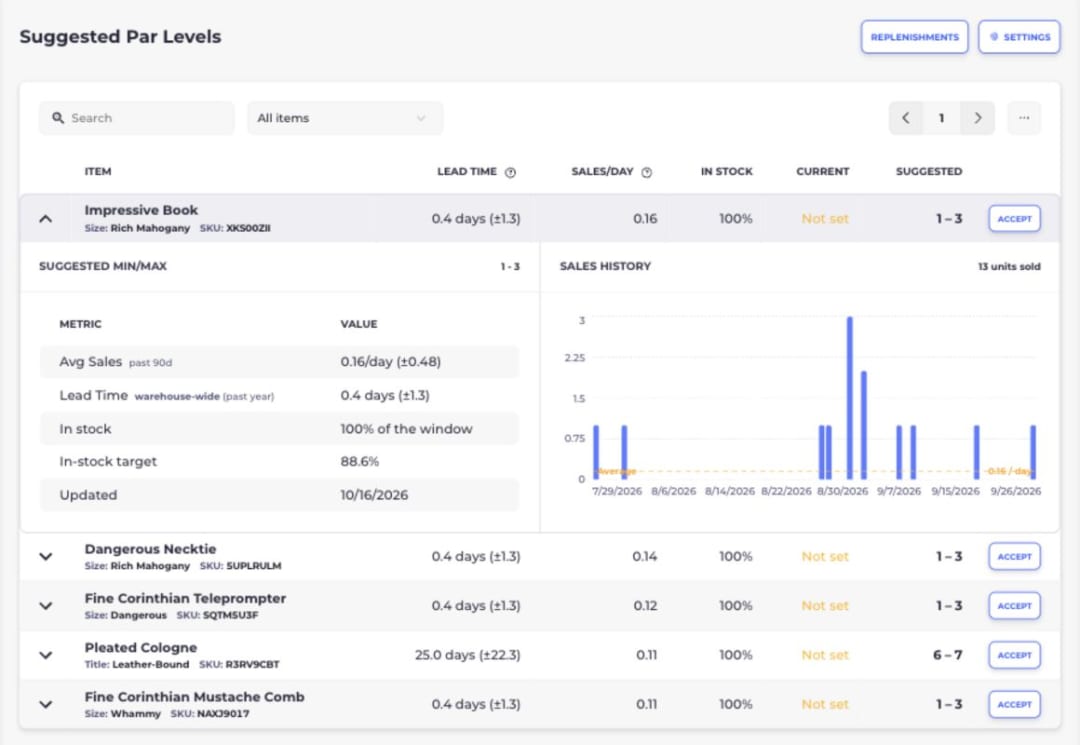
Reorder with a plan
Size purchase orders using sales and lead times, so purchasing starts with demand instead of a guess.
Ask in plain English
Use AI Workbench to turn questions about live inventory and orders into reports, charts and dashboards.
Get help while you work
Ask Savvy Bot about your warehouse data or how to use SKUSavvy, with the assistant alongside your current screen.
Ready to see it in your warehouse?
Bring your Shopify workflow and your questions to a live demo.