Batch picking software for Shopify warehouses
Batch picking groups several orders into one walk, so a picker visits each bin once instead of once per order. SKUSavvy builds the batches from your rules, routes the walk on your warehouse layout, checks every pick with a scan, and keeps each order in its own tote.
What is batch picking?
Batch picking is a warehouse picking method where one picker collects the items for several orders in a single trip, then sorts them back into orders. Instead of walking to the same bin five times for five orders, you walk there once and pick five.
Batch picking software decides which orders belong together, plans the route, and keeps the orders from mixing on the cart. Done on paper, the sorting is where mistakes creep in. These are the three ways SKUSavvy lets you pick.
Single-order picking
One order, one walk. Simple and fine when volume is low or an order is urgent. Every order in SKUSavvy can be fulfilled this way.
Batch picking
Several orders grouped by what they have in common, picked in one walk with the total quantity shown at each bin.
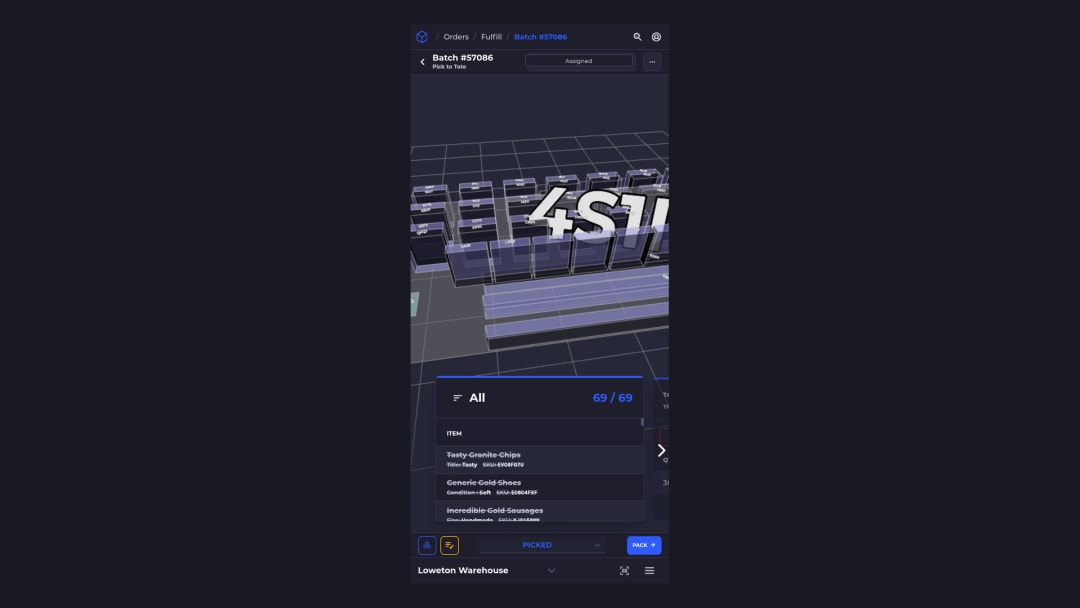
Pick to tote
A batch picked onto a cart of totes, one tote per order. Units are sorted while you pick, so packing never untangles a pile.
When batch picking pays off
Batching is not always faster. It wins in four situations, and most growing Shopify warehouses hit at least two.
Lots of small orders
One to three items per order, many orders a day. Walking is most of the work, so cutting trips cuts the most time.
The same SKUs repeat
A bestseller or a launch shows up in dozens of orders. One stop at its bin covers all of them.
More than one picker
Batches can be assigned to people, so each picker owns a set of orders instead of grabbing the next printout.
A carrier cutoff to hit
Batch by shipping method or delivery date and the orders that must leave first get picked first.
How SKUSavvy builds and runs a batch
From unbatched orders to packed boxes, here is the path. These are real screens with customer data anonymized.
Map the floor once, and every batch uses it
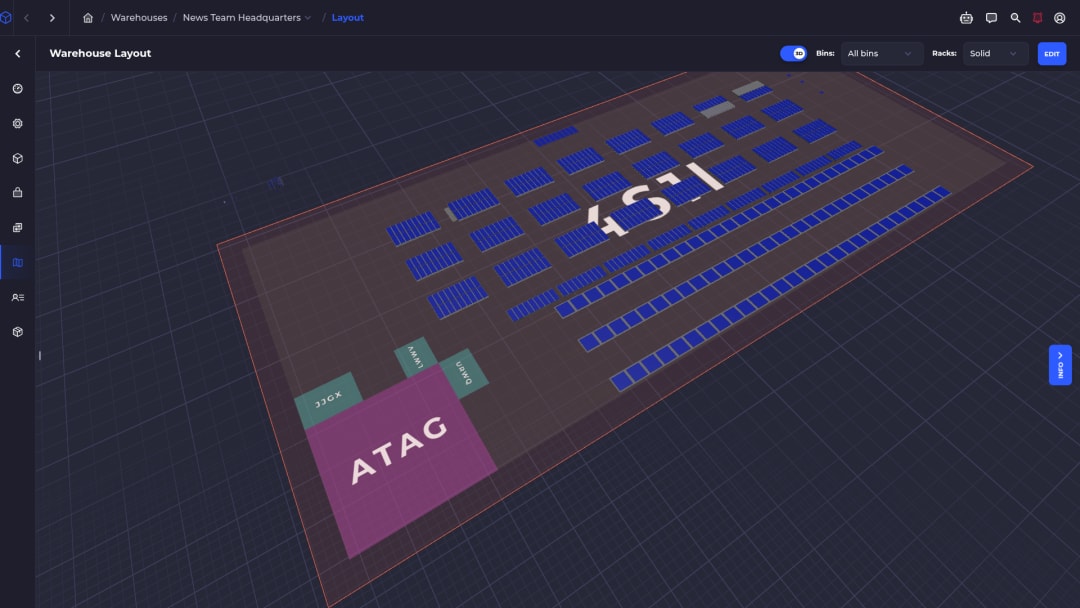
Draw your warehouse, shelves, and bins in 2D or 3D. Areas organize the floor, and only bins hold inventory, so every unit has an address a pick path can reach.
SKUSavvy plans each batch's walk against that layout, so the route follows your real aisles instead of a sorted list of bin names.
Slot the fast movers where batches go
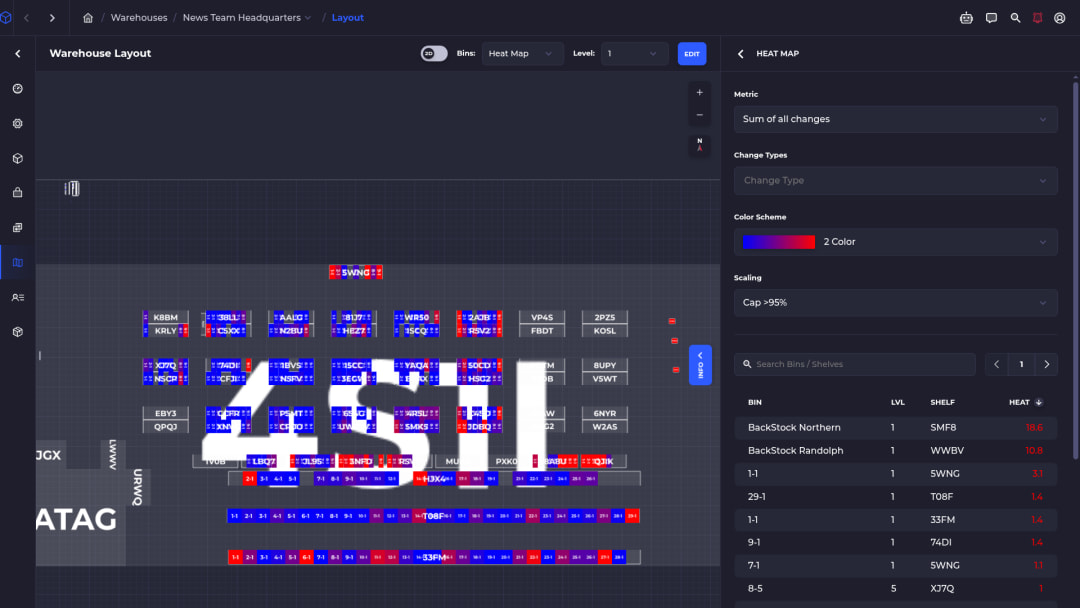
The heat map colors bins by activity and ranks the busiest ones. Put the SKUs that show up in most batches near the pack station and the average walk gets shorter for every batch after that.
Batch the shipments
In Warehouse, Orders, Fulfill, select Batch Shipments and apply your criteria, or tap a saved filter to batch in one step.
Assign the pickers
Auto Assign Employees hands each new batch to the staff you choose, or assign batches by hand.
Walk the routed path
The phone shows the next bin and the total quantity to pick there, on a path planned on your layout.
Scan to confirm
Bin and product scans confirm each pick. A wrong scan shows a red alert that has to be fixed before you move on.
Sort into totes
On a pick-to-tote cart, scan the product and then the tote, or tap the tote, and SKUSavvy tracks what went where.
Pack and sync Shopify
Scan a tote to open its order, pack, and print the label. Fulfillment and tracking sync back to Shopify.
Batch picking software features
Use this list to compare batch picking software for a Shopify warehouse, including ours. Each card says what the feature does and what it changes for you.
Batch criteria
Batch by order tags, product tags, shipping method, SKU, order date, or delivery date.
Each batch matches how your floor actually works.
Item similarity or delivery zones
Group orders with the same products when you ship by carrier, or by delivery zone when you run your own routes.
Fewer bins per batch, or fewer stops per route.
Item and shipment limits
Cap how many items and how many shipments go into each batch.
Batches fit the cart and the shift.
Saved batch filters
Save your criteria once and create batches in one tap.
The morning batch run takes seconds.
Auto-assign pickers
New batches go straight to the staff members you pick.
Nobody waits for a printout.
Pick to tote
Tell SKUSavvy how many totes your cart holds and it fills that many orders, one per tote.
Orders never mix on the cart.
Routed pick paths
Each walk is planned as a traveling-salesman route on your actual layout and shown on the map.
Pickers take the short way without memorizing the building.
Scan verification
Choose bin, product, and pack scans. A wrong scan shows a red alert until it is corrected.
Wrong items get caught at the shelf.
Out-of-stock and partials
Leave out-of-stock items out of the batch or show them marked. A partial ship becomes its own Shopify fulfillment.
One missing SKU doesn't stall the batch.
What changes on the floor
The short version, before any AI.
Less walking
One trip to a bin covers every order in the batch that needs it.
Fewer mis-picks
Bin and product scans stop the wrong item before it is packed. Bunker 27 credits scan-to-pick with cutting their mis-ships.
Faster training
New pickers follow the path and the next bin on a phone instead of learning the shelves by memory.
Peak help without seat fees
Seats are unlimited, so a seasonal picker costs you a login, not a license.
AI pick routing and SavvyBot, with your team in charge
SKUSavvy uses AI where it saves pickers and leads time: planning the walk, keeping pick bins stocked, and answering questions about batches. It does not run the floor on its own.
Ask SavvyBot about your batches
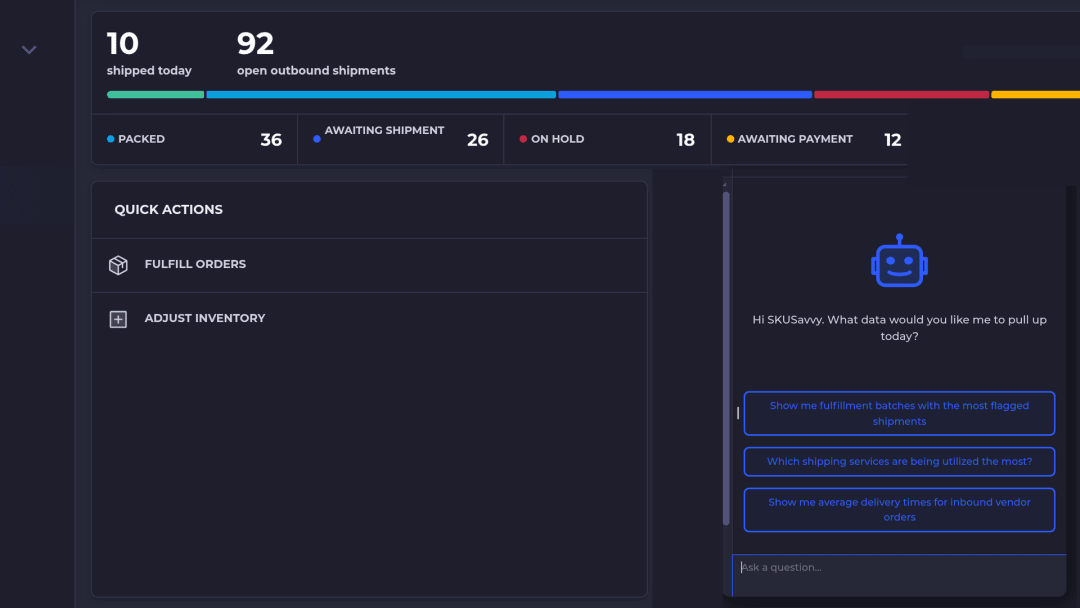
Open SavvyBot from the sidebar and ask which batches have the most flagged shipments, or which shipping services you use most. It looks up live account data, builds a chart or CSV export, and takes you to the right screen.
It can take actions in your account only after you explicitly approve them. SavvyBot runs on AI credits.
Layout-aware pick routing
Every batch's path is planned against your real layout and drawn on the map.
Pickers walk the short way on day one.
Reorder suggestions a person confirms
Reorder Radar flags SKUs that will run short before a new order could arrive and prefills a PO. You confirm it.
Batches don't stall on empty bins.
See purchase order managementA GraphQL API for agents
Orders, inventory, locations, pick batches, and forecasts sit behind one GraphQL API, with API calls included in every plan.
Why it suits an inventory agentPaper pick lists, a per-seat WMS, or SKUSavvy
Three ways to batch pick, for three different floors.
| Job | Paper pick lists | Per-seat desktop WMS | SKUSavvy |
Build a multi-order batch | Print one list per order and walk the floor for each | Batch tools behind a paid seat | Batch by criteria or a saved filter in one tap |
Keep orders apart on the cart | Sticky notes on totes | Tote IDs, sometimes as a separate module | One tote per order on a pick-to-tote cart |
Walk an efficient path | List order, with backtracking | A path printed at the desk | A routed path on the phone, drawn on your layout |
Handle out-of-stock items | Cross out lines and rebuild by hand | An exception queue on another screen | Leave them out of the batch or show them marked |
Add pickers at peak | Free, with no checks | Another paid seat each | Unlimited seats |
Batch picking vs wave picking
Wave picking releases groups of orders on a schedule, often timed to carrier pickups. Batch picking groups orders by what they share so one walk covers them. In practice many teams do both: they batch within a wave.
In SKUSavvy, batch criteria include shipping method, order date, and delivery date, so you can build a batch of everything leaving with one carrier today.
See every picking method on the order picking software pageWhat batch picking software costs
Batch picking is not an add-on module. SKUSavvy costs $179 a month, which includes your first 249 orders, then a per-order rate that drops as volume grows. Seats are unlimited, so every picker gets a login, and every account starts with a 30-day free trial with no credit card.
Estimate your bill on the SKUSavvy pricing pageCompare WMS pricing modelsBatch picking FAQ
Straight answers for Shopify brands that pick their own orders.
What is batch picking in a warehouse?
A picking method where one picker collects items for several orders in a single trip, then the items are sorted back into orders. It cuts walking because each bin is visited once per batch instead of once per order.
What is batch picking software?
Software that groups orders into batches, plans the pick path, confirms picks with scans, and keeps orders separate on the cart. SKUSavvy does this on phones and tablets for Shopify warehouses.
How does SKUSavvy decide which orders go in a batch?
You set the criteria: order tags, product tags, shipping method, SKU, order date, or delivery date, plus item similarity or delivery zones. Every order that matches is batched, across several batches if needed.
How many orders go in one batch?
You set an item limit and a shipment limit. With pick to tote, SKUSavvy fills one order per tote on your cart.
How do totes keep orders separate?
Each shipment gets its own tote. You scan the product and then the tote, or tap the tote on screen, and SKUSavvy tracks the count in each one. At pack, scanning a tote opens its order.
What happens when an item is out of stock?
You can leave out-of-stock items out of the batch or show them marked. If an order ships partially, SKUSavvy creates a separate Shopify fulfillment for what actually shipped.
Can I still pick a single order?
Yes. Any order can be fulfilled on its own, with its own batch label, when it is urgent or volume is low.
Do pickers need handheld scanners?
No. A phone or tablet camera works as a scanner. Many teams add a Bluetooth or USB barcode scanner for speed.
How is the pick path planned?
As a traveling-salesman route through your actual warehouse layout, shown on the 2D or 3D map, with the total quantity to pick at each bin.
Is batch picking the same as wave picking?
No. Waves group orders by release time; batches group orders by what they share. You can batch within a wave by using shipping method or delivery date as criteria.
Does SKUSavvy use AI for picking?
For routing and answers, yes. Pick paths are planned on your layout, and SavvyBot answers questions about batches and shipments. Pickers still walk, scan, and decide; SavvyBot changes nothing without your approval.
Can an AI agent read pick batches?
Yes, through the SKUSavvy GraphQL API, which covers orders, inventory, locations, pick batches, and forecasts. API calls are included in every plan.
Does batch picking work with Shopify?
Yes. Orders arrive from Shopify by webhook within seconds, and fulfillment status and tracking sync back to each Shopify order when you ship.
What does batch picking software cost?
It is included in the SKUSavvy plan: $179 a month for your first 249 orders, then a per-order rate that falls with volume, with unlimited seats.
Related pages
Warehouse management software
The full cloud WMS for Shopify floors: bins, picks, packing, and reorder.
Explore the WMSCloud inventory management
How cloud stock counts reach the floor with par levels, purchase orders, and transfers.
Read the cloud inventory guidePurchase order management
Vendor POs sized from sales and lead time, scanned check-in, and put-away to bins.
See purchase order managementWMS pricing
What per-user and order-volume WMS plans cost, and what the price should include.
Compare WMS pricingOrder picking software
Every picking method on one page: single-order, batch, and pick to tote.
See order pickingBatch picking guide
Step-by-step setup for batch criteria, saved filters, and staff assignment.
Read the guide3D warehouse mapping
Draw shelves and bins, see stock where it sits, and route pickers through the layout.
See warehouse mappingPick once for many orders.
Start a 30-day free trial, or check pricing for your order volume.