Inventory Reconciliation Best Practices for Warehouses
Alex
The short version of inventory reconciliation best practices: count by bin on a schedule, compare against the right number, find the cause before you change anything, and write down why every adjustment happened. Then fix the process that made the gap, or you'll be reconciling the same SKU next month.
Many guides stop at "count your stock and compare it to your records." That's the easy part. The hard part is the gap: 6 units missing, 4 extra in the wrong bin, and a sales channel that already sold them.
If you run SKUSavvy and want the clicks for unallocated stock and Reconciliation Needed records, our step-by-step inventory reconciliation guide covers them. This post is the operator side: what good reconciliation looks like, how often to do it, the usual causes of a mismatch, and a checklist you can run every week.
What inventory reconciliation actually is
Inventory reconciliation is comparing what your system says you have with what is physically on the shelf, finding out why the two differ, and correcting the record with a reason. It's not the same as a count. The count tells you there's a gap. Reconciliation explains it and closes it.
Reconciling items are the transactions that explain a gap. A purchase order received short but checked in as full. An order picked from the wrong bin. A return put back without a scan. A case of damaged units thrown out and never recorded. Each one leaves the record and the shelf disagreeing until someone finds it.
Inventory reconciliation best practices
These are in the order they pay off. The first three prevent a lot of the mess. The rest keep it from coming back.
| Practice | Why it matters |
|---|---|
1. Count by bin, not by SKU total | A SKU total can look right while two bins are wrong. Counting each bin tells you where the stock actually is, which is what pickers need. |
2. Cycle count instead of one big annual count | Small counts every week catch a problem while the cause is still fresh. A year-end count finds the gap months after anyone remembers why. |
3. Count fast movers more often | Your top sellers move the most, so they tend to drift more. A common rule of thumb is A items weekly, B items monthly and C items once a quarter. |
4. Count blind | Hide the expected quantity so people count what's there instead of confirming what the screen says. |
5. Scan the bin and the item | A scan proves the counter is at the right bin and holding the right SKU. Typing a bin code by hand is how counts land in the wrong place. |
6. Account for movement during the count | Orders keep shipping while you count. Know whether picks and receipts during the count change the expected number, or count when the bin is quiet. |
7. Compare against the right number | On hand is what's physically there. Available is on hand minus what's committed to open orders. Count against on hand; your sales channel sells available. |
8. Find the cause before you adjust | Check recent receipts, picks, transfers and returns for that SKU and the bins around it. A gap in one bin often has a matching surplus nearby. |
9. Record a reason on every adjustment | Damage, theft, count correction, mis-pick. Reasons turn a pile of adjustments into a pattern you can fix. |
10. Decide what syncs to your sales channel | A correction that changes your real total should update your store so you don't oversell. Moving a loss between bins shouldn't. |
11. Fix the process, then recount | If the cause was a mis-pick, turn on scan verification. If it was receiving, recount POs at check-in. Then count that bin again next week. |
Common causes of inventory discrepancies
Gaps tend to come from a handful of places. The pattern of the gap usually tells you which one.
| Cause | What the gap looks like | Fix |
|---|---|---|
Receiving errors | A whole SKU is short or over by the amount on one PO line | Count at check-in against the PO, not later |
Mis-picks | One variant is short and a neighbor is over by the same amount | Scan every pick; review bins that hold look-alike SKUs |
Put-away into the wrong bin | Stock is in the building but not where the record says | Scan the bin on put-away |
Orders fulfilled outside the system | Stock leaves with no bin attached to the removal | Route every fulfillment through the WMS, or record it the same day |
Unrecorded damage, samples or giveaways | Slow, steady shrink on a few SKUs | Make "damage" and "sample" real adjustment reasons and use them |
Returns restocked without a scan | Surplus on popular SKUs, often in the wrong bin | Scan returns into a bin like any receipt |
Bundles and kits | Components short after kits are built or sold | Check that building or selling a kit deducts its components |
Picked units left in a closed batch | Units picked into a tote that never shipped stop counting as stock | Review Unaccounted Stock and return or write off each unit |
How often should you reconcile inventory?
There's no single right cadence. This is a reasonable starting point for a Shopify brand running its own warehouse.
| When | What to do |
|---|---|
Every day | Clear the exception list: stock with no bin, negative quantities, anything flagged for review |
Every week | Cycle count your fast movers and any bin with a recent discrepancy |
Every month | Count the middle of the catalog, and read the adjustment log by reason |
Every quarter | Make sure every bin has been counted at least once, and compare totals with your books |
Year end | Whatever count your accountant needs for the inventory value on your balance sheet |
If one SKU keeps showing up, count it more often until you find the cause. Cadence is a tool, not a rule.
An inventory reconciliation checklist
A reconciliation checklist is the short list of steps you run every time, so nobody skips the boring ones. Here's ours:
Pick the bins. Fast movers, recent discrepancies, and bins due by date.
Count blind, with scans. Bin first, then each item.
Compare to on hand. Note every bin that's over or under.
Look next door. Check neighboring bins and look-alike SKUs for the matching surplus or shortage.
Check recent history. Receipts, picks, transfers and returns for that SKU since the last count.
Adjust with a reason. One adjustment per cause, with the reason written down.
Choose the sync. Push real losses to your store; keep bin moves internal.
Fix the cause. Change the step that broke, not just the number.
Schedule a recount. Same bin, next week.
A worked example
Here's a made-up but very normal one. Your system says bin A-03-2 holds 48 of a t-shirt in Large. The counter finds 42. Six short.
Before adjusting, they check the bin next door, which holds the same shirt in Medium. It counts 6 over. That's the tell: the same amount, one size apart.
The pick history shows several Medium orders last week. Someone grabbed Large from the wrong bin without scanning. The system took Medium out of stock while Large actually left the building, and some customers got the wrong size.
The fix is two adjustments with the reason "mis-pick", one down and one up, both synced to your store, since each size's count really changed. Then turn on scan verification for picking, and recount both bins next week.
How SKUSavvy handles inventory reconciliation
SKUSavvy is a warehouse management system for Shopify sellers. Inventory normally lives in a bin on a shelf, and counts, picks and adjustments all work on that same bin-level inventory. Here's what it does today.
| Feature | What it gets you |
|---|---|
Bin-level inventory with flags | Stock with no bin is flagged in the inventory list: Assign Location for a positive quantity that hasn't been put away, Reconciliation Needed for a deficit SKUSavvy couldn't attribute to a bin |
Reconcile or delete a deficit | Reconcile pulls the missing quantity from the bin it really left, without changing your warehouse total or syncing to Shopify. Delete Record lowers the total when stock truly left, with a Sync to Shopify toggle |
Cycle counts three ways | Pick bins by hand, let SKUSavvy choose bins based on their products and when they were last counted without skipping uncounted bins, or count every bin that matches criteria like SKU, product type or tags |
Blind counts and scan rules | Turn on bin scan and item scan requirements, and hide the expected number so staff count blind |
Counting while you pick | Cycle count inventory updates in real time, so picking from a bin that's in the count won't break the count |
Discrepancy review and logs | Before a count updates inventory, you confirm counted vs expected for each item. Every change is logged as Cycle Counted in your warehouse logs with who counted, when, the bin and the quantity |
Adjustments with reasons | Adjust a quantity, enter the reason, and choose whether to sync the change to Shopify |
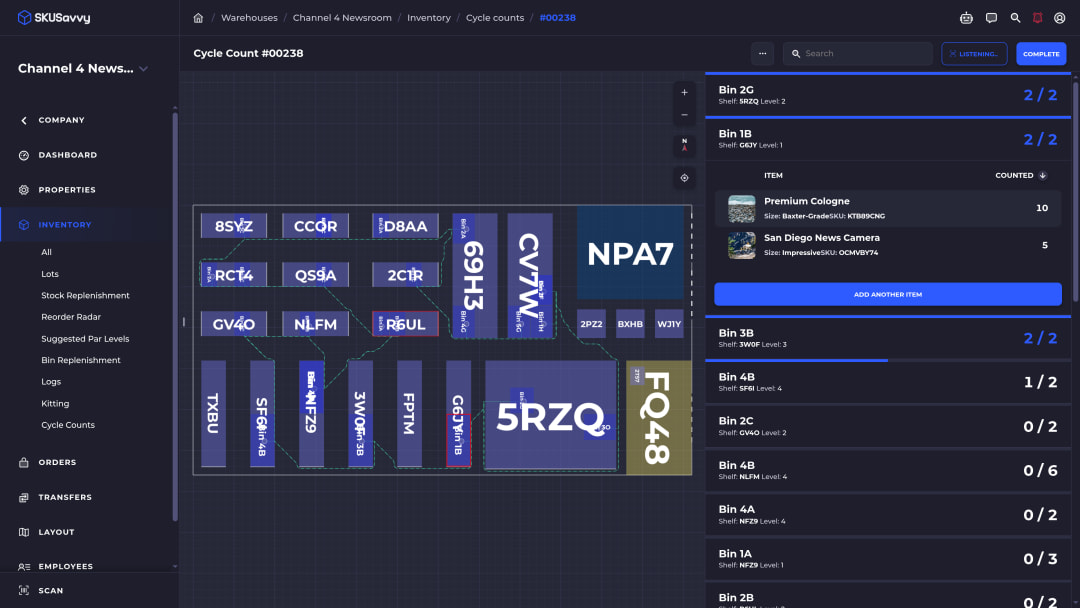
Setting up counts is covered in the cycle counting docs, and the Assign Location and Reconciliation Needed steps show how to clear flagged stock. For how stock is tracked per warehouse and kept in step with your store, see cloud inventory management.
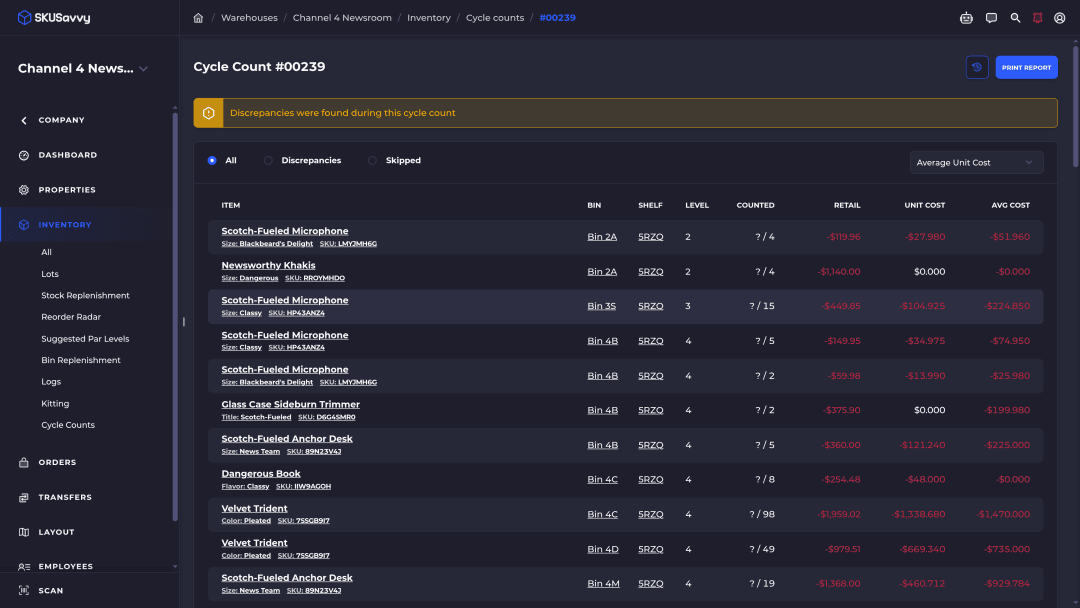
If your bins already have barcode labels, SKUSavvy can import those values, so you don't have to relabel the warehouse before your first scanned count.
Using Savvy Bot with cycle counts
The AI in SKUSavvy is Savvy Bot, the in-app assistant. Ask it about your own orders and inventory, have it run a report like your top sellers this month, or ask how a feature like cycle counts works, and it explains it and can take you to the right page. It reads and explains. It won't change anything unless you turn on edits and approve each one, and it runs on AI credits.
Choosing bins for an automatic cycle count and flagging a discrepancy are rules and arithmetic, not AI. SKUSavvy picks bins from what they hold and when they were last counted, and a discrepancy is counted minus expected. A count doesn't change inventory until you confirm its discrepancies.
SKUSavvy is $179/month including your first 249 orders, then a per-order rate that falls as volume grows, with unlimited users and month-to-month plans, as of October 16, 2026. See SKUSavvy pricing for your volume. The 30-day trial needs no credit card.
Inventory reconciliation FAQ
Short answers to what people ask most.
What is inventory reconciliation?
Comparing your inventory records with what's physically on hand, finding the reason for any difference, and correcting the record with that reason. A count finds the gap; reconciliation explains and closes it.
What is the best practice in inventory reconciliation?
Cycle count by bin on a schedule, count blind with scans, find the cause before you adjust, and record a reason on every change. Then fix the step that caused the gap.
How often should you reconcile inventory?
Clear exceptions daily, cycle count fast movers weekly, and make sure every bin gets counted at least once a quarter. Count a SKU more often while it keeps showing gaps.
What are examples of reconciling items?
A PO received short but checked in as full, a pick from the wrong bin, a return restocked without a scan, damaged units thrown out without an adjustment, or an order fulfilled outside the system.
What is a reconciliation checklist?
The fixed list of steps you run each time you reconcile: pick bins, count blind, compare, check neighbors and history, adjust with a reason, choose what syncs, fix the cause and schedule a recount.
What's the difference between a cycle count and inventory reconciliation?
A cycle count is counting a few bins at a time on a rotation. Reconciliation is what you do with the result: explain each difference and correct the record.
Does SKUSavvy sync inventory corrections to Shopify?
You choose. An adjustment has a sync option, deleting a deficit record has a Sync to Shopify toggle, and reconciling a deficit from a bin doesn't sync because your total doesn't change.
Keep reading
Cycle counting in SKUSavvy
Manual, automatic and criteria-based counts, blind counts and discrepancy logs.
Read the cycle counting guideCloud inventory management
Stock tracked per warehouse and across all of them, in step with your Shopify store.
See inventory managementCount the bin. Find the cause. Fix the record.
Start a 30-day trial or check pricing for your order volume.