Labels for Warehouse Racks: What to Print and Where It Goes
Alex
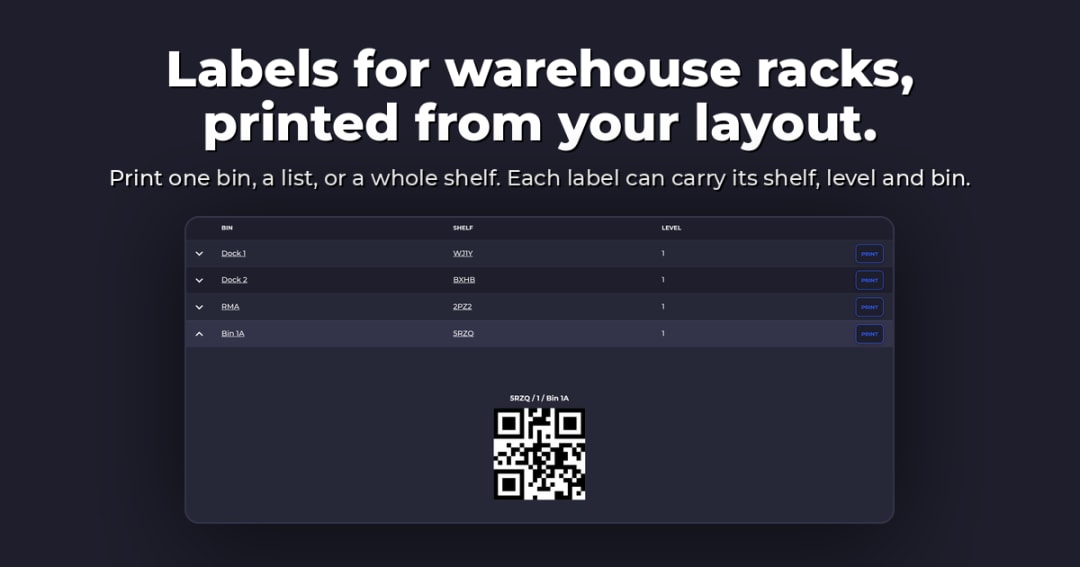
Labels for warehouse racks are the location tags on beams, shelves and bins that tell a picker exactly where they're standing. A good rack label carries one short location code and a barcode that scans from where the picker stands, and nothing that goes out of date. Put it on the front of the beam or shelf at the location it names, and print it from the same system that tracks the stock.
Below: which label goes where, what to print, how to code locations, where to stick them, and print vs buy. Laying out the warehouse itself first? Start with our step-by-step guide to setting up bin locations and warehouse labels, then come back for the labels.
The Six Labels You'll Find on a Rack
Most warehouse labels do one of six jobs. Know the job and you know the size, the material and where it goes.
| Label | Where it goes | What it's for |
|---|---|---|
Beam labels | Front face of a pallet rack beam | Names each pallet position for put-away and picking scans |
Shelf and bin labels | Shelf lip, or the front of a bin or tote | Names small-parts locations; the label each-pick teams scan all day |
Multi-level placards | Upright or bottom beam, at reach height | One barcode and arrow per level, for spots too high to scan |
Aisle signs | End of each aisle, or hung above it | Gets people to the right aisle first |
Floor labels | Floor lanes and floor-stack spots | Marks locations that have no rack |
Load capacity plaques | In plain view on the rack run | States the rack's rated load (more below) |
Material comes second. Direct thermal paper is fine indoors for bins you relabel often. Synthetic labels printed with a thermal transfer ribbon last longer under sunlight, cleaning and pallet scrapes. Freezers need a cold-rated adhesive on a dry surface, and retro-reflective labels are for long-range scanners reading high levels from the floor.
What to Print on a Rack Label
Less than you think. Every extra field is one more thing that can be wrong after the next re-slot.
The location code, large enough to read from a few steps away
A barcode that encodes exactly the same code, nothing more
An arrow, when the label sits above or below the location it names
Optional: a colour band per level or zone, so people spot the right row before they read
Leave off product names, SKUs and quantities. Those change. The location doesn't. Let the scan pull up what's in the bin from your system, so a label never needs reprinting just because stock moved.
One test before you print a hundred: the text and the barcode must say the same thing. If the label reads B-04-C-02 and the barcode holds B04C02, someone will eventually type one and scan the other.
A Location Code Scheme That Survives Growth
The code is what people say out loud, type and scan thousands of times. Make it boring and consistent.
Fix the order: zone, aisle, bay, level, position. Drop the parts you don't need.
Pad numbers to a fixed width (04, not 4) so codes sort and line up.
Use letters for levels and numbers for bays, and skip I and O.
Use one separator everywhere. A dash reads best.
Leave room in the numbering for bays you might add later.
So B-04-C-02 reads as zone B, aisle 04, level C, position 02. In SKUSavvy the structure is shorter: a location is a shelf, a level and a bin on a visual map of your warehouse, so the label only carries what the map doesn't already show.
Where to Put Labels So They Scan the First Time
Put each label on the front face of the beam or shelf lip, lined up with the location it names. Same spot in every bay.
Pick one rule for which beam owns a label, usually the beam just below the location, and add arrows if you ever break it.
On each-pick shelving, keep labels between knee and shoulder height so nobody crouches or stretches to scan.
For upper pallet levels, use a multi-level placard at reach height, or long-range scanners with retro-reflective labels.
Clean the beam first, keep labels clear of where pallets rub, and pick matte over glossy under bright lights.
Then test. Scan a sample with your team's own devices, from where a picker stands, before you label the building. A phone camera and a hardware scanner don't read from the same distance.
Print Your Own or Buy Them?
Most small and mid-size warehouses do both. Print what changes. Buy what has to survive.
| Option | Good for | Watch out for |
|---|---|---|
Print in-house on a thermal printer | Bin and shelf labels, short runs, anything you re-slot | Direct thermal fades with heat and light; use thermal transfer on synthetic stock where labels must last |
Print inserts for label holders | Beams and shelves you re-slot often; swap the insert, don't scrape a sticker | Holders cost more up front than a sticker |
Buy pre-printed labels | Big pallet rack runs, retro-reflective, freezer and floor labels | Lead time, and every change means a new order |
Magnetic labels | Steel shelving you rearrange | They can get knocked off in busy aisles |
Where do you get cheap labels? The lowest cost per label is usually a roll of direct thermal labels in a printer you already own, slid into holders on the beams. Spend on bought labels only where the spot demands it: high levels, freezers, floors and outdoor racking.
Labeling products too? Our guide to making and printing warehouse barcode labels for Shopify products covers that side.
Rack Capacity Labels and OSHA
This is the one rack label about safety, not location. OSHA's general rule on handling and storing materials (29 CFR 1910.176) says storage must not create a hazard, and material stacked in tiers must be stable and secure against sliding or collapse. Detailed guidance on load capacity plaques comes from the rack industry standard, ANSI MH16.1, published by the Rack Manufacturers Institute (RMI), which calls for the rack's rated load to be posted where people can see it.
The numbers on the plaque come from your rack manufacturer or a structural engineer, never from a label template. Local building and fire codes can add rules of their own. This is general information, not legal advice: check OSHA, RMI and your local authority for what applies to you.
How SKUSavvy Handles Rack and Bin Labels
SKUSavvy is a warehouse management system for Shopify sellers. You build your warehouse as shelves, levels and bins, and the labels print from that same map.
| Feature | What it does | Why it matters on the floor |
|---|---|---|
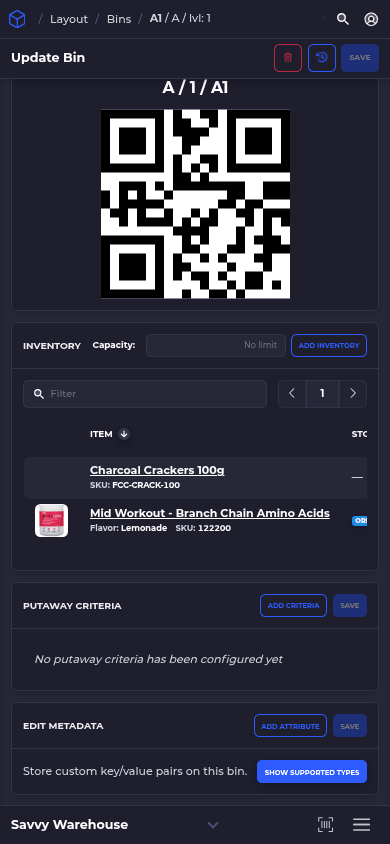
A barcode for every bin | Each bin in your layout gets a barcode automatically | Nobody invents codes by hand, and every label prints from the same bins the system tracks |
Import existing bin barcodes | Already labeled? Import your existing bin barcode values in SKUSavvy | Keep the labels on your racks instead of relabeling the building |
Print by bin, list or shelf | Print one bin, a list of bins, or every bin on a shelf | Relabel a shelf after a re-slot in one print run |
Label sizes and templates | 2x1, 4x2, 4x4, 4x6 or a custom size, with shelf name, level, bin name, barcode, custom text and images | Fit the label to your beam face, shelf lip or tote |
Scan the bin, then the item | Turn on bin scans and pickers scan the bin, then the item, with a red alert on a wrong scan. At receiving and putaway, scan the bin to confirm where stock goes | Stock is tracked by location, so a wrong-bin pick gets caught before the box is sealed |
Scan anything | Scan a bin label from any screen to pull up that bin | Checking what's in a location takes one scan |
Phones or scanners | A web app (PWA) with a camera scan button on every screen; Bluetooth scanners pair for all-day work | Start with the phones you own, nothing to install from an app store |
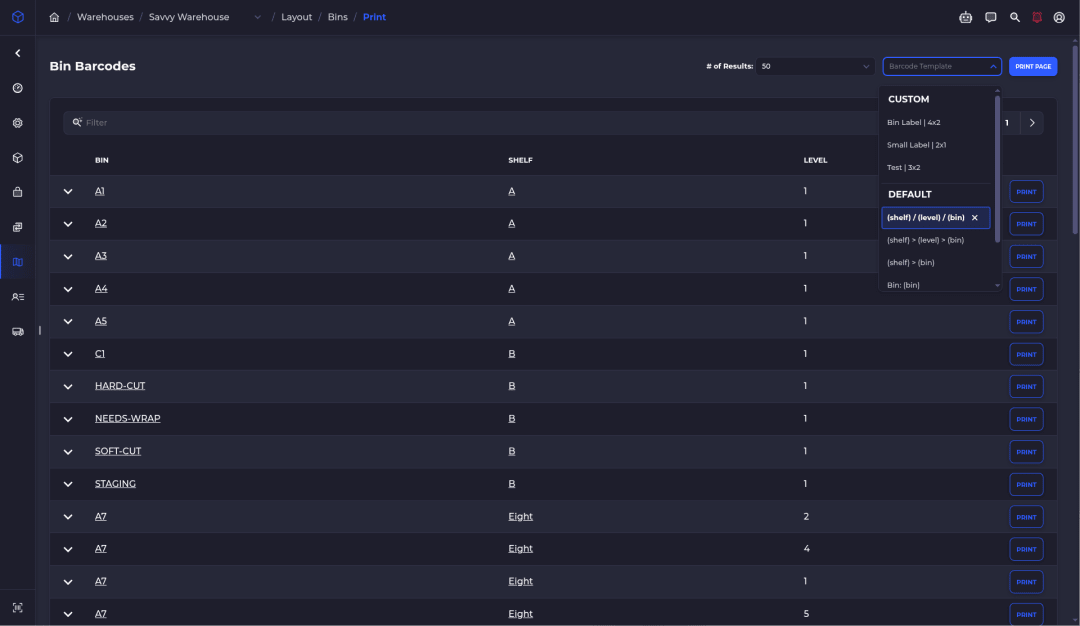
Can't find the print screen? Ask Savvy Bot, the assistant inside SKUSavvy. It answers how-to questions from the docs and can open the right page for you.
Beyond labels, from receiving to routed picking, see SKUSavvy's warehouse management software. The 30-day trial needs no credit card, so bring your location codes and print one test shelf.
Labels for Warehouse Racks FAQ
What Are the Best Ways to Label Warehouse Racks?
One code scheme everywhere, a label on the front of the beam or shelf at each location, a barcode that matches the printed code, placards for high levels, and labels printed from the system that tracks your stock.
What Size Should a Rack Label Be?
Big enough that the code reads from a few steps away and the barcode scans from where a picker stands. Fit it to the beam face or shelf lip, and test a few sizes with your own scanners before printing the whole run.
Should a Rack Label Show the SKU?
No. Products move and locations don't. Put the location on the label and let a scan show what's in the bin.
Can I Scan Rack Labels with a Phone?
Yes. In SKUSavvy every screen has a camera scan button. For people who scan all day, a hardware scanner is faster.
Keep Reading
Setting Up Warehouse Bin Locations
The setup guide: areas, aisles, bays, levels and bins, and how to lay them out.
Read the warehouse labels setup guideShopify Barcode Generator
Make and print warehouse barcode labels for your Shopify products.
Read the barcode guideWarehouse Management Software
Bins, scan-checked picking and a 3D map of your warehouse, for Shopify sellers.
See the WMSLabel the Rack. Scan the Bin. Ship the Right Order.
Start a 30-day trial or check pricing for your order volume.