Multi-Warehouse Inventory Visibility
See Every Item Across Every Warehouse
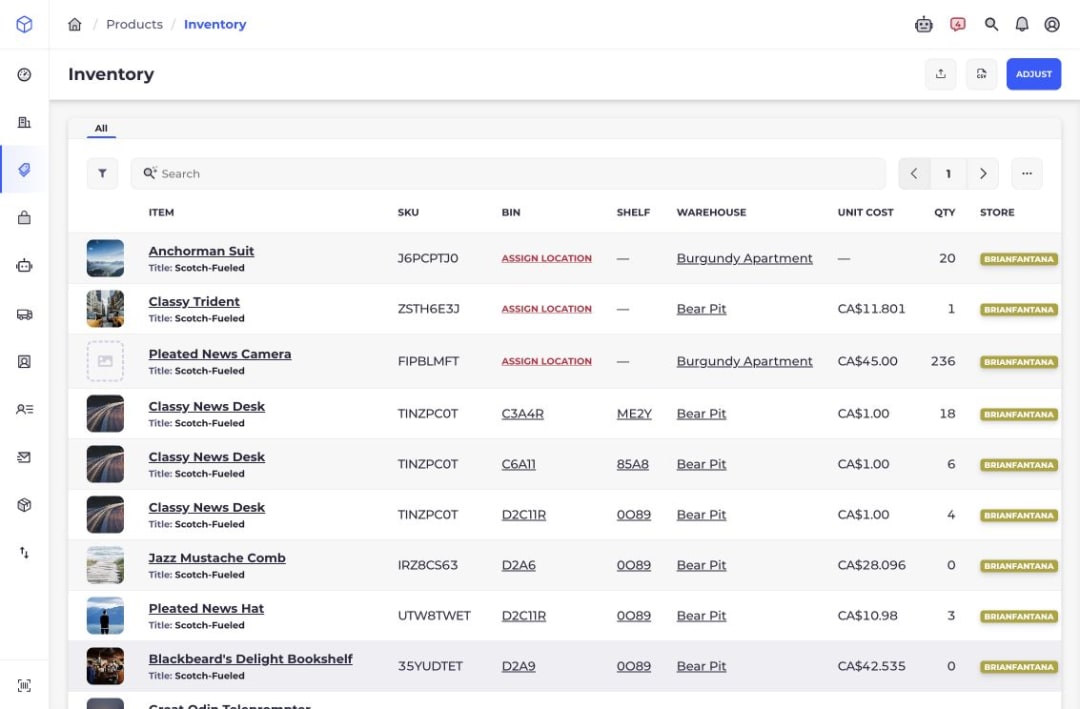
Start with one inventory view for the whole company, then open a warehouse to see the bin, shelf, quantity, store, and cost behind each stock record.
Free 30-day trial. No credit card required.
The Problem
Can You Trust The Stock Number In Front Of You?
A total quantity does not tell you which warehouse holds the stock, whether it has a usable bin, or which store record it belongs to. When those details live in separate tabs or spreadsheets, every availability question turns into an investigation.
Find The Missing Context
Totals Hide The Location
The company may have stock, while the warehouse that needs to fulfill the order does not.
Stock Has No Usable Bin
An item can have quantity without an assigned warehouse location, leaving pickers unable to find it.
Teams Compare Different Views
Warehouse staff, planners, and ecommerce operators may answer the same stock question from different records.
The Feature
Move From The Company Total To The Exact Bin
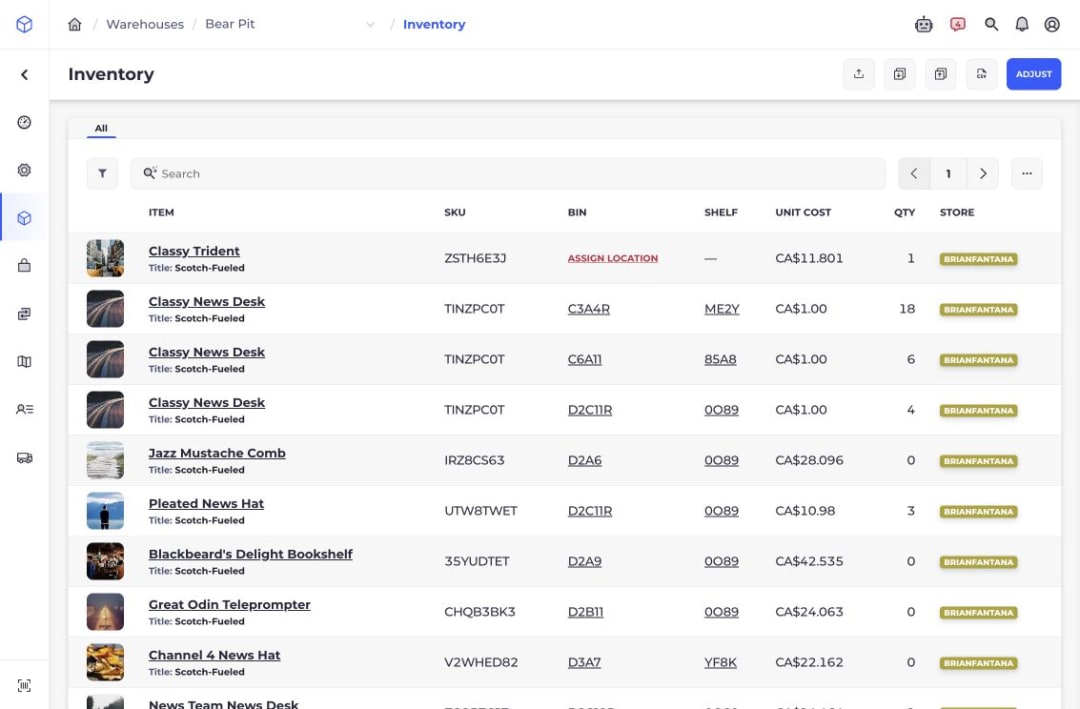
SKUSavvy uses the same inventory table at two scopes. The company view shows stock across warehouses. The warehouse view removes the extra location column and focuses the team on the bins, shelves, quantities, costs, and store records inside that facility.
- 01
Search The Company View
Find an item by title, SKU, or serial number when serialization is enabled.
- 02
Compare Warehouse Records
See the warehouse attached to every quantity row instead of adding totals from separate exports.
- 03
Open The Working Warehouse
Narrow the same inventory table to one facility when a picker, receiver, or inventory lead needs location detail.
- 04
Act On The Record
Open the item or linked bin, assign unlocated stock, adjust inventory, or export the filtered view.
Product Proof
Focus One Warehouse On The Stock It Can Use
The warehouse inventory view shows the operational record behind the company total. Each row keeps the item, SKU, bin, shelf, unit cost, quantity, and connected store together.
How It Solves The Problem
Keep Quantity And Location In The Same Answer
The company view answers where inventory exists. The warehouse view answers where the operator can find it. Because both views read the same stock records, teams can move from planning to floor-level work without rebuilding the answer in a spreadsheet.
See All Warehouses
Review inventory rows across every warehouse from the company products area.
Filter The Working Set
Search and filter by product status, product type, tags, store, pricing, and ABC class when enabled.
Follow Bin And Shelf Links
Open the physical location connected to an allocated inventory row.
Spot Unlocated Stock
Rows without a bin show an Assign Location or Reconciliation Needed action instead of hiding the gap.
Keep Store Context
See which connected Shopify store record belongs to each item row.
Export The Same View
Export inventory from the company or warehouse scope for review and reporting.
Fit And Requirements
Give Each Role The Right Inventory Scope
Users need permission to view inventory. Warehouse access determines which facility records they can open, while company-level access supports cross-warehouse planning and review.
Inventory Permission
Give team members the View Inventory permission to open stock records.
Warehouse Access
A warehouse user can open the facility inventory used for receiving, picking, counting, and adjustment work.
Shopify Locations
Connected Shopify locations become warehouses in SKUSavvy, and imported stock must be allocated to bins before it is pickable.
Optional Detail
Lot, serial, ABC, velocity, tag, and unit-cost detail appears when the related feature or table column is enabled.
Questions
Inventory Visibility FAQs
Answers about company-wide and warehouse inventory views in SKUSavvy.
What is inventory visibility?
Inventory visibility is the ability to see what stock exists, where it is stored, and which operational record supports the quantity. SKUSavvy shows inventory across the company and lets you narrow the same records to one warehouse.
Can I see inventory across multiple warehouses?
Yes. The company inventory view includes the warehouse attached to every stock row, so you can search an item and compare its records across facilities.
What changes in the warehouse inventory view?
The warehouse view limits inventory to the selected facility and focuses on its item, SKU, bin, shelf, unit cost, quantity, and store context. It also exposes warehouse actions such as adjustment, allocation, import, and export based on permissions.
Can I find inventory by SKU or serial number?
Yes. Inventory search supports SKU and title. Serial-number search is available when serialization is enabled.
How does SKUSavvy show inventory without a bin?
A positive quantity without an allocated bin shows Assign Location. A negative unallocated record shows Reconciliation Needed, which makes the location gap visible in the table.
Does SKUSavvy keep Shopify inventory in sync?
SKUSavvy receives Shopify locations as warehouses and tracks more detailed bin-level stock inside each facility. Inventory workflows can send supported quantity changes back to Shopify, while the warehouse table shows the store connected to each item.
Know What You Have And Where It Lives
Give planners one company view and warehouse teams the bin-level detail they need to act.