Inventory Tracking App for Warehouses and Back Rooms
A good inventory tracking app answers two questions in a few seconds: how many do we have, and which shelf is it on. Many apps stop at the first. If people pick orders from your shelves, you need the second too.
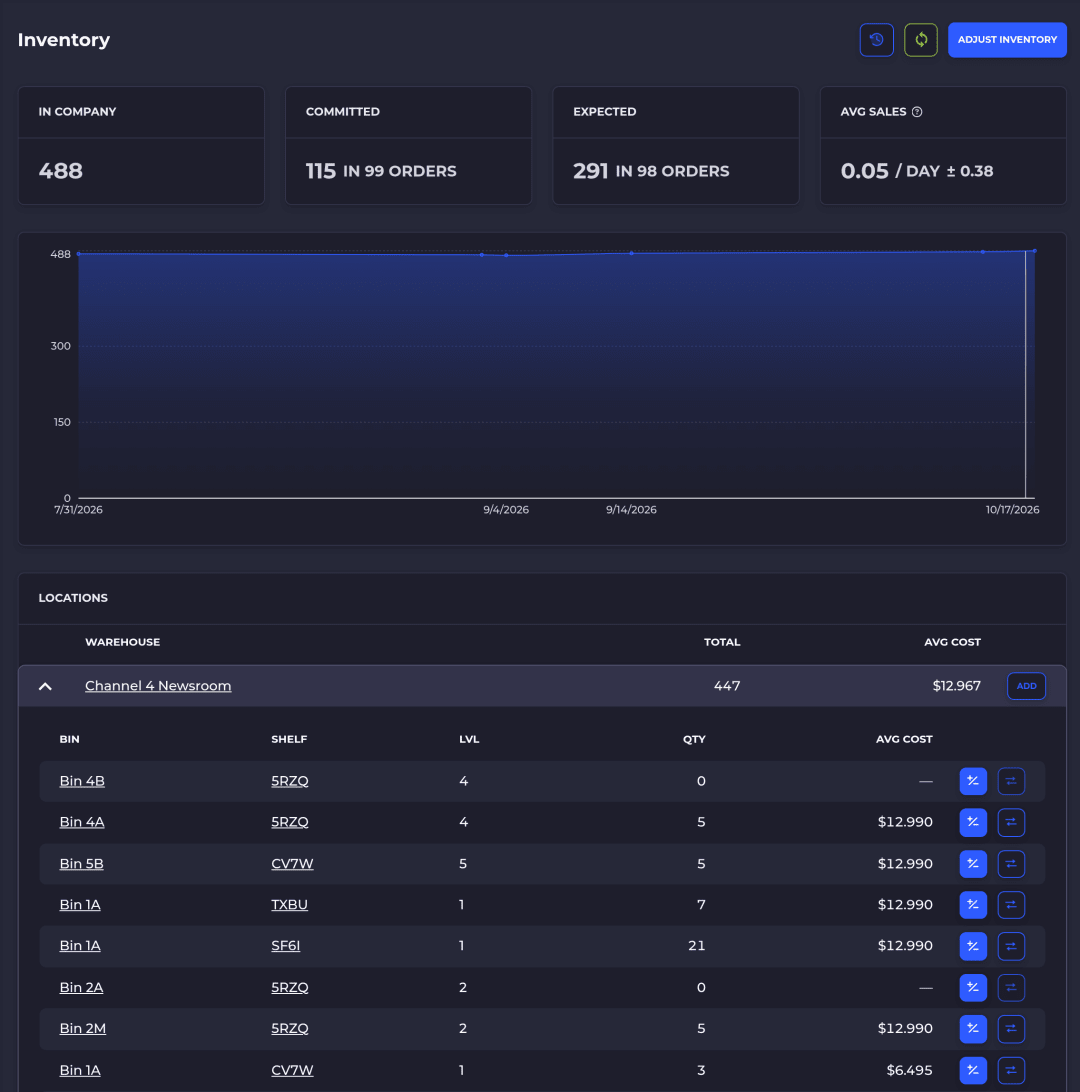
The short answer
An inventory tracking app is software on a phone, tablet or computer that keeps a running count of your stock as it comes in, moves and goes out. The good ones let you scan instead of type, so the count changes when the item moves, not when someone gets back to a desk.
For a small stockroom, a simple item app or the scanner in your store's own app may be enough. Once more than one person picks orders, or the same product sits in more than one spot, you want an app that tracks stock by bin and logs every move.
Below is how to tell the difference, what to look for, and where SKUSavvy fits. SKUSavvy is our product, so we say plainly where it isn't the right pick.
What an inventory tracking app actually tracks
Apps sold under the same name track very different things. Here's the ladder, from least to most.
| Level | What the app knows | What it can't tell you |
|---|---|---|
Count | You have 40 units | Where they are, or who moved them |
Location | 30 at the warehouse, 10 at the store | Which shelf in the warehouse |
Bin | 12 in bin A-03-2, 18 in overflow B-11-1 | Nothing important: this is what pickers need |
Bin plus history | Every receipt, pick, move and count, with who and when | Why someone skipped a scan, which is a training problem |
If you only ever ask "how many," a count-level app is fine. If you ask "where is it" more than once a day, buy for the bin level.
Three kinds of inventory tracking apps
Simple item apps
Folders, photos, QR labels and quantities. Good for supplies, equipment and small product lists where one person knows the room.
Your store's own app
Shopify's mobile app can scan a barcode to find a product and adjust its quantity by location. It's a reasonable first step if you already sell on Shopify.
Warehouse apps (WMS)
Track stock by bin, guide receiving, put-away, picking and counts with scans, and keep your store's numbers in step. Built for teams shipping orders from shelves.
The Shopify scanner details are from Shopify's inventory scanner help page. Shopify can store one bin name per product at each location, but it tracks quantity by location, not by bin.
What to look for before you pick one
Scanning with what you already own. The phone camera for starters, and a Bluetooth or USB scanner when someone scans all day.
Stock by bin, not just by location. A total that's right while two shelves are wrong still sends pickers searching.
A log of every move. Receipts, picks, transfers, counts and adjustments, each with a person, a time and a reason.
One source of truth with your store. Decide which system owns the quantity, and make sure the other one follows it.
Counting without shutting down. Small counts on a rotation, while orders keep shipping.
Pricing that doesn't punish more people. Seasonal help and second shifts shouldn't each add a seat to the bill.
Phone app, browser app or scanner?
You don't need a native app from an app store to track inventory on a phone. SKUSavvy runs in the browser as a web app (PWA) at app.skusavvy.com. Add it to your home screen from Safari or Chrome and it opens full screen like any other app.
Start with the phone camera. Every screen has a scan button. When someone scans all day, add a Bluetooth or USB scanner that types like a keyboard: it's faster and the phone stays in a pocket. Teams use models like the Zebra DS2208 and Honeywell Voyager 1200g. Scanners are bought separately.
The full list of barcode formats and scanner setup is in the supported barcode formats guide.
Features and benefits
What SKUSavvy tracks, and what that gets you on the floor.
| Feature | What it gets you |
|---|---|
Stock by bin, synced to Shopify | On Hand by bin in SKUSavvy, kept in sync with your Shopify store so you don't oversell |
Scan anything | Scan a product, bin or shipment from any screen and SKUSavvy pulls it up |
Scan-checked receiving | Check in a purchase order by scanning, and short or over shipments show up as discrepancies on the PO |
Directed put-away | New stock goes to a bin the system points to, so the next picker finds it |
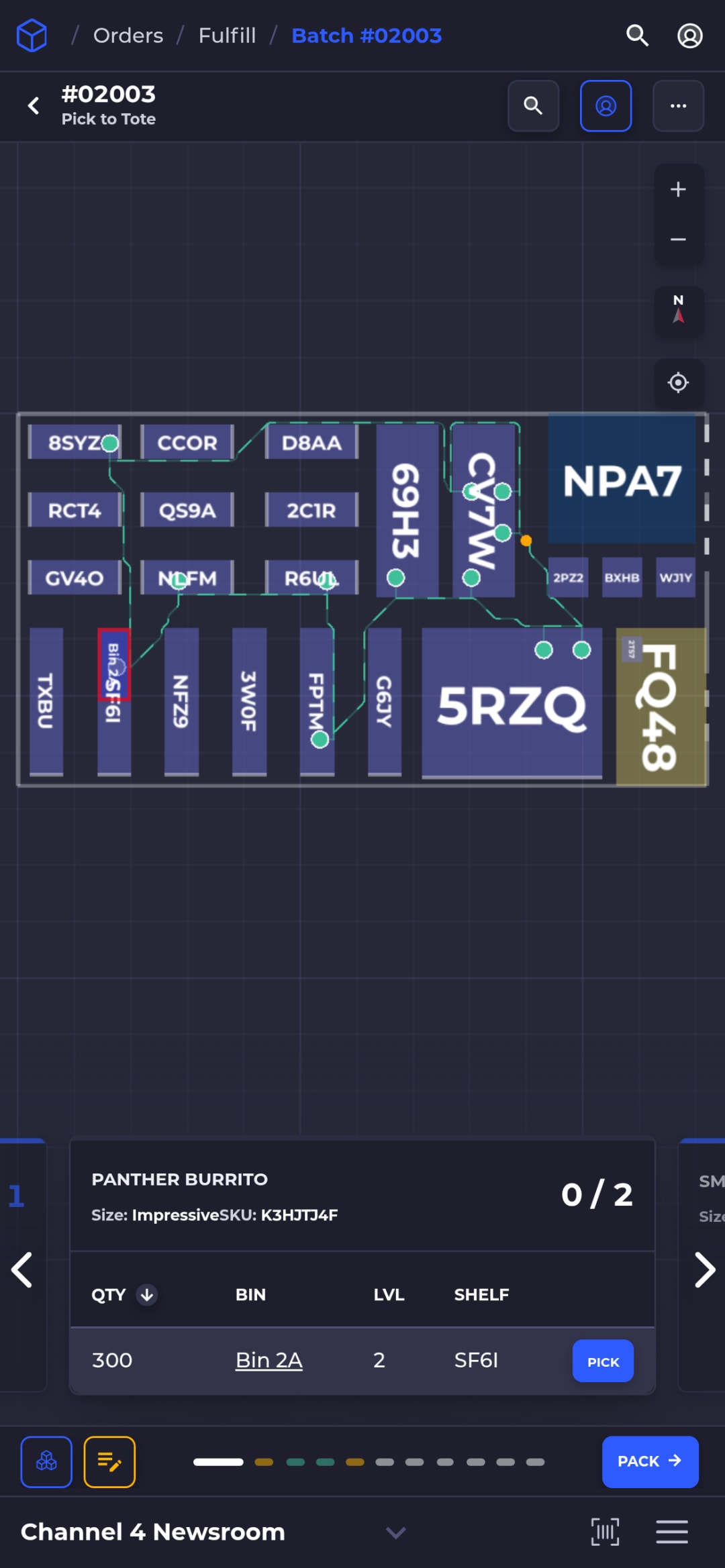
Routed picking with scan checks | Pickers follow a path on the map, and a wrong bin or item gets a red alert before it ships |
Cycle counts by bin | Count a few bins at a time while picking continues; differences are logged with who counted and when |
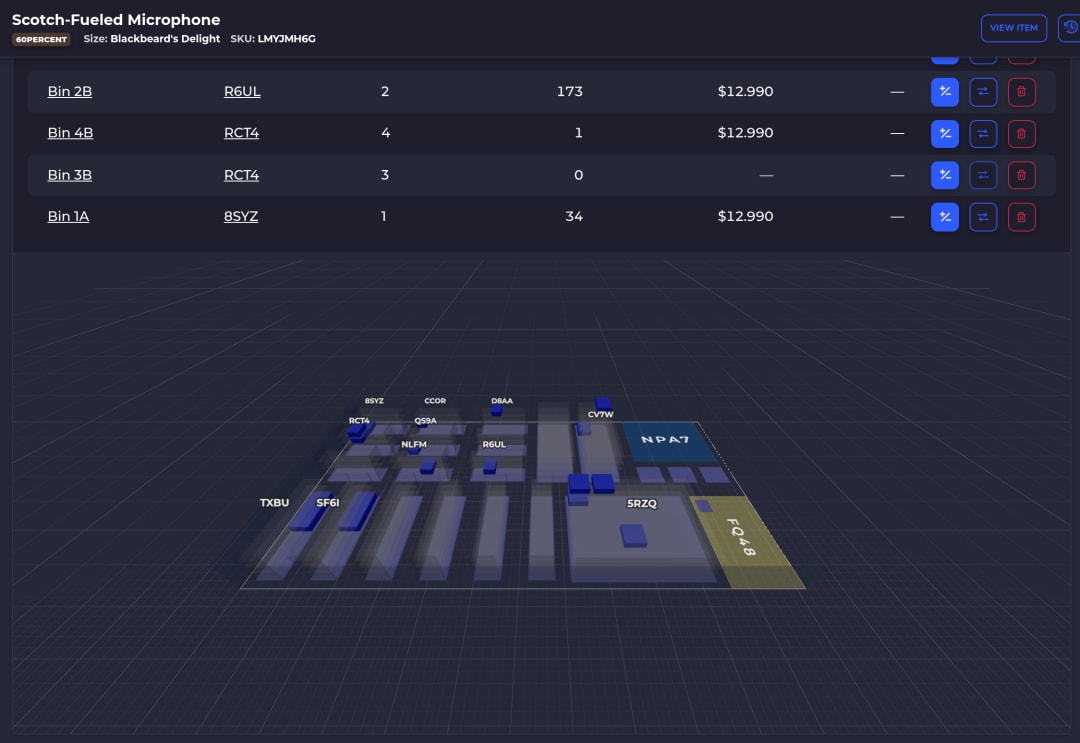
Bins on a 3D warehouse map | See where an item lives on a map of your floor, not just a total |
Transfers between bins and warehouses | Move stock bin to bin or warehouse to warehouse with a record of each move |
Unlimited users and warehouses | Seasonal pickers and a second location don't add seats |
Runs in the browser on phones and tablets | Use devices you already own, with nothing to install from an app store |
How stock is tracked across warehouses and kept in step with your store is covered on cloud inventory management. If you organize by SKU first, see SKU-based inventory.
Using Savvy Bot to find stock
Savvy Bot is the in-app assistant. Ask it about your own orders and inventory, have it run a report like your top sellers this month, or ask how a feature like cycle counts works, and it explains it and can take you to the right page.
It reads and explains. It won't change anything unless you turn on edits and approve each one, and it runs on AI credits. Scanning the shelf and deciding what to do about a gap stay with your team.
Start a 30-day trialWhat SKUSavvy costs
As of October 17, 2026, SKUSavvy is $179/month, which covers your first 249 orders. Orders past that are billed per order, and the rate falls as volume grows. Users are unlimited, plans are month to month, and the 30-day trial needs no credit card.
Purchase orders and transfers count as orders too. Carrier postage, scanners and printers are separate. Enter your monthly orders on SKUSavvy pricing for an exact number.
When SKUSavvy isn't the right app
If you track tools, supplies or equipment rather than products you sell, a simple item app is a better fit. If you don't sell on Shopify, SKUSavvy isn't built for you. It's a warehouse system for Shopify sellers who hold and ship their own stock.
Inventory tracking app FAQ
What is the best inventory tracking app?
The one that tracks at the level you need. For a handful of products in one room, a simple item app or your store's own scanner works. For a team picking orders from shelves, pick an app that tracks stock by bin, scans every move and keeps your store in sync.
Can I track inventory on my phone?
Yes. Many inventory apps run on a phone and scan barcodes with the camera. SKUSavvy runs in the phone's browser as a web app, so there's nothing to download from an app store.
Does SKUSavvy have an iPhone or Android app?
SKUSavvy is a web app (PWA). Open app.skusavvy.com in Safari or Chrome and add it to your home screen, and it opens full screen like an app.
Do I need a barcode scanner?
Not to start. The phone camera scans barcodes in SKUSavvy. A Bluetooth or USB scanner is faster if someone scans all day.
What's the difference between an inventory tracking app and a WMS?
An inventory app keeps counts. A warehouse management system also tells people where to put stock, which bin to pick from and what to count next, and checks each step with a scan.
Does an inventory tracking app work with Shopify?
Many do. With SKUSavvy, orders come in from Shopify and stock levels go back to it, so the store sells what's actually on your shelves.
Keep reading
Cloud inventory management
Stock tracked per warehouse and across all of them, in step with your Shopify store.
See inventory managementSupported barcode formats
Formats SKUSavvy prints and scans, plus camera and hardware scanner setup.
Read the guideKnow how many, and which shelf.
Start a 30-day trial or check pricing for your order volume.