How Inventory Tracking Programs Work, and How to Switch Safely
Alex
Inventory tracking programs are software that records how much stock you have and, depending on the kind, where it sits, when it arrived and who moved it. They run from a spreadsheet, to the inventory built into your store, to a warehouse management system (WMS) that tracks every unit by bin. The right one is the simplest program that still answers the questions your floor asks every day.
We build SKUSavvy, a mobile WMS for eCommerce sellers on Shopify, so this guide is written from the warehouse side. It covers what each kind of program actually records, the terms you'll meet in all of them (FIFO, LIFO, JIT, SKU, KPI), and how to switch programs without losing a count. If you only need a phone app for counting stock by shelf, our guide to choosing an inventory tracking app covers that.
What Inventory Tracking Programs Actually Record
Every program answers how many. The difference is what else gets written down each time stock moves. That's the thing to compare, because it decides which questions you can answer later without walking the aisles.
| Kind of program | What it records | The question it can't answer |
|---|---|---|
Spreadsheet | Whatever someone types: SKU, count, maybe a location column | Did a sale or a return change this number since the last edit? |
Simple inventory app | Count per item, photos, sometimes a room or shelf | Which orders still need picking, and from where? |
Store or POS inventory | Available quantity per location, with adjustments | Which shelf or bin inside the location holds the stock? |
Inventory or order management software | Purchase orders, reorder points, stock across channels | Who picked the wrong unit, and from which bin? |
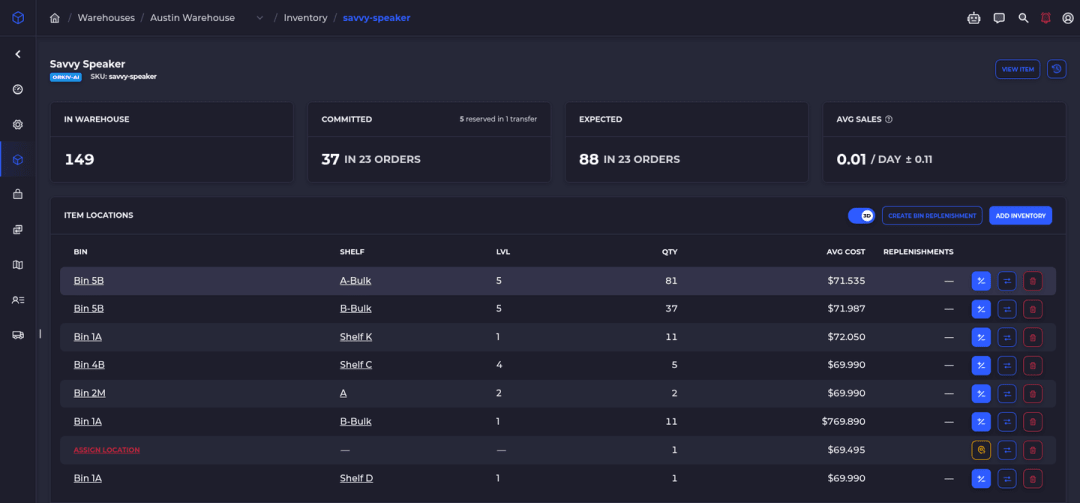
Warehouse management system | Quantity per bin, every move, lots and expiry, pick and pack | Little day to day, but bins need names and labels first |
Read the right-hand column as a forecast. Each one is a question somebody will eventually ask you: where is it, why is the count off, which batch expires first. When you can't answer one without a stock walk, the program has stopped keeping up.
What Is a Good Inventory Program?
A good inventory program is one that answers your daily questions without a second tool or a stock walk. For a business shipping online orders from its own shelves, that usually means six things:
It updates when an order is placed, not when someone remembers to.
It knows where each unit is, down to the bin, once more than one person picks.
It keeps a history of what changed, when and who did it.
It works where the stock is, on a phone or scanner, not only at a desk.
It connects to your store and your accounting, so nobody retypes numbers.
It lets you export your data as a CSV if you ever leave.
If you sell from one room and one person touches the stock, a spreadsheet or your store's built-in inventory covers most of that list. Once a second picker, a second room or lot-dated stock shows up, the bin and history lines start to matter.
Inventory Terms Every Program Uses
These terms show up in every program's settings and reports, and they mean slightly different things depending on whether you're talking about the shelf or the books.
What Is FIFO, LIFO and JIT?
FIFO means first in, first out: the oldest stock leaves first. It's the normal way to pick anything that ages, fades or goes out of style. LIFO means last in, first out: the newest stock leaves first. You'll mostly see LIFO as an accounting method for valuing stock, not as a way to pick. JIT means just in time: you order stock to arrive close to when you need it, so less cash sits on the shelf, as long as suppliers deliver on time.
Keep two questions apart: which unit gets picked, and what cost gets booked. In SKUSavvy, lot-tracked items pick the lots that expire soonest first (FEFO). Cost is a separate calculation: SKUSavvy values stock with a moving weighted average cost per bin. If expiry dates drive your business, see how lot and expiration tracking works.
What Is a SKU and a KPI?
A SKU (stock keeping unit) is your own code for one sellable version of a product, like a T-shirt in black, size M. It's not the same as a barcode, which is the scannable number on the label, though many brands set them to match. A KPI (key performance indicator) is a number you watch to see whether things are working. These are the inventory KPIs worth tracking:
| KPI | What it tells you | How it's usually worked out |
|---|---|---|
Inventory accuracy | Whether the program matches the shelf | Units counted that match the system, divided by units counted |
Inventory turnover | How fast stock sells through | Cost of goods sold divided by average inventory value |
Days of stock | How long current stock will last | Units on hand divided by average daily sales |
Dead stock | What isn't selling | Items with no sales over a period you choose |
Order accuracy | How many orders ship right | Orders shipped without an error, divided by orders shipped |
You don't need all five on day one. Start with inventory accuracy, because every other number is only as good as the count underneath it.
How to Switch Inventory Tracking Programs Without Losing Count
Most switches go wrong at the cutover, not in the new program. Orders keep coming in while you count, and for a day nobody is sure which system is right. Here's the order that avoids that.
Clean your SKUs. Every sellable variant gets one unique SKU, and the barcodes on the product match the ones in your store.
Decide where each kind of data lives. Products usually stay in your store; after go-live, stock counts live in the new program.
Name and label your bins before you count, so every number you record has a place.
Load costs before quantities, so the first stock value is right.
Count by bin and import the counts as a file of item, bin and quantity.
Test the flow with a few orders before live orders depend on it.
Pick a quiet cutover window: pause receiving, count, import, then let the new program start sending stock to your store.
Run a cycle count in week one to catch anything the import missed.
What the Switch Looks Like in SKUSavvy
Products come from your Shopify store, so you create them there first. If your bins already have barcodes, import them instead of relabeling. Stock goes in with the inventory import: each CSV row places a quantity of one item into one bin, matched by SKU or barcode and by bin name or bin barcode, up to 10,000 rows per file.
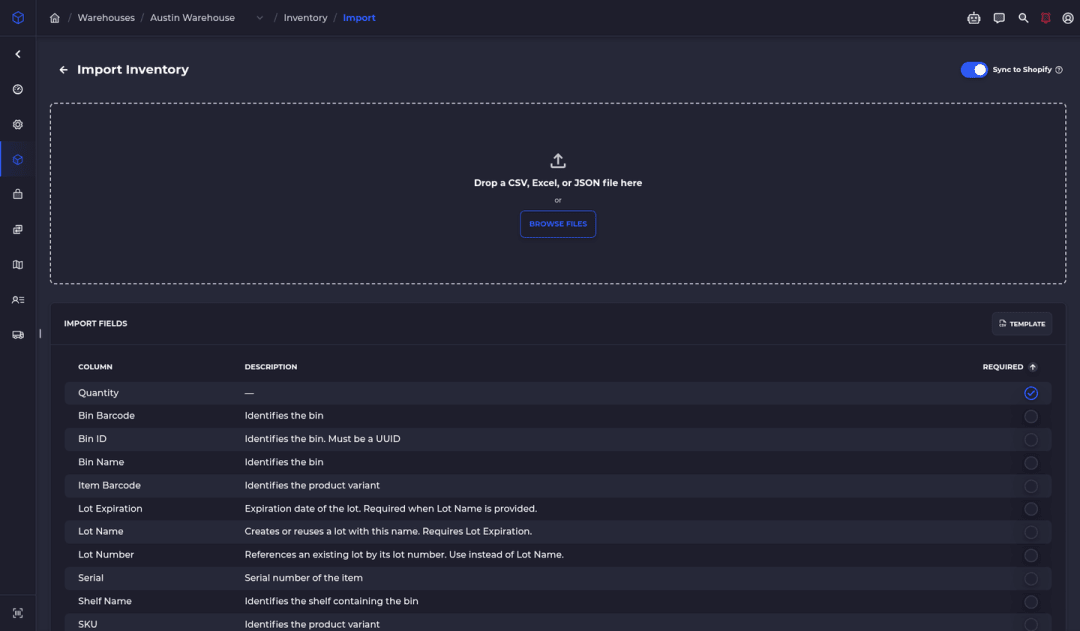
The import has three modes. Add puts quantities on top of current stock. Replace sets each listed item to the count in the file. Replace all does the same and also clears stock for anything not in the file, which is what you want for a full reset. With lot tracking on, only Add is available, so lot-tracked stock always imports by adding. The inventory import doesn't set cost, so run the landed cost import first, then the quantity import.
Want to rehearse first? Connect a Shopify development store and turn on Test Mode to practice orders and test purchase orders. Stock checked in on a test PO doesn't count as real inventory, but ad-hoc stock adjustments and fulfilled shipments still sync to the connected store, which is why the docs recommend a development store, not your live one. After go-live, SKUSavvy is the source of truth for stock and pushes available quantities to Shopify.
Features and Benefits: How SKUSavvy Tracks Inventory
| Feature | What it does on the floor |
|---|---|
Stock by bin | On-hand quantity for every item in every bin, so pickers know which shelf, not just how many |
On hand vs available | Available is on hand minus what's committed to orders, and that's the number Shopify gets |
Kept in sync with your Shopify store | New orders land in the queue as they're placed, and stock changes push to Shopify |
Pick order | Lot-tracked stock picks the soonest-expiring lots first |
Kits | Shopify shows how many kits you can build from what's on the shelf |
Barcodes and labels | Import the bin barcodes you already use; print product labels at 2x1, 4x2, 4x4, 4x6 or a custom size |
Cycle counts | Count bin by bin, review the lines that came up off, and export the results as a CSV |
QuickBooks Online add-on | The sync happens immediately: a new PO creates a draft bill, and check-in bills the received quantity |
Phones, tablets and scanners | Runs in the browser as a progressive web app; scan with the camera or a Bluetooth or USB scanner |
Using Savvy Bot With Inventory Tracking
Savvy Bot is the AI assistant inside SKUSavvy, and it works from your live account data. Ask how many units of a SKU are on hand, which items are running low, or for a report like your top sellers this month, and it answers with a table or chart, or opens the right page. On a new account it can walk you through warehouse setup, connecting Shopify and importing products, which is most of the switch above.
It reads and explains. It doesn't change anything unless you turn on edits and approve each one, and it uses AI credits. The counting itself stays human: someone still has to stand at the bin.
When a Simpler Program Is Enough
A WMS is more setup than a spreadsheet. Bins need names, labels need printing, and someone has to do the first count. If you ship a handful of orders a day from one room and you're the only one picking, that work may not pay back yet.
It starts paying back when the questions in the first table become weekly ones: when a picker can't find stock the store says you have, when two people edit the same count, or when a dated lot ships late. That's the point to move up a level.
Inventory Tracking Programs FAQ
What Is the Best Inventory Tracking Program for a Small Business?
The simplest one that answers your daily questions. One person and one room: a spreadsheet or your store's inventory. Online orders picked from your own shelves by more than one person: a program that tracks stock by bin.
Can I Track Inventory in Excel or Google Sheets?
Yes, and many businesses start there. A spreadsheet only knows what someone typed, so sales, returns and moved boxes don't update it on their own, and there's no record of who changed a number.
Are There Free Inventory Tracking Programs?
Spreadsheets cost nothing, and some inventory apps offer starter plans with limits on items, users or locations. Check the limits against your catalog before you load it. SKUSavvy has a 30-day trial.
What's the Difference Between Inventory Tracking and Inventory Management?
Tracking records what you have and where. Management uses those records to decide what to reorder, where to store it and how to pick it. Most programs do some of both.
Does SKUSavvy Work With Shopify?
Yes. You install it from the Shopify App Store, and your products, orders and locations come across. After that, your warehouse is kept in sync with your Shopify store.
Is SKUSavvy a Mobile App?
SKUSavvy runs in the browser on phones, tablets and computers as a progressive web app, so there's nothing to download from an app store.
Keep Reading
Best Warehouse Inventory Tracking System
Five types of tracking systems compared, and the bin test to run in any trial.
Compare tracking systemsLot and Expiration Tracking
Lots and expiry dates captured at receiving, with the soonest-expiring stock picked first.
See lot trackingTrack Every Unit by Bin, Kept in Sync With Shopify
Start a 30-day trial or check pricing for your order volume.