3PL client portal for inventory, orders & invoices without exposing rate cards
Give each brand a self-service home for its own stock, orders, inbound notices and invoices.
What is a 3PL client portal?
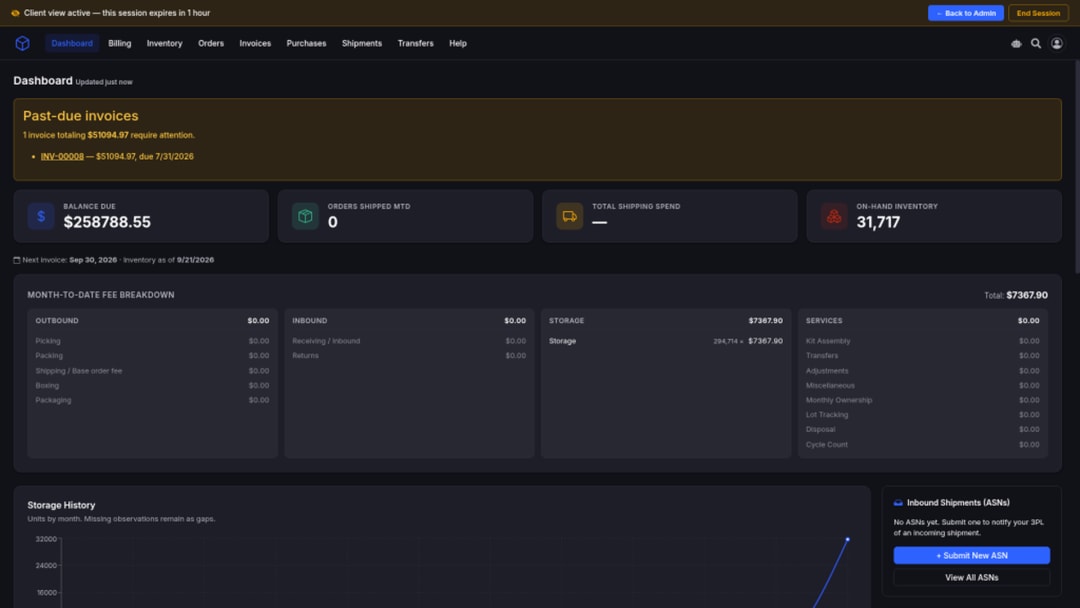
A 3PL client portal is a scoped self-service app where each brand sees its own inventory, orders, ASNs, transfers, ledger context, invoices, and payment status. Brands never see cost-plus details or another client's data.
Who it’s for
Designed for 3PLs and hybrid fulfillers who want brands to self-serve inventory, orders, ASNs, and invoices without sharing cost-plus details or other clients' data.
Brand operators
Get current inventory, order and shipment details, ASN submission, and invoice PDFs without emailing your 3PL for every status check.
3PL owners protecting isolation
Server-scoped access ensures a client session cannot access another client's records or an operator console. Cost-plus and markup inputs stay internal.
Hybrid fulfillers
Provide sister brands or partner accounts on the same floor with dedicated portals and separate billing instead of a shared operations login.
Give brands self-service visibility from inbound ASNs to paid invoices
Give each brand a dedicated portal on top of the warehouse activity you already run. Contact us to see how the client portal adds onto SKUSavvy WMS.
Inventory you can trust
Let clients browse their stock by product and warehouse with real-time quantities, committed counts, and expected inbound units. Location occupancy explains storage context clearly.
Orders, ASNs & transfers
Open outbound orders and shipments, submit inbound ASNs while pending, prepare outbound submissions, and review transfers, all scoped to the signed-in brand.
Ledger & invoices
Filter and export ledger rows, open invoice links, and download PDFs in your chosen presentation. ACH Pay Now appears when your store receiving route is configured.
Scoped isolation
Clients see final charges for their own account only, never cost-plus inputs, rule IDs, unit-rate configs, or another client's inventory, orders, or invoices.
DASHBOARD
A home screen for each brand
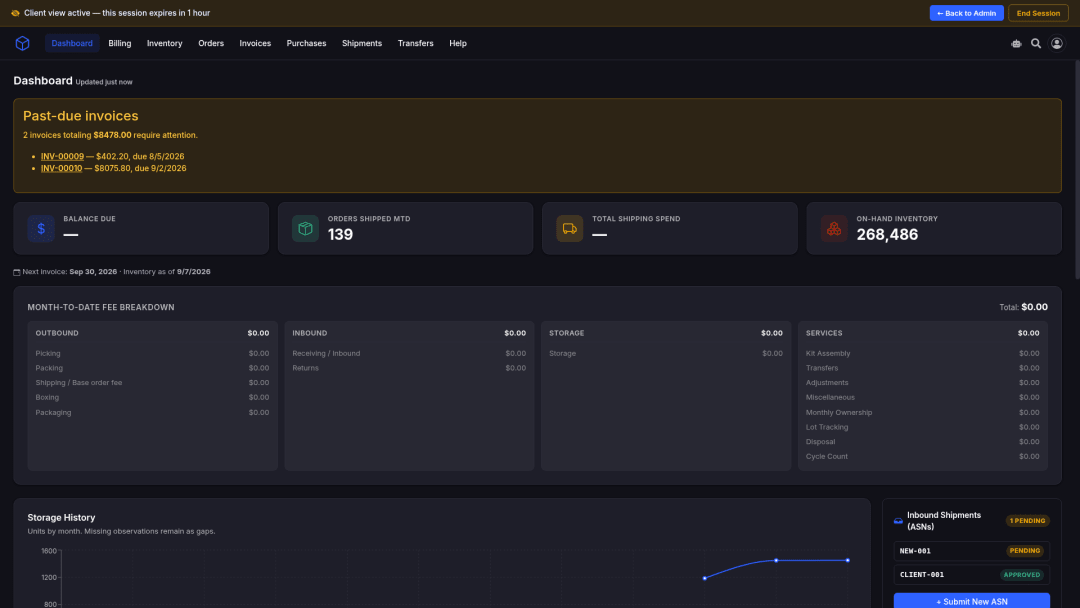
The portal home summarizes shipped-order KPIs, on-hand inventory, next invoice date, estimated billing, charts, past-due invoice links, and shipping trends so brands stop asking ops for status updates.
Today & MTD shipped orders
See today's and month-to-date shipped-order counts without waiting on an ops export.
On-hand inventory snapshot
Current inventory context on the home view so brands know what they hold before opening the full inventory screen.
Next invoice date
Surface the next expected invoice timing so finance can plan collections and reviews.
Estimated billing where permitted
When regular billing is enabled, display accurate estimated billing totals calculated directly from verified system activity.
Charts & trends
Itemized billing charts plus inbound and shipping trends help brands spot volume shifts early.
Past-due invoice links
Past-due invoices stay prominently linked until they are no longer past due.
Server-scoped session
Everything on the dashboard is limited to the signed-in client's own account data.
Open the product host
Start at https://3pl.skusavvy.com/. In-app navigation takes brands to inventory, orders, ASNs, ledger, and invoices for their signed-in account.
INVENTORY & OCCUPANCY
Stock and location context without a price calculator
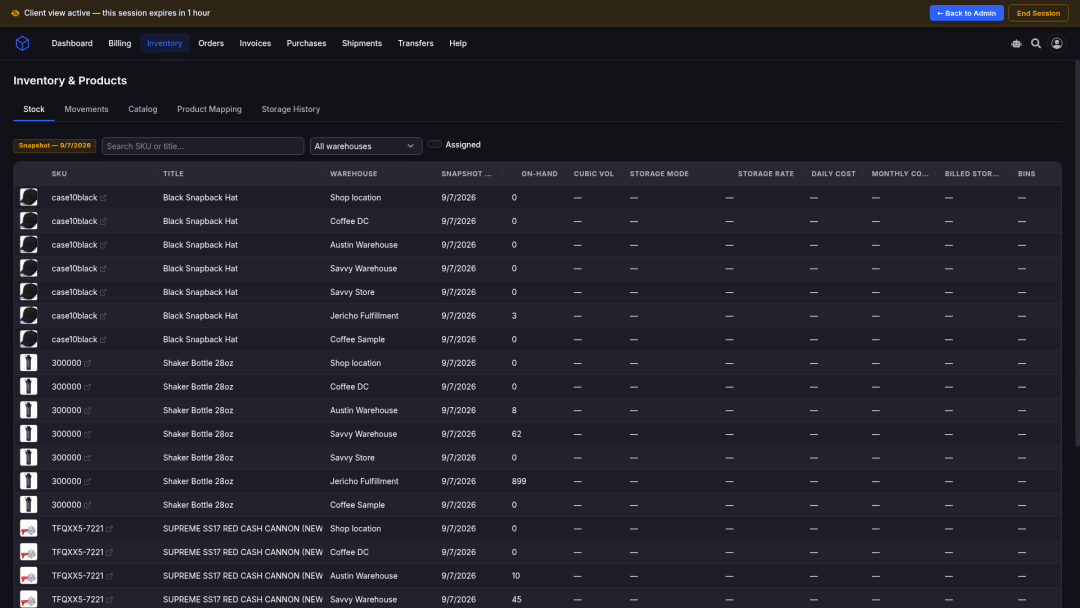
Clients browse inventory by product or variant and warehouse, with SKU, barcode, image, quantities, and committed or expected where available. Occupancy shows location counts, types, weeks occupied, and billed state as explanation, not a client-side storage price calculator.
Browse by product & warehouse
Filter and open inventory by product/variant and warehouse with the client-visible identity used across inbound workflows.
Committed & expected
Where available, committed and expected quantities sit beside on-hand so brands can plan without guessing.
Snapshot or live quantities
Depending on account setup, inventory is sourced from a current snapshot or live quantities. Pending enrichment shows as pending, not a fabricated name.
Occupancy as explanation
Location counts, types, weeks occupied, and billed state explain storage service. The portal never asks the browser to infer a storage total from bins or rates.
Movements history
Filter movements by type, product, date, and billing state. See quantity changes, warehouse context, billing status, and final amounts when regular billing permits.
Transfer rows labeled
Transfer activity can appear in movement history as a clearly labeled transfer row.
Products & warehouses
Read-only product catalog and warehouse views identify operational scope for planning and inbound submissions.
No cost-plus on inventory
Clients never see private carrier costs, internal rates, markup configuration, or another client's stock.
ORDERS & ASNs
Outbound detail and inbound notices in one portal
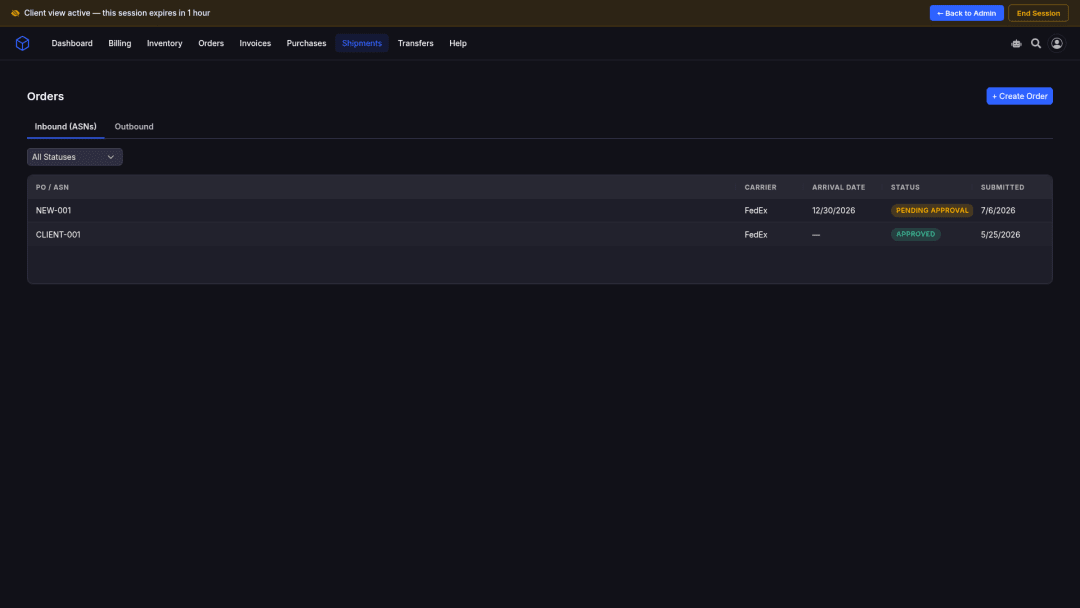
Clients list and open orders with line items, carriers, services, boxes, tracking, lots, timelines, and server-generated cost breakdowns. They review inbound POs and submit ASNs while pending. Approved or rejected ASNs become read-only on purpose.
Orders & shipments
List, filter, and open outbound orders. Inspect shipments, carriers, services, boxes, tracking numbers, lots and expiration dates, and a chronological timeline.
Server cost breakdowns
Detail pages show per-event cost breakdowns calculated on the server to ensure billing accuracy.
Purchase orders
Inbound POs show status, warehouses, ordered and received units, shipments, receiving progress, and applicable receiving charges when presentation permits.
ASN create with CSV prefill
Submit an Advance Shipment Notice with lines, quantities, arrival date, warehouse, lots, expiration dates, notes, and tags. CSV import can pre-fill the form.
Editable while pending
Clients can edit an ASN while it is pending approval. Once approved or rejected, the ASN locks to maintain an accurate inbound audit trail.
No client delete after decision
Clients cannot delete an ASN after approval or rejection, keeping your receiving history complete and reliable.
Outbound submissions
Prepare and submit outbound orders, including CSV-assisted entry. Edit or cancel while pending; later states become read-only.
Own-account scope only
Order and ASN views never widen into another client's records or an operator console.
TRANSFERS & MOVEMENTS
Site-to-site work clients can actually follow
Clients list and open transfers, filter by status, origin, destination, dates, and search text, inspect line items and quantities, and view transfer fees and warehouse movement context, without seeing the commercial details behind those fees.
Transfer list & detail
Filter transfers by status, origin, destination, dates, and search. Open line items, quantities, sites, and status.
Transfer fees as finals
Clients see transfer totals and safe fee context, never unit-rate config or cost-plus inputs.
Movement filters
Inventory movements filter by type, product, date, and billing state with quantity, warehouse, and billing status.
Billed / pending / not billable
Simplified billing omits dollar amounts cleanly without displaying misleading zero-dollar figures.
No double-bill confusion
When transfer-order charging is enabled, underlying movement events are not separately billed. Clients still see labeled transfer context in history.
Warehouse movement context
Transfer detail includes warehouse movement context so brands understand where units moved and why a fee appeared.
LEDGER, INVOICES & PAY NOW
Commercial truth clients can review, and pay when ready
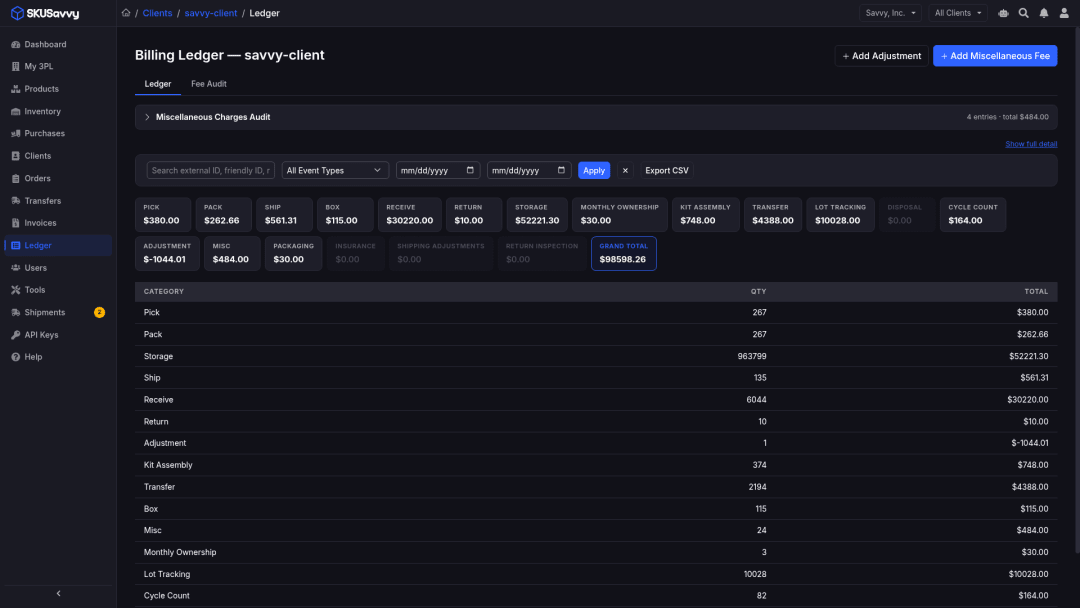
The ledger supports event-type and date filters, pagination, grouped totals, invoice links, safe references, and CSV export. Invoices show status, line groups, and PDF download. ACH Pay Now appears once the store's receiving bank account is connected. An invoice is paid when the transfer settles.
Ledger filters & CSV export
Filter and group ledger rows, export CSV, and open related invoice links from safe references.
Regular vs simplified
Regular clients receive final amounts and totals. Simplified clients keep rows, statuses, quantities, and safe descriptions while dollar fields are omitted.
Rollup is presentation
Rollup groups ordinary event types on the invoice while preserving period-level adjustment reasons: presentation only, not a second ledger.
Invoice lifecycle
Clients see Draft, Sent, Payment Pending, Paid, Overdue, or Cancelled states with line-item groups and safe descriptions.
PDF in saved presentation
Download PDFs in the client's saved regular, simplified, or rollup presentation.
Pay Now when the route is ready
ACH is offered only when the invoice is eligible, receiving routing is active, the payment service is ready, and no unresolved authorization already exists.
Paid when the transfer settles
When a client authorizes the debit, the invoice moves to Payment Pending. It moves to Paid when the transfer settles, and back to unpaid if the transfer fails or is returned.
Duplicate debit protection
A second debit for the same invoice is blocked while an authorization is reconciled or a transfer already exists.
ACH bank payments
Invoices support direct ACH Pay Now payments when configured for your warehouse receiving route.
Manual payment stays operator-side
Recording a payment collected outside automated ACH is an operator action. Clients do not get a card rail from that workflow.
ISOLATION & ASSISTANCE
Own-account self-serve with finals only
Access is enforced server-side. A client cannot turn a portal request into an operator request, and an administrator cannot use a client selector to broaden a client session. Search and SavvyBot stay inside permitted own-account data; ledger and invoice remain the commercial authority.
Client data stays isolated
Clients see final applicable charges for their own account only, never cost-plus inputs, rate-card formulas, rule IDs, or another client's data.
No operator console widen
A client session cannot widen into another client or an operator console. Staff access stays intentionally narrower than administrator access.
Search their own records
Clients can search their own accessible platform records. Results never include other clients.
SavvyBot answers questions
Clients can ask SavvyBot about their own records. It never widens what they can see.
Profile & password
Clients can check their session, log out, change password, and update profile information after first-time invited password change.
Payment routing hidden
Operator payment routing setup and manual payment recording controls stay operator-side. Clients only see Pay Now when the store route is ready.
The client portal journey
From invite to ACH when ready: the self-service loop brands actually run.
1. Invite and sign in
Client users sign in with email and password on the portal host. Invited users change a temporary password. A secure session cookie keeps subsequent requests authenticated within their own account.
2. Orient on the dashboard
Home KPIs show shipped orders, on-hand inventory, next invoice date, charts, and past-due links so brands know what needs attention before digging into detail.
3. Check inventory and occupancy
Browse stock by warehouse and product. Use occupancy for location and weeks-occupied context, not as a live storage price calculator.
4. Plan inbound with ASNs
Review purchase orders and submit Advance Shipment Notices with lines, arrival, warehouse, lots, and optional CSV prefill. Edit while pending; approved or rejected ASNs lock for audit.
5. Follow orders, outbound, and transfers
Open order and shipment detail, prepare outbound submissions while pending, and review transfers with quantities, sites, status, and fee context.
6. Review ledger and invoices
Filter ledger rows, export CSV, open invoices, and download PDFs in the saved presentation: regular amounts, simplified no-dollar views, or rollup grouping.
7. Pay when ACH is ready
When the store receiving route and payment service are ready, eligible invoices expose Pay Now. Authorization moves the invoice to Payment Pending, and it is paid when the transfer settles. Talk to us about collections fit for your stores.
Frequently asked questions
Straight answers for 3PL operators and brands evaluating a scoped client portal.
What is a 3PL client portal?
A scoped self-service app where each brand sees their own inventory, orders, ASNs, transfers, ledger context, invoices, and payment status, without cost-plus details or another client's data.
- Open it at https://3pl.skusavvy.com/
- You control rate cards and payment settings
- Clients see final charges, or a simplified view without dollar amounts
What can clients do in the SKUSavvy 3PL client portal?
Dashboard, inventory and occupancy explanation, movements, orders and shipments, POs plus ASN create/edit while pending, outbound submissions, transfers, ledger and exports, invoices and PDF, Pay Now when ready, search, and scoped SavvyBot.
- Every client sees only its own account
- An ASN locks after you approve or reject it
- Occupancy shows storage context, not a price estimate
Can one brand see another brand's inventory or invoices?
No. Access is enforced server-side. A client session cannot widen into another client or an operator console.
- Own-account inventory, orders, ASNs, transfers, ledger, invoices
- Never private cost inputs or markup configuration
- SavvyBot and search stay inside the same scope
Do clients see my rate-card formulas and cost-plus inputs?
No. Clients see final applicable charges according to their invoice presentation or a simplified view that omits dollar fields on purpose. Rule IDs and unit-rate config stay operator-side.
- Regular billing shows final amounts
- Simplified billing leaves amounts out instead of showing zeros
- Rollup changes how the invoice reads, not the ledger
Can clients pay invoices in the portal?
Yes, by ACH bank transfer, once the store's receiving bank account is connected. The invoice is paid when the transfer settles.
- Payment by ACH bank transfer
- Payment Pending until the transfer settles
- Only operators can record payments collected elsewhere
Is occupancy a live storage price calculator?
No. Occupancy shows location counts, types, weeks occupied, and billed state as operational explanation. Storage charges come from configured accrual on the ledger, not from browser-side math on bins or rates.
- Useful context for brands reviewing stock
- Not a guarantee of a live price estimate
- Missing enrichment shows as pending sync
Can clients edit or delete ASNs after approval?
An ASN is editable while pending approval. Once approved or rejected, editing is disabled and clients cannot delete the record, protecting your inbound audit trail.
- CSV prefill with row-level parse feedback
- Lines, quantities, arrival, warehouse, lots, notes
- Read-only after decision is intentional
How does the portal relate to rate cards and invoicing?
Operators configure rate cards and generate invoices from the ledger. The portal is where clients review the resulting operational truth and safe billing context, and pay when ACH is configured.
- Rate cards set each client's prices
- Invoicing turns the ledger into invoices
- Activity billing turns warehouse events into ledger lines
Does SavvyBot replace the ledger or invoice?
No. Search and SavvyBot help clients find permitted records and ask questions inside their scope. Final billing decisions should be verified against the ledger and invoice.
- Helps clients find their own records
- The ledger and invoice stay the final word
- Never shows another client's data
Where do brands open the portal?
Brands sign in at https://3pl.skusavvy.com/ with the invite you send them.
- Sign in at https://3pl.skusavvy.com/
- Questions? Use the contact form below
- Talk to us about the right setup for your warehouse
Explore the 3PL product pages
Dive deeper on the billing hub, rate cards, invoicing, and activity billing. Open the product at https://3pl.skusavvy.com/ or talk to us about fit.
3PL billing hub
Warehouse activity → rate-card ledger → invoices → client self-serve. Start with the full product story.
Rate cards
Configure per-client pick, pack, storage, shipping margins, and VAS. Amounts stay on the card.
Invoicing
Ledger → review/adjust → PDF → ACH Pay Now when your store receiving route is ready.
Activity-based billing
Orders, receipts, returns, transfers, and shipments become ledger lines to stop spreadsheet reconciliation.
Give brands a portal that respects isolation
Open the 3PL portal to explore client self-serve for inventory, orders, ASNs, and invoices, or talk to us about onboarding and ACH readiness.