Activity-based 3PL billing from real warehouse events
Orders, receipts, returns, transfers, shipments, kitting, and scheduled storage become ledger lines priced from each client's rate card. Stop reconciling ops exports into billing sheets. Price the work as it happens, then invoice from the ledger.
What is activity-based 3PL billing?
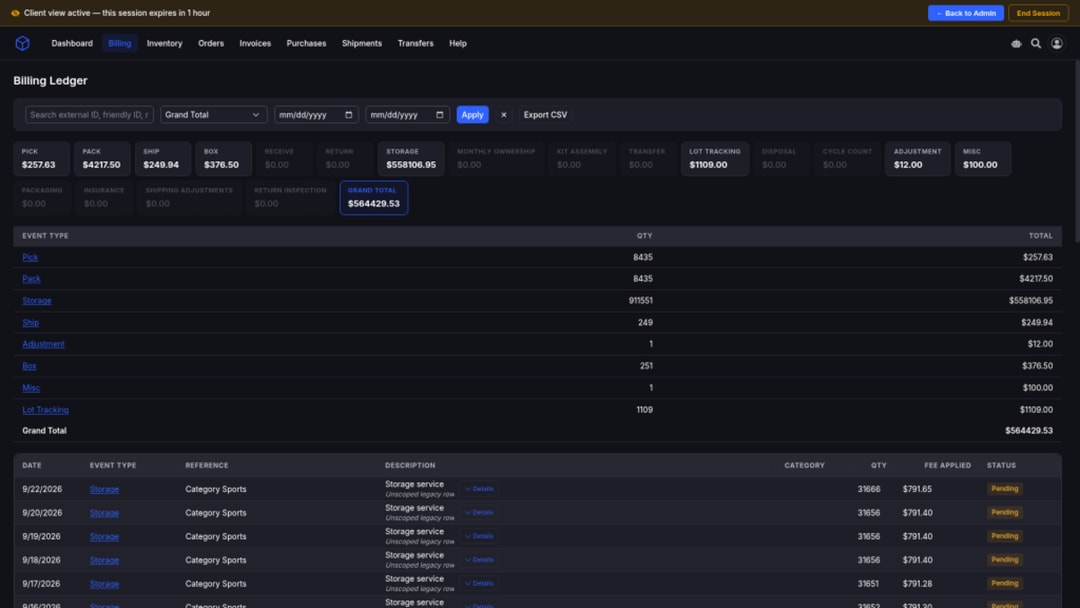
Activity-based billing turns warehouse events (orders, receipts, returns, transfers, shipments, kitting, and scheduled storage) into ledger lines priced from each client's rate card. You invoice from that ledger instead of rebuilding totals in a spreadsheet.
Who it’s for
Operators who need warehouse activity priced into client ledgers without living in spreadsheets or inventing charges when a rate or trigger is missing.
Spreadsheet-weary 3PLs
Multi-brand storage, pick/pack, and shipping margins tracked in fragile workbooks that disagree with the floor.
Ops-led commercial teams
Want charges tied to confirmed receives, fulfilled shipments, and transfer orders, not ordered-qty guesses or silent estimates.
Teams that need exceptions visible
Missing source cost and ambiguous attribution stay reviewable instead of inventing a charge.
Warehouse events → rate card → ledger lines
Configured rates plus qualifying events become auditable ledger rows. No rate or no trigger means not billable, not a fake zero. Invoice from the ledger when the period is ready.
Events become money
Fulfilled shipments, confirmed receives, kit conversions, transfer orders, and scheduled storage create ledger lines when the client's rate card has a matching fee.
No rate or trigger = not billable
Missing configuration does not invent a silent estimate. Not billable is an honest state, not a zero-dollar charge pretending to be free work.
Transfers without double-billing
Transfer-order out and in charge at shipment and check-in. Underlying movement events are not separately billed when transfer-order charging is on.
Occupancy explains, it does not price
Occupancy shows location context for storage service. It is not a live browser calculator that invents storage totals from bins and rates.
ACTIVITY → LEDGER
Bill the work that actually happened
Scheduled sync and event-driven webhooks bring order, shipment, receiving, restock, kit, transfer, and related events. Retries use duplicate protection so the same event does not intentionally create a second charge. Operators review unattributed or incomplete work instead of inventing amounts.
Idempotent event capture
Webhook retries and resync jobs use duplicate protection, so the same qualifying event does not intentionally create a second charge.
One ledger per client
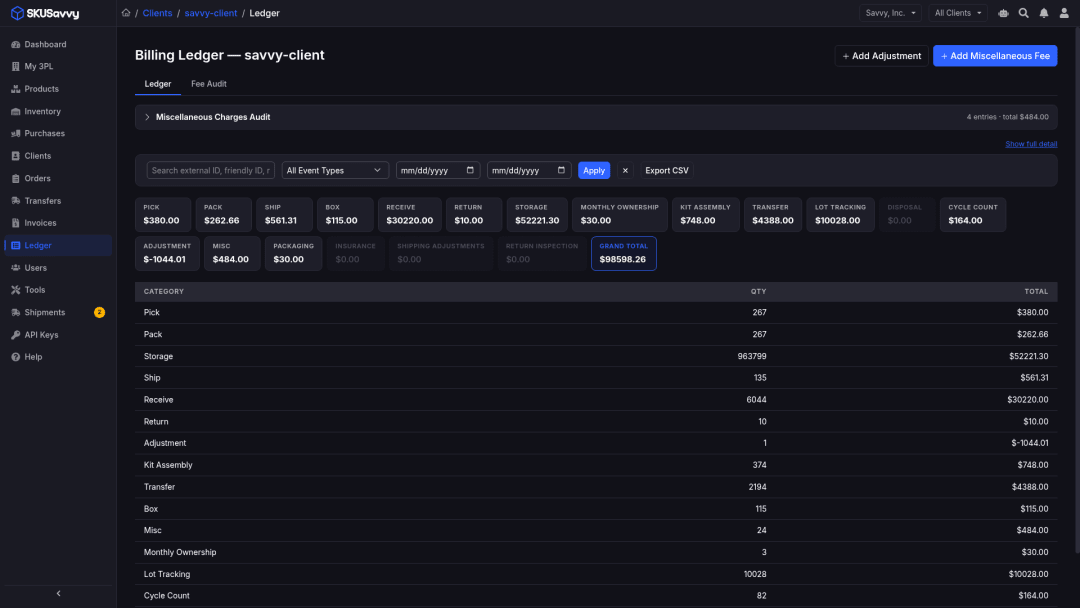
Each billable event becomes a row with type, quantity, description, reference, amount when permitted, and invoice state.
Pending until ready
A row can remain pending until the required event or invoice process finishes, avoiding silent rewrites after invoice.
Exceptions stay visible
Missing source cost and ambiguous attribution surface for operator review rather than inventing a charge.
Grouped totals for month-end
Review event breakdowns and grouped totals before generating invoices from the ledger.
Exports without sheet-as-SoR
Export for offline analysis when needed. The ledger stays the commercial system of record.
Client-safe presentation
Clients see final applicable charges or simplified views, never cost-plus guts or rule IDs.
Health vs empty upstream
Health views distinguish empty upstream from failed upstream requests so sync failures are not mistaken for quiet success.
FULFILLMENT & SHIPPING
Fulfilled shipments drive the commercial stack
When a shipment is fulfilled, configured fulfillment and shipping fees price from the client's rate card into ledger lines. Cancellation can void un-invoiced fulfillment rows before adding a cancellation charge.
Base order
A base service charge when a shipment is fulfilled, flat per fulfilled shipment when configured.
Pick bands that match your card
Two-band cutoff or three-tier brackets price pick work from the rate card, not a rebuilt spreadsheet each month.
Case pack & pack
Case pack (tag + rate/category) and pack per shipped unit when those fees are configured on the card.
Minimum order shortfall
Brings a shipment up to a commercial minimum after ordinary shipment charges; only the shortfall is added.
Cancellation handling
Cancellation can void un-invoiced fulfillment rows before adding a configured cancellation charge.
Lot tracking service
Per eligible lot-day from a monthly rate when lot traceability is in scope for the client.
Carrier shipping + optional margin
Final client charge reflects resolved shipping policy. Clients never see private carrier cost or markup inputs.
Surcharges, boxes, materials
Carrier surcharge, box count, and packaging materials price when rates and shipment evidence exist.
Shipping adjustments
Operators can create approved post-shipment shipping corrections; resulting rows may be client-visible as finals.
Missing cost stays reviewable
Unknown source shipping cost is flagged for operator review rather than replaced with a silent checkout guess.
RECEIVING & RETURNS
Confirmed received quantity is the billing basis
Receive fees price on confirmed received units. Ordered quantity is not substituted for missing receipt quantity. Returns, inspection, disposal, and cycle counts price when rates and events exist.
Receive on confirmed qty
Per confirmed received unit, or a fixed fee at the configured boundary: purchase order, line item, or shipment.
No ordered-as-received swap
Ordered quantity is not used as a stand-in when receipt quantity is missing. The event must confirm what landed.
Return processing
Per-unit return fees when configured; a return rate takes precedence, otherwise a configured receiving rate can apply.
Return inspection
Inspection work prices when the rate card and return events support it, not as an automatic free pass.
Disposal
Per unit disposed when disposal movements and rates are configured.
Cycle counts
Cycle-count fees apply when configured rates and qualifying count events exist.
Inbound visibility for clients
Clients can review inbound progress in the portal; commercial amounts follow their presentation settings.
Not billable when unconfigured
If the card has no receive/return fee and no qualifying trigger, the work stays not billable, not a fake zero.
KITTING & TRANSFERS
Kit conversions and transfer orders without double charges
Kit assembly and kit pick price from conversion movements. Transfer-order out and in charge at shipment and check-in without double-billing underlying movement events when transfer-order charging is enabled.
Kit assembly
Flat kit rate, or three component-count tiers for two-part, three-part, and four-or-more-part kits when tiers are configured.
Kit pick
Flat pick rate per unit on kit-conversion movements. Movement-level work uses flat pick pricing, not order-level tier logic.
Transfer out
Units shipped from an origin warehouse on a transfer order using a dedicated outbound rate or shared transfer fallback.
Transfer in
Units checked into the destination warehouse using a dedicated inbound rate or shared transfer fallback.
No double-bill on movements
Transfer movement events themselves are not separately billed when transfer-order charges are enabled.
Clear transfer rows
Clients see transfer totals and a clearly labeled transfer row in movement history.
Historical kit backfill
Supported backfill uses the flat kit rate when component count is unavailable for tiered pricing.
Conditional by configuration
Catalog presence of kit or transfer fees is not a promise every client receives every fee.
STORAGE & MONTHLY SERVICES
Scheduled storage accrual: occupancy is not a calculator
Daily unit, pallet, and location storage accrue on schedule; rows can update while uninvoiced. Storage minimums, category minimums, ownership, and peak-value insurance apply under their documented conditions. Occupancy explains location context; it does not invent a live price.
Daily unit storage
Per unit per day with optional product-category rate overrides, featuring scheduled accrual that is mutable until invoiced.
Pallet storage
Per pallet per day using configured units per pallet when that storage mode is active.
Location storage
Rules by location type with daily-tally or monthly-peak methods. Clients see aggregate Storage plus safe location context, never per-location rates.
Storage minimum
Monthly minimum prorated for supported modes when computed daily storage is positive but below the prorated minimum.
Monthly category minimums
Separate minimums for pick, receive, kitting, and return, evaluated at invoice generation for shortfalls only.
Ownership & peak-value insurance
Apply under documented conditions when valuation evidence is complete, not invented on incomplete data.
Occupancy ≠ price calculator
Occupancy shows location counts, types, and weeks occupied as explanation. The portal never asks the browser to infer storage totals from bins and rates.
Schedule-driven honesty
Storage snapshots and monthly services run on a cadence. Sync and scheduled accrual are the honest model, not absolute real-time everything.
MISC & ADJUSTMENTS
Operator-approved work, not an automated time clock
Fee Entry and admins record approved miscellaneous charges and manual adjustments. Non-standard or labor-like work lands as misc or adjustment rows when operators authorize it, not as an automated hourly time-clock feed.
Miscellaneous entries
Non-standard services authorized by an operator, using a rate-card default or explicit per-entry amount.
Manual adjustments
Credits, charges, corrections, or other approved billing changes with explicit quantity and amount.
Adjustment-reason fees
Configured reason-based fees when your commercial model needs labeled corrections.
Invoice surcharges
Percentage surcharge included when an invoice is created for clients whose terms require it, applied after ordinary charges and minimums.
Fee Entry role
Scoped staff can record approved miscellaneous charges without owning full admin write access.
Approved labor-like work
Capture approved labor-like work as miscellaneous or adjustment rows when operators authorize it, not as an automated time-clock feed.
Client-visible finals only
Resulting charges may appear on the client ledger/invoice as finals, never private cost inputs.
Review before invoice
Investigate warnings and add approved entries before generation closes the period.
Frequently asked questions
Straight answers for 3PL operators evaluating activity-based billing: events to ledger lines, not spreadsheet rebuilds.
What is activity-based 3PL billing?
Warehouse events (orders, receipts, returns, transfers, shipments, kitting, and scheduled storage) become ledger lines priced from each client's rate card. You invoice from that ledger instead of rebuilding totals in a spreadsheet.
- Configured rate + qualifying event = ledger row
- No rate or no trigger = not billable (not a fake zero)
- Clients see finals or simplified views, never cost-plus guts
Which warehouse events become billable?
Fulfillment and shipping on fulfilled shipments; receiving on confirmed received quantity; returns, inspection, disposal, and cycle counts when configured; kit assembly and kit pick; transfer-order out/in; scheduled storage and monthly services; plus operator-approved misc and adjustments.
- Catalog presence ≠ every client gets every fee
- Amounts live on the per-client rate card
What does “not billable” mean?
When there is no applicable rate or no qualifying trigger, the platform does not invent a charge. Not billable is an honest state; it is not a zero-dollar line pretending the work was free.
Do transfers get double-billed?
No. When transfer-order charging is enabled, transfer out and transfer in price at shipment and check-in. Underlying movement events are not separately billed for the same transfer work.
Is occupancy a storage price calculator?
No. Occupancy explains location counts, types, and weeks occupied. Storage amounts come from scheduled accrual against the rate card. The browser does not infer a storage total from bins and rates.
Does this include automated hourly labor billing?
Non-standard or labor-like work is recorded as operator-approved miscellaneous charges and manual adjustments. Fee Entry and admins authorize those rows; there is no automated hourly time-clock labor feed.
How do events reach the ledger without duplicates?
Scheduled synchronization and event-driven webhooks bring operational events. Retries use duplicate protection so the same event does not intentionally create a second charge. Operators can request supported resync and backfill, then review exceptions.
What is required before billing appears?
Store, warehouse scope, client assignment, and source mapping must be in place before meaningful inventory or billing appears. Events arrive through sync and webhooks; storage accrues on schedule; that is the honest timing model.
Where do rate cards and invoices fit?
Rate cards hold the commercial model. Activity billing writes ledger lines. Invoicing reviews, adjusts, and generates statements from the ledger, including ACH Pay Now when your store receiving route is ready.
- Rate cards: /3pl-rate-cards
- Invoicing: /3pl-invoicing
- Product host: https://3pl.skusavvy.com/
Where do I open the product?
Start at https://3pl.skusavvy.com/. In-app navigation takes you to clients, rate cards, ledgers, and invoices for your signed-in account. Talk to us if you want help mapping your events to billable lines.
Explore the 3PL product pages
Dive deeper on rate cards, invoicing, and the client portal, or return to the billing hub. Open the product at https://3pl.skusavvy.com/ or talk to us about fit.
3PL billing hub
Warehouse activity → rate-card ledger → invoices → client self-serve. Start with the overview.
Rate cards
Configure per-client pick, pack, storage, receiving, kitting, transfers, and misc fees.
Invoicing
Review ledger activity, adjust, generate PDFs, and collect with ACH Pay Now when the route is ready.
Client portal
Scoped brand access to inventory, orders, ASNs, ledger context, and invoices without cost-plus guts.
Bill the work that actually happened
Open the 3PL portal to explore activity billing, or talk to us about wiring your warehouse events to rate cards and ledgers.