3PL rate cards that price pick, pack, storage, and VAS per client
Set each client's prices once, and every warehouse event is priced from that card.
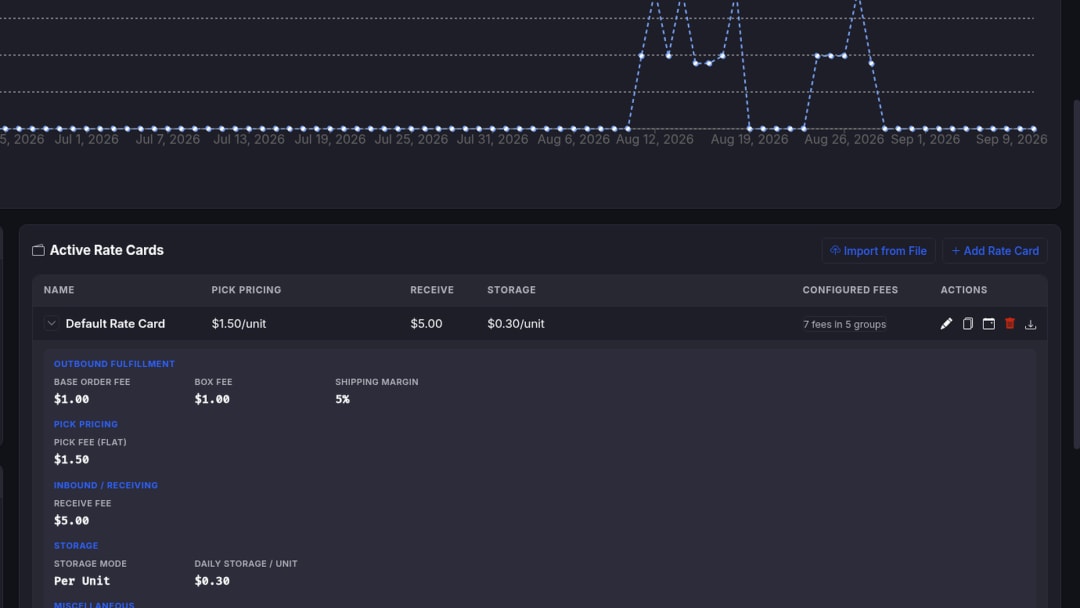
What is a 3PL rate card?
A rate card is each client's schedule of service prices and rules. In SKUSavvy, warehouse events that qualify are priced against that card into an auditable ledger, then into invoices.
Who it’s for
Operators who need per-client fee schedules without rebuilding pick, pack, storage, and VAS math in a shared sheet every month.
Operators setting commercial terms
Need per-client schedules for pick bands, storage modes, carrier margins, and VAS without rebuilding math in Excel each month.
Multi-client 3PLs
Assign rate cards and product mappings per brand to handle different minimums, packaging rules, and special conditions.
Billing viewers & owners
Owners and admins write rate cards and fee rules. Billing Viewer staff review cards read-only within assigned stores.
Build per-client commercial models instead of one-size fee lists
Connect stores and warehouses, assign each client a rate card, map products where special handling applies, then let configured events price into the ledger.
Customize fee schedules for every client
Fee families in the catalog are available when configured. Each client receives only the specific fees configured on their assigned card.
Clients see finals only
Client views show final applicable charges according to your presentation rules, never revealing cost-plus inputs, markup formulas, or unit-rate configuration.
Assign cards per brand
Give each client a dedicated commercial schedule for pick bands, storage modes, carrier margins, VAS, and minimums without sharing another brand's rules.
Pricing shapes the card can express
Per-unit, fixed, tiered, per-order, per-box, per-pallet, per-location, monthly, and minimum-charge models. Regular, simplified, or rollup presentation without changing ledger math.
CLIENT ASSIGNMENT
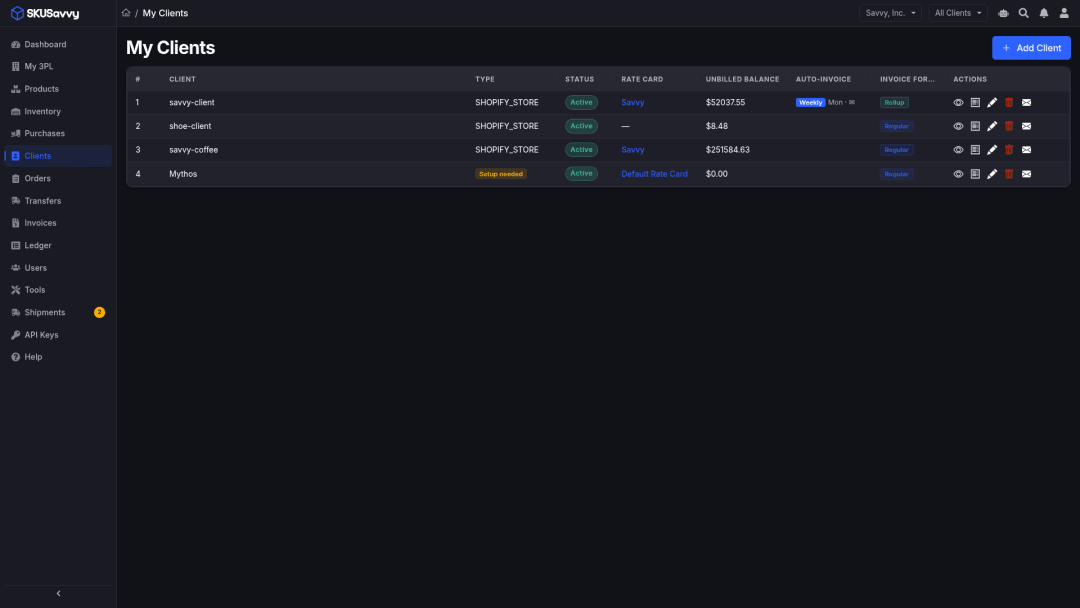
Assign one card per client with custom mapping for special handling
Assign a rate card to each brand, then attach product or category mappings when case-pack, storage overrides, or other conditional fees need them. Owners write; Billing Viewer reviews read-only.
Per-client schedules
Different minimums, packaging rules, and storage modes per brand without a shared workbook.
Product & category mapping
Attach special handling where case-pack tags, category rates, or storage overrides apply.
Owner / admin write access
Owners and admins configure cards and fee rules for assigned stores.
Billing Viewer read-only
Scoped staff can review rate cards without changing commercial terms.
Store + warehouse + client
Meaningful billing needs store, warehouse, client, and mapping in place first.
Check before you bill
Review the client's effective rates before the billing period closes.
FULFILLMENT
Base order, pick bands, pack, and related order fees
Base order
Flat service charge when a shipment is fulfilled, general when configured.
Pick: two-band or three-tier
Two-band cutoff with flat-rate fallback, or three-tier brackets (unit one, mid band, above). Three-tier replaces two-band when its first-tier setting is active.
Case pack
Per case-pack unit when the order tag and rate or category rule match. Replaces ordinary pick only for matching orders.
Pack
Packing labor per shipped unit, general when configured.
Minimum order
Brings a shipment up to a commercial minimum after ordinary shipment charges, adding only the shortfall.
Cancellation & lot tracking
Flat cancellation when configured. Lot tracking prices per eligible lot-day from a monthly rate for eligible lot inventory.
SHIPPING & PACKAGING
Carrier shipping, surcharges, boxes, and materials
Clients see final shipping and packaging charges, keeping your private carrier costs and markup inputs hidden. If a carrier cost is missing, the line is flagged for review.
Carrier shipping + optional margin
Pass-through shipping with an optional configured service margin. Carrier-specific rules can override the default percentage.
Carrier surcharge
Flat amount by carrier rule, conditional and operator-configured.
Box
Per box using the fulfilled shipment’s box count when boxes and a rate are present.
Packaging materials
Catalog/actual material pricing or an approved client-facing configured price. Client sees the resulting charge only.
Shipping adjustment
Operator-created post-shipment correction. The resulting row can appear on the client ledger and invoice.
Finals, not cost-plus
Client views never reveal private carrier cost, markup formulas, or unit-rate configuration.
RECEIVING & RETURNS
Receive, return, inspection, disposal, and cycle count
Confirmed received quantities serve as the billing basis for receiving fees. Ordered quantities are never billed in place of received counts.
Receive
Per confirmed received unit, or a fixed fee at purchase-order, line-item, or shipment boundary when configured.
Return
Per unit restocked from a return. A return rate takes precedence; otherwise a configured receiving rate can apply.
Return inspection
Per returned unit, appearing alongside the return charge when configured.
Disposal
Per unit disposed. Movement, ledger, and invoice visibility follows client presentation rules.
Cycle count
Per unit counted, visible in movement and billing views.
Charged only when configured
A fee applies only when you set its rate and the triggering work happens, so invoices carry no zero-dollar lines.
STORAGE
Daily unit, pallet, location, minimums, and insurance
Storage accrues on schedule and updates while uninvoiced. Occupancy details explain location context clearly without acting as a live price calculator.
Daily unit storage
Per unit per day with optional product-category rate overrides, general where configured.
Pallet storage
Per pallet per day using configured units per pallet as a conditional storage mode.
Location storage
Rules by location type with daily-tally or monthly-peak methods. Clients see aggregate storage plus location context, never per-location rates.
Storage & category minimums
Monthly storage minimum (prorated) when computed daily storage is positive but below the minimum. Separate monthly category minimums for pick, receive, kitting, and return.
Ownership
Flat monthly account or inventory ownership service, generated on the first day of the month.
Peak-value inventory insurance
Percentage of verified peak inventory value for the period, calculated when configured percentage and valuation evidence exist.
KITTING
Kit assembly and kit pick from conversion work
Kitting fees price from kit-conversion movements when rates are configured. Tiered assembly needs all tier rates; historical backfill can use the flat kit rate.
Kit assembly
Flat kit rate, or three component-count tiers for two-part, three-part, and four-or-more-part kits.
Kit pick
Flat pick rate per unit on kit-conversion movements using ordinary flat pick pricing instead of order-level tier logic.
Conditional on rates
Tiered pricing is conditional on all tier rates being present for that card.
Movement-level truth
Assembly and pick charges attach directly to actual conversion movements, eliminating spreadsheet guesses.
TRANSFERS & MISC
Bill inbound and outbound transfers accurately without double-billing
Transfer-order charges bill at shipment and check-in. Movement events are not separately billed when transfer-order charging is enabled. Miscellaneous and adjustment rows are operator-created where required.
Transfer out
Units shipped from an origin warehouse on a transfer order using a dedicated outbound rate or shared transfer fallback.
Transfer in
Units checked into the destination warehouse using a dedicated inbound rate or shared transfer fallback.
No double-billing movements
When transfer-order charges are on, underlying movement events are not billed again.
Miscellaneous
Non-standard service authorized by an operator, rate-card default or explicit per-entry amount.
Manual adjustment & reason fees
Credits, charges, and corrections with explicit quantity/amount. Adjustment-reason fees for supported inventory changes.
Configured invoice surcharge
An optional percentage added when an invoice is created, for clients whose terms include it.
ROLES & ACCESS
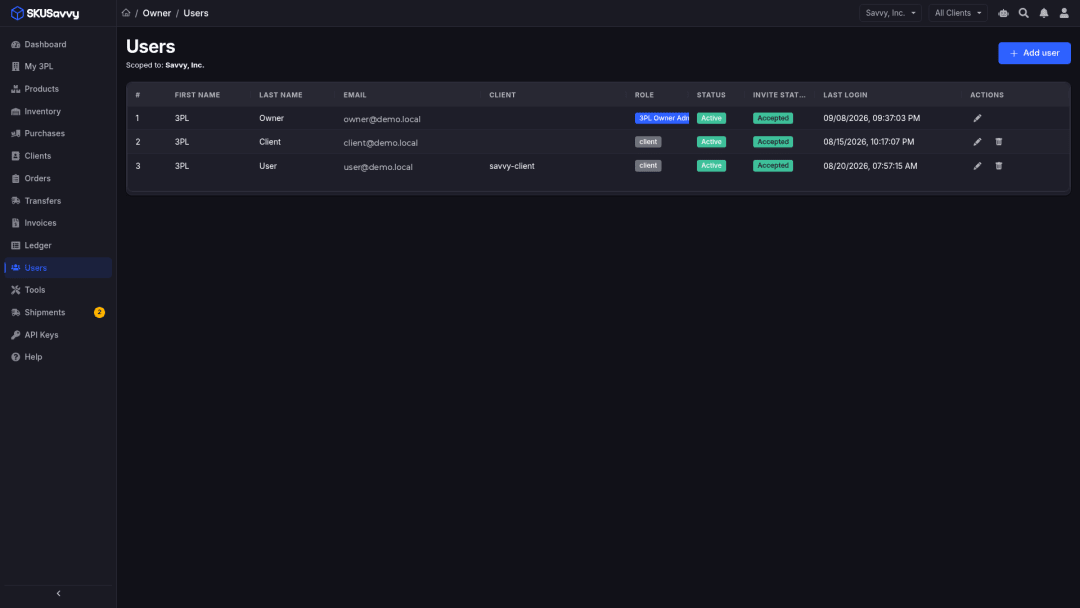
Owners write commercial terms while Billing Viewers review
Rate cards and fee rules stay under owner/admin write access. Billing Viewer staff can review clients, ledger activity, invoices, and rate cards read-only within assigned stores.
Owners & admins
Configure stores, warehouses, clients, rate cards, fee rules, billing calendars, users, payment routing, and integrations.
Billing Viewer
Reviews clients, ledger activity, invoices, rate cards, and billing warnings in read-only mode with no commercial write access.
Fee Entry
Records approved miscellaneous charges without full commercial admin rights.
Floor roles stay scoped
Receiving clerks, fulfillment staff, and warehouse staff work inbound, outbound, and inventory within assigned stores without accessing rate-card editors.
Clients: finals only
Portal users see final applicable charges or simplified views for their own account, never seeing another client's data or private cost inputs.
Server-side isolation
A client session cannot widen into another client or an operator console via UI selection.
How charges appear to clients
Ledger and invoice lines follow the client's billing format, and each line shows its status.
Pending: the work is recorded and the client sees its status before the amount is final
Billed: final ledger row per presentation rules
Invoiced: attached to an invoice and linkable from the ledger
Not billable: no applicable charge exists
Simplified: operational context without client dollar fields
Frequently asked questions
Straight answers for operators evaluating per-client rate cards and fee families.
What is a 3PL rate card in SKUSavvy?
A rate card is each client’s configured schedule of service prices and rules. Warehouse events that qualify price against that card into an auditable ledger, then into invoices.
Does every client get every fee in the catalog?
No. Catalog presence means a fee family is available when configured. Each client only receives the fees and pricing modes assigned on their card and triggered by real events.
- Configure only the families you charge today
- Map products/categories where conditional rules apply
- Verify the effective schedule before billing
What do clients see on charges?
Final applicable charges according to regular, simplified, or rollup presentation, never cost-plus inputs, markup formulas, rule IDs, or unit-rate configuration.
Who can edit rate cards?
Owners and admins write rate cards and fee rules. Billing Viewer staff can review cards read-only within assigned stores. Fee Entry can record approved miscellaneous charges without full commercial admin rights.
Which fee families can a card express?
Fulfillment, shipping, packaging, receiving, returns, storage, kitting, transfers, and miscellaneous adjustments. Rates and calculation modes live directly on each card.
How do rate cards connect to activity billing and invoicing?
Configured rates plus qualifying warehouse events create ledger rows. Operators review and adjust, then generate invoices (Draft → Sent) with PDF and ACH Pay Now when the store receiving route is ready.
- Activity billing: /3pl-activity-billing
- Invoicing: /3pl-invoicing
- Client portal: /3pl-client-portal
Where do I open the product?
Open the 3PL product at https://3pl.skusavvy.com/. For questions, use the contact form on this page or book a demo with our team.
Explore the 3PL product pages
Dive deeper on the billing hub, activity billing, invoicing, and the client portal. Open the product at https://3pl.skusavvy.com/ or talk to us about fit.
3PL billing hub
Warehouse activity → rate-card ledger → invoices → scoped client portal.
Activity-based billing
Orders, receipts, returns, transfers, and shipments automatically become ledger lines, eliminating spreadsheet reconciliation.
Invoicing
Ledger → review/adjust → PDF → ACH Pay Now when your store receiving route is ready.
Client portal
Provide scoped views for inventory, orders, ASNs, transfers, and invoices without exposing cost-plus inputs or other clients' data.
Put commercial rules on a rate card instead of a spreadsheet
Open the 3PL portal to explore rate cards, or talk to us about mapping your pick, pack, storage, and VAS schedule to per-client cards.