3PL invoicing software that closes the month from the ledger
Turn ledger lines from real warehouse work into reviewed invoices, PDFs and ACH payments.
What is 3PL invoicing software?
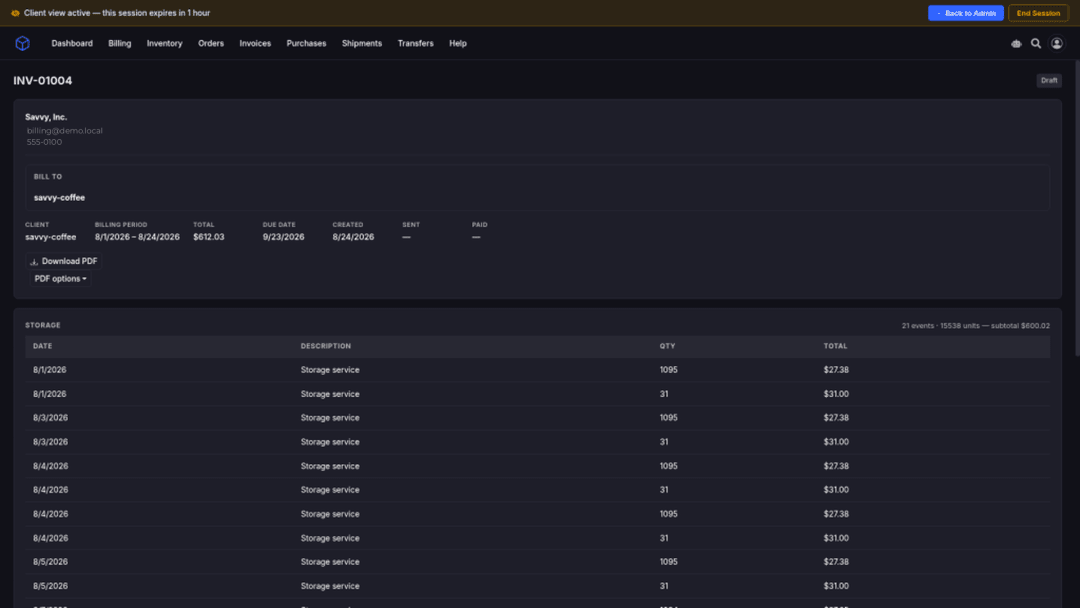
3PL invoicing software turns billable warehouse activity into client invoices. In SKUSavvy, accrued ledger activity (fulfillment, receiving, storage, and VAS priced from each client's rate card) becomes reviewable client invoices with PDF download and ACH Pay Now when configured.
Who it’s for
3PL operators who need warehouse activity priced into client invoices, with review before send and collections only when the ACH route is ready.
Operators tired of rebuild invoices
Stop re-keying pick, pack, storage, and VAS totals from ops exports every billing day. Invoice directly from accrued ledger lines.
Teams that need review before send
Adjustments, warnings, and Draft state exist so humans can inspect before clients see a statement.
Collections when ACH is configured
Pay Now appears once you connect a receiving bank account for the store. Payments you collect elsewhere can be recorded by an operator.
Ledger → review → Draft → Sent → PDF → ACH when ready
Accrue billable work on an auditable ledger, review and adjust, generate invoices on a billing day or on demand, present PDFs clients can download, and collect with ACH Pay Now only when the store route is ready.
Accrue on the ledger
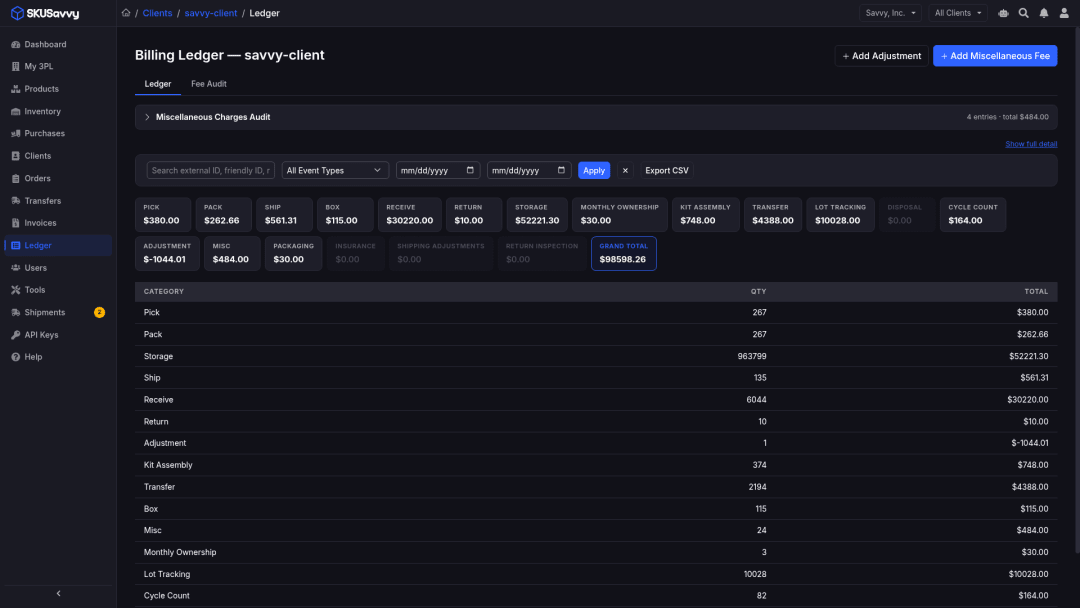
Billable events and scheduled storage create ledger rows with type, quantity, description, reference, amount when permitted, and invoice state. Pending stays pending until the event or invoice process finishes.
Review and adjust
Investigate unattributed shipment lines, add approved miscellaneous or adjustment entries, and recalculate or backfill supported historical activity. Problems found after an invoice is sent show as warnings, so closed invoices do not change.
Draft → Sent and PDF
Generate manually or on a configured client billing day (1 to 28). Invoices start as Draft, then Sent, Payment Pending, Paid, or Overdue. PDFs use regular, simplified, or rollup presentation. This changes presentation only, not the underlying ledger.
ACH and manual pay
Pay Now appears once the invoice is eligible and the store's receiving bank account is connected. An invoice is paid when the transfer settles. Operators can also record payments collected elsewhere.
ACCRUE
Accrue on the ledger first
Warehouse activity priced from each client's rate card becomes ledger lines before any invoice is generated. The same event never creates a second charge.
Event-backed rows
Each billable event becomes a ledger row with event type, quantity, description, reference, amount when the viewer may see it, and invoice state.
Scheduled storage accrual
Daily unit, pallet, and location storage accrue on cadence. Rows can update while the period remains uninvoiced.
Pending until ready
A row stays pending until the event or invoice process finishes, instead of showing an estimate.
No duplicate charges
If the same warehouse event arrives twice, it is charged once.
REVIEW & ADJUST
Inspect before clients see a statement
Draft exists so operators can investigate exceptions, apply approved adjustments, and surface warnings, instead of pasting totals from a fragile sheet.
Unattributed lines
Investigate shipment lines that still need client attribution before they roll into an invoice.
Approved misc and adjustments
Fee Entry and admins can record approved miscellaneous charges and manual adjustments with explicit quantity and amount.
Recalculate and backfill
Recalculate or backfill supported historical activity when the commercial model or source data needs a correction.
Warnings for closed periods
Post-invoice issues surface as billing warnings rather than quietly rewriting closed history.
DRAFT → SENT
Generate invoices on your billing day or on demand
Manual generation or a configured client billing day (day 1 to 28). Automatic email sends each invoice to the client's contact email. Authorized cancellation ends without treating the invoice as paid.
Draft first
Invoices start as Draft so operators can review line groups before clients see them.
Status progression
Sent → Payment Pending → Paid or Overdue. Dashboards keep payment and overdue states visible.
Billing day automation
Configure per-client billing day 1 to 28. Generation still respects the ledger period and configured minimums.
Authorized cancellation
An authorized cancellation ends the invoice without treating it as paid.
PDF PRESENTATIONS
Regular, simplified, or rollup: same ledger underneath
Download PDFs in the client's selected presentation. Rollup groups ordinary event types while preserving period-level adjustment reasons. Presentation is not a second ledger.
Regular itemized
Clients see final charges with plain descriptions. Your cost inputs stay private.
Simplified no-dollar
When commercial terms require it, simplified presentation can omit dollar detail while still delivering the statement artifact.
Rollup grouping
Rollup groups ordinary event types for readability while keeping period-level adjustment reasons visible.
Ledger remains authority
PDF is a presentation of ledger-backed invoice lines. Exports and the ledger stay the commercial audit trail.
ACH PAY NOW
Collect when the store receiving route is ready
Pay Now is offered when the invoice is eligible, the store owner has linked a receiving bank account, and no payment for that invoice is already in progress. Otherwise clients see that payment is not available yet.
Conditional, not always-on
Missing, inactive, removed, or still-awaiting-approval routing disables ACH until a replacement is active.
Authorization is not settlement
When a client authorizes the debit, the invoice moves to Payment Pending. It moves to Paid only when the transfer settles.
Failed and returned paths
Failed, returned, or cancelled transfers return the invoice to Overdue or the applicable unpaid state.
Duplicate debit protection
A second debit for the same invoice is blocked.
ACH bank payments
Clients pay by ACH bank transfer from a linked bank account. Card payments are not offered.
Per-store receiving account
Each store pays into its own receiving bank account. Clients see only the bank name and last four digits.
MANUAL PAYMENT & AUDIT
Record outside collections: keep the audit trail on the ledger
Operators can record payments collected outside the portal. That records the paid date and method on the invoice and does not move any money. Event type, quantities, descriptions, references, invoice state, and final amounts where permitted stay on the ledger.
Operator-only recording
Manual payment recording is an operator action, not a client card or bank checkout.
Recording moves no money
Recording the paid date and method does not move any money.
CSV and warnings
Ledger CSV exports and billing warnings support month-end review alongside invoice status.
Clients see final charges only
Client views show final charges, or a simplified view without dollar amounts. Your rate inputs stay private.
Invoice surcharges
An optional invoice surcharge is added to the total as a billing adjustment.
Status remains operator-controlled
Invoice-status workflow stays a separate operator control from recording an externally collected payment.
The invoicing path operators run
After activity has accrued on the ledger: from review to collection.
1. Accrue on the ledger
Billable events and scheduled storage create ledger rows. Pending rows stay pending until the event or invoice process finishes.
2. Review and adjust
Investigate unattributed lines, add approved miscellaneous or adjustment entries, recalculate or backfill supported history, and read billing warnings.
3. Generate Draft invoices
Manual generation or configured client billing day (1 to 28). Automatic email sends each invoice to the client's contact email.
4. Send and present PDFs
Send when ready. Clients download PDFs in regular, simplified, or rollup presentation. This changes presentation only, not the underlying ledger.
5. ACH Pay Now when the route is ready
Offered once the invoice is eligible and the store's receiving account is connected. A second debit for the same invoice is blocked.
6. Manual payment when collected outside
Operators record the paid date and method for payments collected elsewhere. No money moves.
Frequently asked questions
Straight answers for 3PL operators evaluating invoicing, PDFs, ACH Pay Now, and ledger audit trails.
What is SKUSavvy 3PL invoicing software?
It turns accrued ledger activity (fulfillment, receiving, storage, and VAS priced from each client's rate card) into reviewable client invoices with PDF download and ACH Pay Now when configured.
- The ledger is the audit trail before and after the invoice
- Draft → Sent → Payment Pending → Paid or Overdue
- Payment by ACH bank transfer
How does ledger activity become an invoice?
Billable events and scheduled storage create ledger rows. Operators review and adjust, then generate invoices manually or on a configured billing day. Invoice lines come straight from the ledger.
Can I review invoices before clients see them?
Yes. Invoices start as Draft. Investigate unattributed lines, add approved adjustments, and address warnings before send.
What PDF presentations are available?
Regular, simplified, and rollup. Rollup groups ordinary event types while preserving period-level adjustment reasons. Presentation does not replace the ledger.
When do clients see Pay Now?
Only when the invoice is eligible, the store owner linked a receiving bank account, per-store transfer routing is active, the payment service is ready, and no unresolved authorization or transfer already exists. Otherwise they see payment unavailable.
Is ACH authorization the same as settlement?
No. Authorization moves the invoice to Payment Pending. Only a settled transfer moves the invoice to Paid. Failed, returned, or cancelled transfers return to an unpaid path.
Can clients pay by card?
Not in the portal today. Clients pay by ACH bank transfer once you connect a receiving bank account, and you can record payments collected any other way.
Can operators record payments collected outside ACH?
Yes. Authorized operators can record paid date and method on the invoice. That does not initiate money movement. Invoice-status workflow remains a separate operator control.
Do you invoice clients into QuickBooks?
No. 3PL client invoices live in the portal, with PDF download and ACH payment. They are not pushed into QuickBooks.
- In-portal invoices and PDFs for brands you fulfill
- Warehouse events → 3PL ledger → in-portal invoices
- Talk to us about how books fit your operation
Where do I open the product?
Open the 3PL product at https://3pl.skusavvy.com/, or talk to us about invoicing and collections. The pages below cover activity billing, rate cards and the client portal.
Explore the 3PL product pages
Dive deeper on activity billing, rate cards, and the client portal, or return to the billing hub. Open the product at https://3pl.skusavvy.com/ or talk to us about fit.
3PL billing hub
Warehouse activity → rate-card ledger → invoices → scoped client portal: the full commercial loop.
Activity-based billing
Orders, receipts, returns, transfers, and shipments become ledger lines, so you stop reconciling spreadsheets.
Rate cards
Configure per-client pick, pack, storage, shipping margins, and VAS. Amounts stay on the card.
Client portal
Self-service for inventory, orders, ASNs, ledger lines, invoices and ACH payment.
Close the month from the ledger
Open the 3PL portal or talk to us about automated invoice days, PDF presentations, and ACH readiness for your stores.